NinjaTrader Strategy Generator
(NinjaScript)

NinjaTrader 8 is a serious futures platform — but NinjaScript is C#-based and not trivial to pick up. Build Alpha generates thousands of strategies per second, validates them with robustness tests, and exports fully operational NinjaScript code at the click of a button.

0
Signals
0
Robustness Tests
NT
NinjaScript
0
Platforms
Definition

What Is a NinjaTrader Strategy Generator?

A tool that creates, validates, and exports rule-based trading systems as NinjaScript (C#) code — without manual coding. NinjaTrader has its own basic Strategy Builder, but it tests a single idea at a time and has no AI to help arrive at better strategies. The best NinjaTrader strategy generator proves a strategy works before you deploy it. Learn more about automatically generated trading strategies and the full research framework in our Complete Guide.

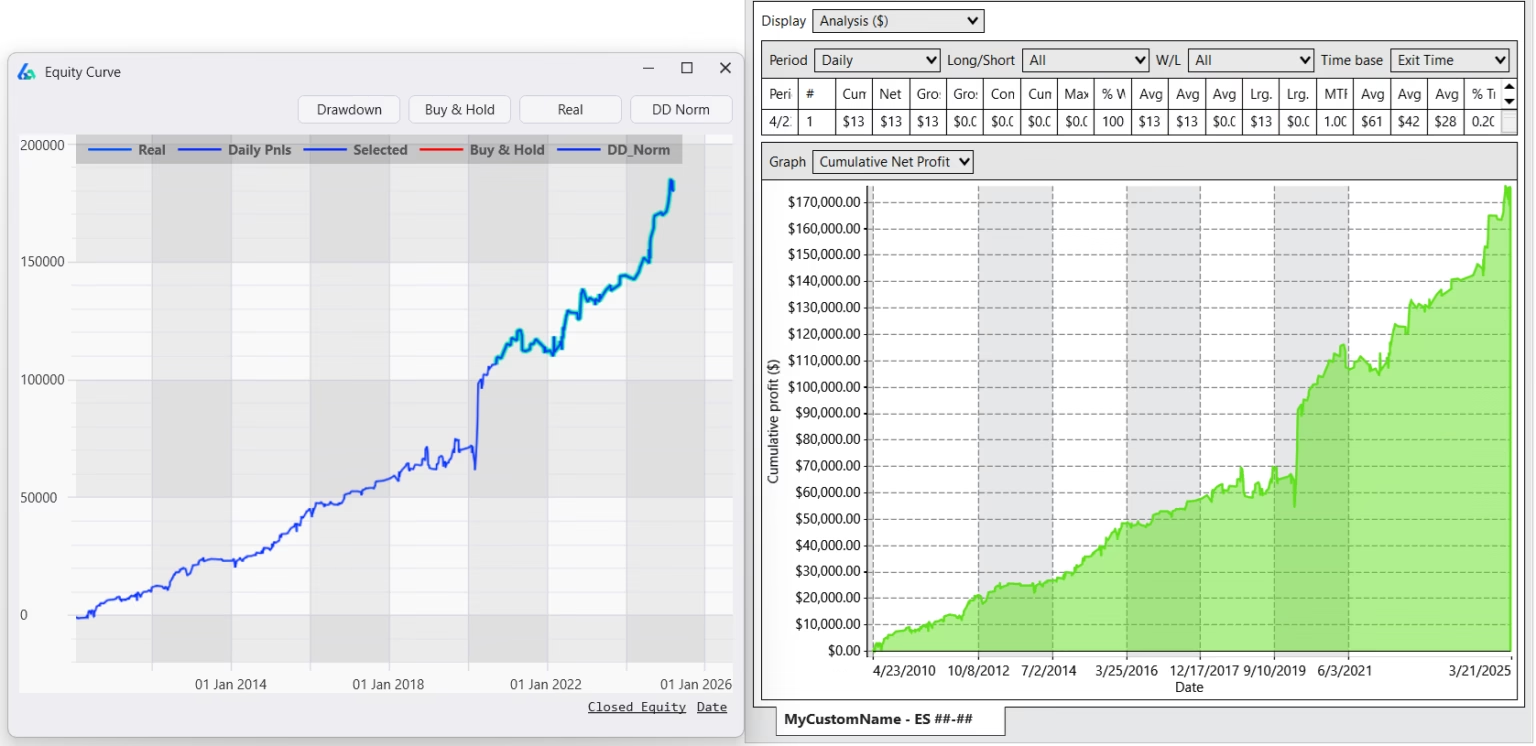
Build Alpha and NinjaTrader 8 matching equity curves — strategy generated in Build Alpha, exported and deployed in NinjaTrader

Key Difference

BUILD ALPHA + NinjaTrader

Build Alpha generates and validates. NinjaTrader backtests and executes.

Build Alpha (Research)

Strategy generation + robustness testing:

  • 7,000+ signals, no-code interface
  • Genetic algorithm + ML overlay
  • Monte Carlo, Noise Test, Walk Forward
  • Vs Random baseline benchmarking
  • Automated filter workflows
  • Alternative data (COT, breadth, news, weather)

NinjaTrader 8 (Execution)

Charting + live/sim trading:

  • NinjaScript (C#) programming
  • Strategy Analyzer & backtesting
  • Direct brokerage (futures focused)
  • Competitive margin requirements
  • Sim-to-live workflow
  • Free platform (data fees apply)

Build Alpha doesn’t replace NinjaTrader — it supercharges your research. Generate hundreds of validated strategy candidates, then export NinjaScript code to NinjaTrader 8 for final verification and live or simulated trading.

Under the Hood

How BUILD ALPHA Generates NinjaTrader Strategies

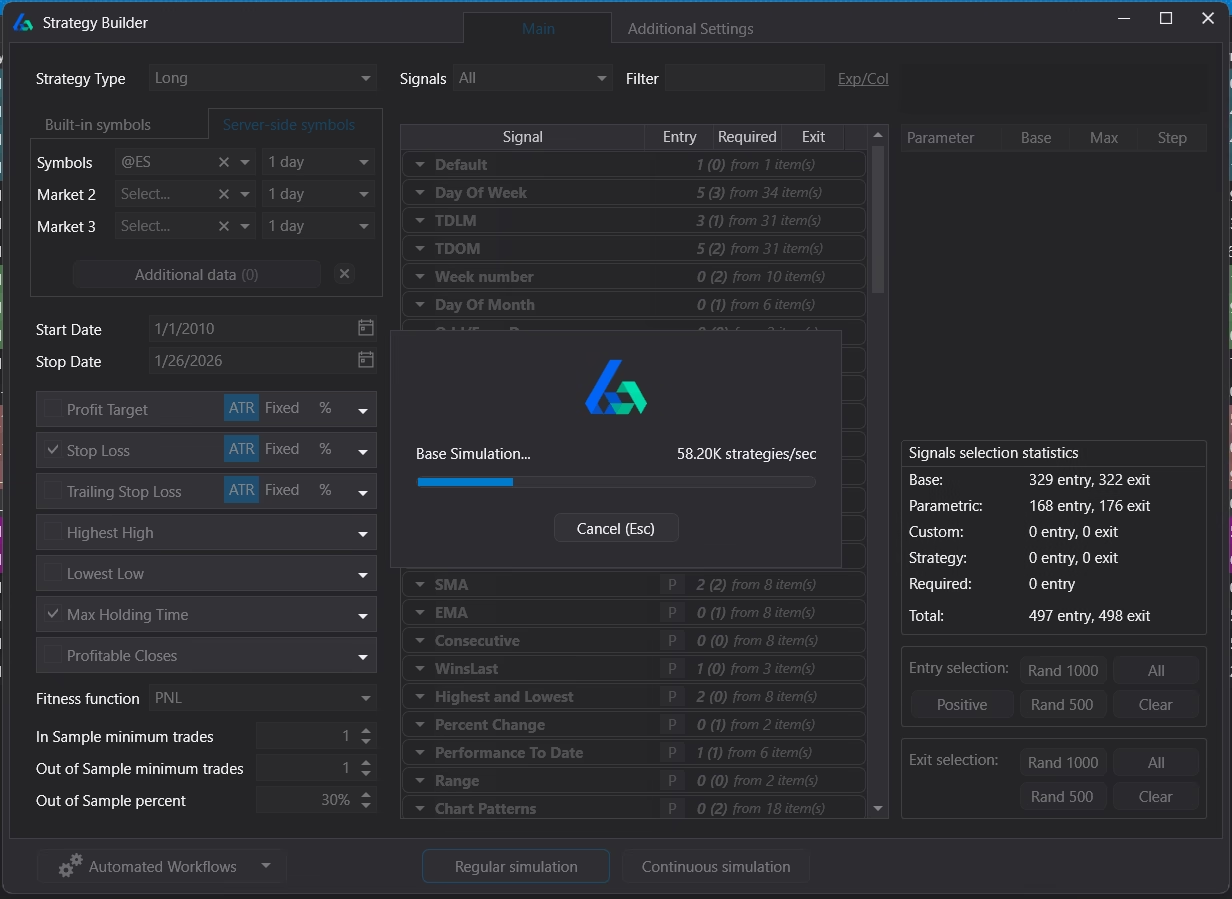
You control the search space. Build Alpha’s genetic algorithm does the heavy lifting.

You Choose the Constraints

I built Build Alpha to do the things that take the most time in strategy development. A genetic algorithm searches for the best strategies while machine learning reviews results and modifies settings automatically — my background in ML is baked into every part of this.

  • Market(s) and timeframe(s)
  • Which signals are allowed (or required)
  • Max rules per strategy
  • Exit framework (hold time, stops/targets)
  • Position sizing and risk management
  • Fitness function selection and weighting

Explore thousands of NinjaScript strategy combinations without manually coding each idea in C#. Build Alpha has supported NinjaTrader since NT7 and now proudly supports NinjaTrader 8.

Build Alpha input interface for NinjaTrader strategy generation showing signal selection, constraint configuration, and genetic algorithm settings

Validation

Institutional-Grade Robustness Testing

Generating strategies is easy. Proving a strategy isn’t curve-fit is where most traders don’t spend enough time. See our full Robustness Testing Guide for a breakdown of all stress tests.

1. Out-of-Sample Testing

Reserve a portion of data so the strategy is evaluated on unseen history. If performance is consistent across both, the strategy likely generalizes.

Build Alpha out-of-sample testing for NinjaTrader strategy validationRead more →

2. Monte Carlo Analysis

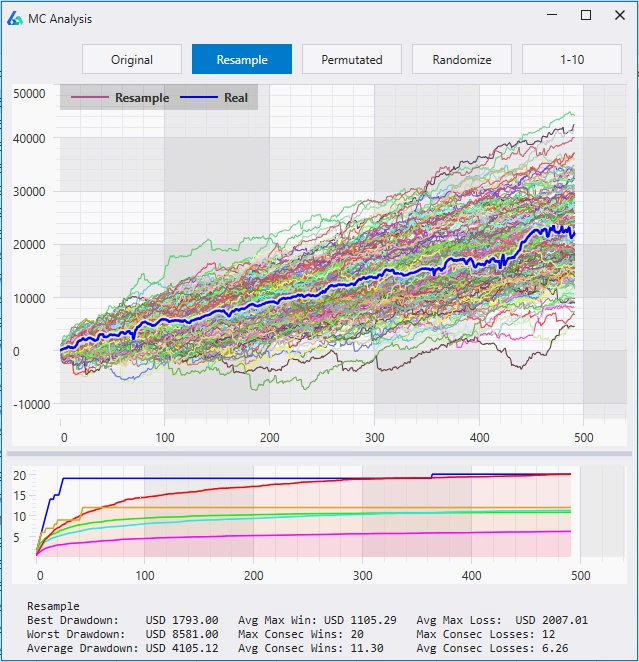
Reshuffle trades to understand drawdown risk and path dependency. Estimate how bad things could get and whether the backtest is unusually lucky.

Build Alpha Monte Carlo simulation for NinjaTrader strategy stress testingRead more →

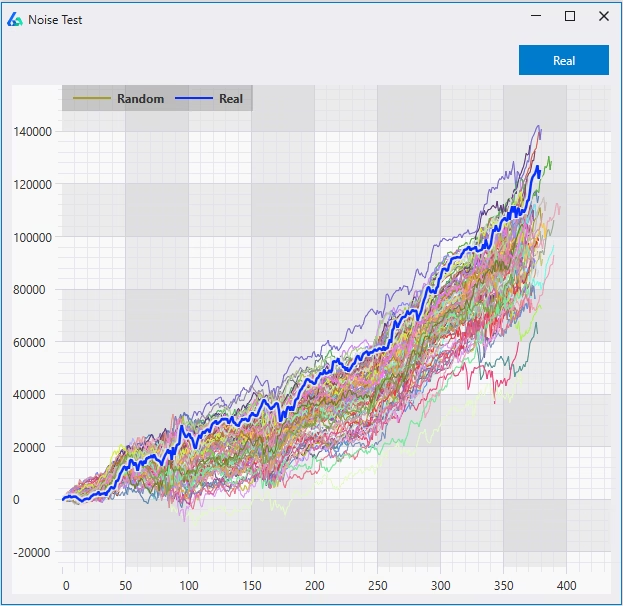
3. Noise Test (Overfitting Detection)

Slightly perturb price data and re-run the strategy. If small changes break it, the rules were fitted to noise — not signal.

Build Alpha Noise Test for NinjaTrader strategy overfitting detectionRead more →

4. Vs Random Baseline

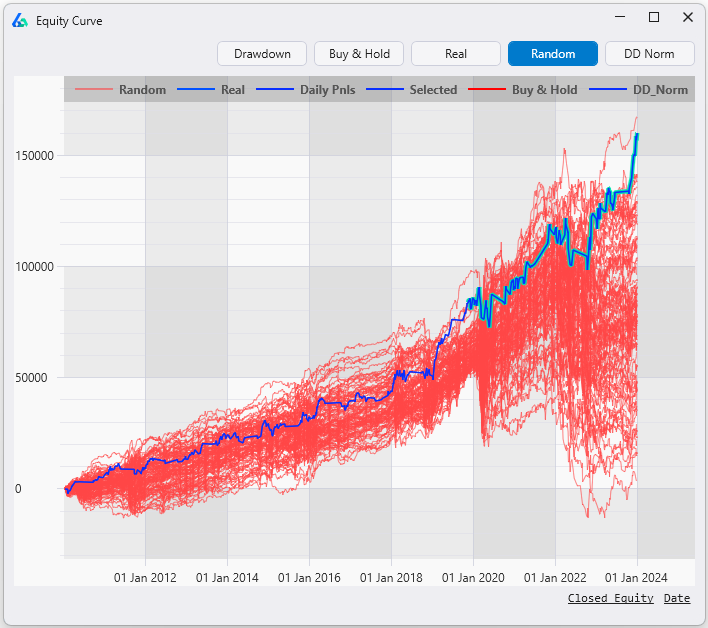
Build the best strategies using random signals, then compare yours. If your “real” strategy can’t beat the best random strategy, there’s unlikely a meaningful edge.

Build Alpha Vs Random test for NinjaTrader strategy benchmarkingRead more →

Scale

Automated Strategy Workflows

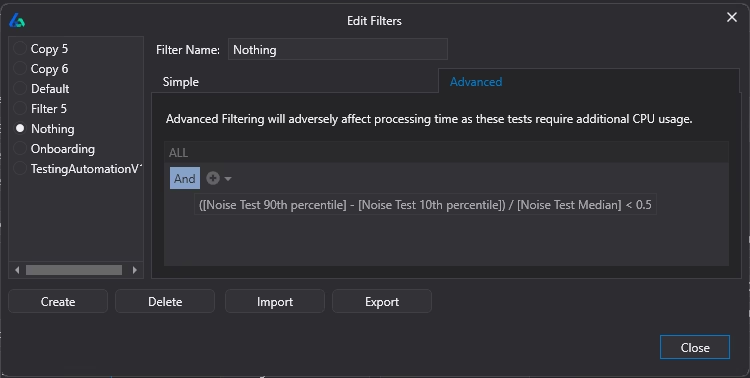
Here’s the thing — we’re not even looking at strategies until they pass muster. Build Alpha automates your entire research pipeline:

  • Set pass/fail thresholds before generation starts
  • Only see strategies that pass your filters
  • Auto-run robustness tests on every candidate
  • Enforce minimum trade counts and risk limits

Things have never been faster than they are these days. Read more: Build Alpha v3 update

Build Alpha automated filter workflows for NinjaTrader strategy research showing pass/fail thresholds and robustness test configuration

Deploy

Export Clean NinjaScript Code

One-click code generation. Copy → paste → compile → trade.

BuildAlphaStrategy.cs
// Generated by Build Alpha — NinjaTrader 8
// Strategy: RSI Pullback + ATR Filter

protected override void OnBarUpdate()
{
double myRSI = RSI(14, 3)[0];
double myATR = ATR(14)[0];

if (myRSI < 30 && myATR > 0.5)
{
EnterLong();
}

SetStopLoss(CalculationMode.Ticks, 50);
SetProfitTarget(CalculationMode.Ticks, 100);
}

NinjaTrader 8
TradeStation
MetaTrader 4/5
MultiCharts
TradingView
Python / IBKR
ProRealTime
More coming

Fast Setup

Export NinjaScript to NinjaTrader 8

1. In Build Alpha’s Strategy Results window, click the “Generate NT Code” button in the lower right.

2. Open the NinjaScript Editor in NinjaTrader 8. Right-click on Strategies → New Strategy. Name it and hit Generate.

3. Select all default code (Ctrl+A), delete it, then paste the Build Alpha code.

4. Rename the class name and StrategyName to match what you provided, then compile.

5. Open a chart, right-click → Strategies, select yours, and enable it. That’s it — you’re running.

Build Alpha’s generated code includes position sizing, time of day, market conditions, entry and exit signals, risk management, session information — the complete strategy with all settings you configured. For a full visual walkthrough, see How to Automate Trading with NinjaTrader.

Build Alpha and NinjaTrader 8 matching backtest equity curves confirming accurate NinjaScript code export

Watch: Generate Strategies & Export to NinjaTrader 8

See the full workflow — from strategy generation to NinjaScript code export and deployment in NinjaTrader 8.

Pitfalls

Why Most NinjaScript Strategies Fail

Failure Mode 1

Over-Optimized Parameters

The strategy only works at very specific values. Changing one input destroys it.

Fix: Noise Test and parameter sensitivity analysis catch this before deployment.
Failure Mode 2

Too Few Trades

“Great backtest” with very few occurrences. Probably luck.

Fix: Set minimum trade counts. Sanity-check distribution.
Failure Mode 3

One-Regime Wonders

Performs in one market environment, collapses in another.

Fix: OOS testing, regime awareness, stress tests. Don’t develop on only a bull market.
Failure Mode 4

Data Mining Bias

Testing thousands of combinations produces some that look great by chance.

Fix: Vs Random baseline separates real edge from noise.
Case Study

Vs Random Benchmarking: Separating Skill From Statistical Luck

Backtesting thousands of strategies guarantees that some will look impressive purely by chance. This is known as data mining bias or multiple hypothesis testing. If you search long enough, you will eventually find a strong-looking equity curve — even if no real edge exists.

Vs Random benchmarking addresses this directly. Instead of only evaluating your strategy, Build Alpha generates large sets of strategies using randomly selected signals within the same constraints.

If your strategy cannot outperform the best randomly generated systems, then its performance may not be statistically meaningful.

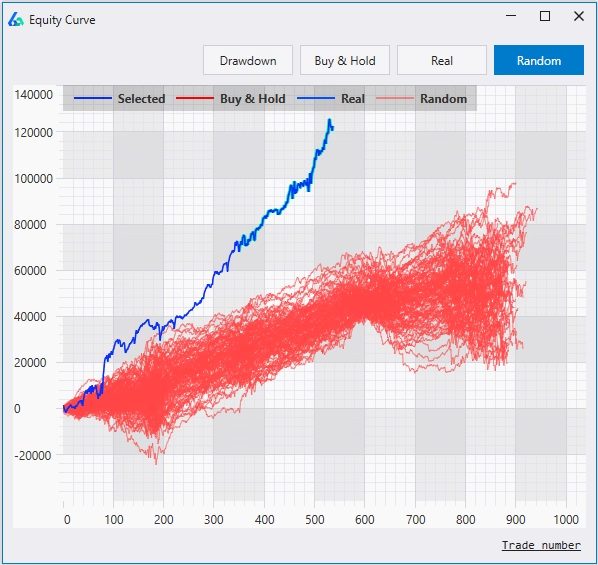
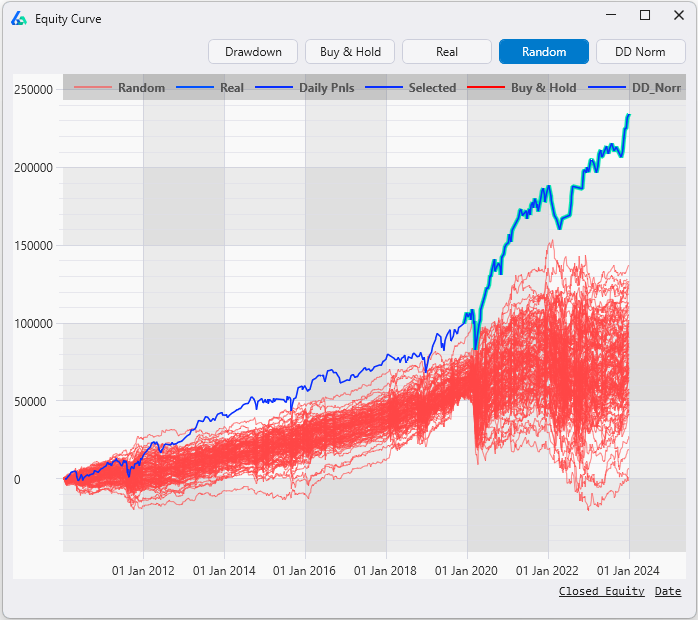
Vs Random — PASS

Build Alpha Vs Random PASS example showing real strategy equity curve clearly outperforming randomly generated strategies

Vs Random — FAIL

Build Alpha Vs Random FAIL example showing strategy buried inside randomly generated equity curves

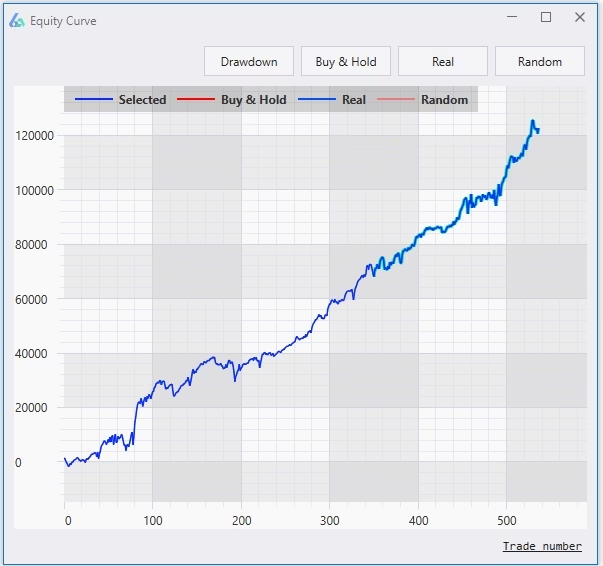
Strategy A (Pass) — the blue equity curve clearly separates from the red random strategies. This signal meaningfully outperforms chance.

Strategy B (Fail) — the blue equity curve is buried inside the red noise. Don’t deploy this one, no matter how good the backtest looks in isolation.

In the Lying Backtests Case Study, strategies that looked exceptional in isolation failed to exceed what randomness alone could produce.

This is why I built the Vs Random test — the question isn’t “Is the backtest profitable?” It’s “Is it better than what chance would create under identical conditions?” For a walkthrough, see the Vs Random Test guide.

Fit Check

Who Is This For?

Good Fit

NinjaTrader user who wants no-code strategy generation. Futures trader who cares about robustness and avoiding curve fitting. Wants to export NinjaScript code for sim or live deployment. Independent trader, prop firm, CTA, or institution. Systematic approach to strategy development.

Not a Fit

Looking for a pre-built strategy or signal service. Want copy-trading or guaranteed returns. Not interested in validation or testing. Many fear automated trading isn’t profitable because they fall for overfit strategies — Build Alpha is the antidote to that.

Build Alpha portfolio view showing NinjaTrader strategy monitoring with equity curves and performance metrics

Build Alpha Portfolio View — monitor strategies, track performance, project expectations

Deep Dive

The Complete Guide to NinjaTrader Strategy Development

Everything you need to know about generating, validating, and deploying NinjaScript strategies. Updated .

What Is NinjaTrader?

NinjaTrader is a widely used trading platform focused primarily on futures markets, though it supports equities and forex as well. It offers advanced charting, a full-featured Strategy Analyzer for backtesting, and the ability to run fully automated strategies through simulated or live brokerage accounts — all without a platform license fee (data fees apply). NinjaTrader is also its own broker with competitive margin requirements, making it especially popular among independent futures traders. NinjaTrader was recently acquired by Kraken in a $1.5 billion deal, and I expect the trend of merging traditional finance and crypto will continue.

While NinjaTrader excels at charting and execution, the bottleneck for most traders is the same one I’ve seen everywhere: building enough strategy ideas to find real edges requires significant NinjaScript coding and parameter tweaking. Build Alpha eliminates that bottleneck by generating thousands of validated strategy candidates that can be exported as NinjaScript code in one click.

NinjaScript & C# Explained

NinjaScript is NinjaTrader’s proprietary coding language built on top of C#. It’s extremely flexible — there are tons of existing functions, tools, indicators, and strategy logic blocks for those who want to dive into the code. But C# is not trivial for a non-coder to pick up. The learning curve is steeper than EasyLanguage or Pine Script, and writing, debugging, and maintaining NinjaScript strategies takes real development time.

Build Alpha generates fully operational NinjaScript code at the click of a button. You don’t need to know C# or NinjaScript. The exported code includes everything — entry logic, exit rules, position sizing, session handling, risk management — ready to paste into NinjaTrader’s NinjaScript Editor and compile. If you do know C#, the generated code is clean, readable, and fully editable.

How to Build NinjaTrader Strategies Without Coding

NinjaTrader has its own basic Strategy Builder, and it may be fine for simple rules. But it tests a single idea at a time and has no artificial intelligence to help arrive at better strategies. Build Alpha, on the other hand, generates thousands of strategies per second using a genetic algorithm and machine learning — improving strategies as it goes.

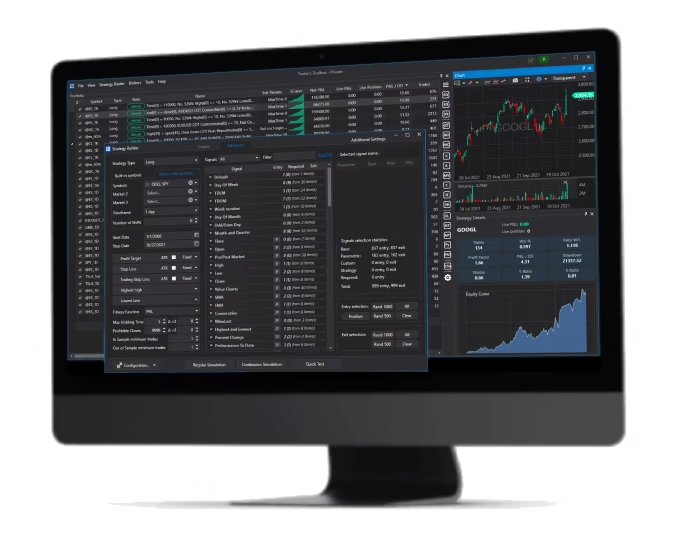
You define your strategy constraints through Build Alpha’s point-and-click interface: markets, timeframes, entry signals, exit rules, risk management parameters, and fitness functions. The software generates, evaluates, and validates strategy candidates automatically. No NinjaScript coding required at any stage. This is what I built Build Alpha to do — let traders focus on the creative and analytical parts of strategy development, not the engineering.

What Makes the Best NinjaTrader Strategy Generator?

A lot of tools can assemble trading rules into NinjaScript code. The best NinjaTrader strategy generator goes further — it must answer the question every systematic trader needs answered: is this backtest real, or is it curve-fit noise?

Here’s what separates Build Alpha. First, the signal library: 7,000+ signals spanning price action, indicators, volume, volatility, seasonality, intermarket relationships, sentiment, economic data, and more. Second, the search engine: a genetic algorithm with ML overlay that’s more efficient than brute-force and less prone to overfitting. Third — and this is where most traders underinvest — validation built into the workflow. Build Alpha’s automated filter workflows ensure only strategies passing out-of-sample testing, Monte Carlo, Noise Tests, and Vs Random benchmarking are ever promoted for export.

How Build Alpha’s Genetic Algorithm Generates Strategies

Build Alpha uses a genetic algorithm with a machine learning overlay to explore the space of possible strategy combinations. You define constraints, the engine generates, evaluates, and evolves candidates. The GA produces a large candidate set of diverse strategies — not just a single “best” backtest — giving you the ability to compare, filter, and validate across multiple approaches before exporting to NinjaTrader.

Automated filter workflows narrow the candidate set to only strategies that pass your complete validation pipeline: performance thresholds, robustness tests, trade count minimums, drawdown limits, and stability checks. Fewer curve-fit backtests. More strategies that are actually worth deploying.

7,000+ Built-In Trading Signals

Build Alpha’s signal library covers 7,000+ signals across every major category: price action, all major technical indicators (RSI, MACD, Stochastics, ATR, Bollinger Bands, moving averages, Kaufman Efficiency Ratio, Hurst Exponent, DMI), volume, volatility, seasonality, market breadth, sentiment, yields, spreads, economic/news data, COT data, option flows (GEX, DIX), intermarket relationships, multi-timeframe signals, and composite indicators.

You can also create custom indicators through a no-code custom signal editor or add custom Python signals for ML models and proprietary indicators. All custom signals integrate seamlessly into the generation engine and can be exported as part of your NinjaScript code.

NinjaScript Code Export Process

In the lower-right of the Strategy Results window, click the “Generate NT Code” button. Open NinjaTrader 8’s NinjaScript Editor, right-click on Strategies → New Strategy, name it, and hit Generate. Select all default code (Ctrl+A), delete it, paste the Build Alpha code, rename the class name to match your strategy name, and compile. Open a chart, right-click → Strategies, select yours, enable it — and you’re running. The entire process takes under a minute.

Build Alpha also generates code for TradeStation (EasyLanguage), MetaTrader 4/5 (MQL), MultiCharts (PowerLanguage), TradingView (Pine Script), Python for Interactive Brokers, and ProRealTime — so your research is never locked to a single platform. For a full visual walkthrough of the NinjaTrader export, see How to Automate Trading with NinjaTrader.

Matching Backtest Results Across Platforms

Build Alpha prides itself on matching results. If you use the same data in both platforms, with the same session templates and transaction costs, the results will match. I’ve shown this publicly multiple times — Build Alpha on the left, NinjaTrader on the right, with matching equity curves. The generated code includes position sizing contracts, time of day, market conditions, entry and exit signals, risk management, session information — the complete strategy.
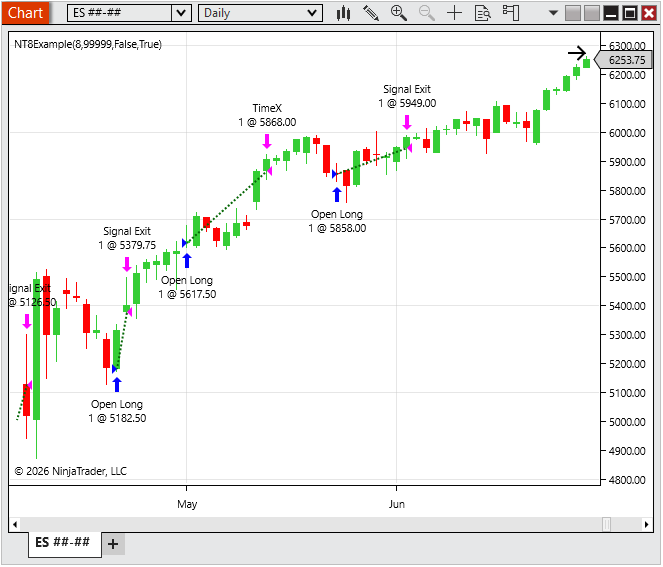
Build Alpha generated NinjaTrader 8 strategy with trades displayed on OHLC price chart showing entry and exit signals
Build Alpha strategy running in NinjaTrader 8 — trades displayed on chart

Where small differences do appear, they’re typically attributable to data feed variations, session/timezone handling, or order fill modeling. Align your NinjaTrader settings with the assumptions used during Build Alpha’s generation phase and results converge closely. Please check your data connection from the NinjaTrader Connections menu before proceeding — you won’t be able to load a strategy onto a chart without one. For a complete setup guide, see Build Alpha for NinjaTrader.

Portfolio Strategy Management

The holy grail is not a single technical indicator — it’s combining trading algorithms. Build Alpha’s portfolio mode lets you combine multiple validated strategies into a single simulation using pooled capital, analyze correlation matrices, and optimize allocations across asset classes and timeframes. Each strategy can be independently exported as NinjaScript code, giving you a modular approach to building a diversified trading book.

Build Alpha also connects to live data feeds for strategy monitoring — track real-time P&L, receive position change alerts, and monitor strategy health against Monte Carlo projection bands. If live trading starts performing worse than the lower red band — a band that should have been exceeded in 95% of all possibilities — that means performance is unlikely and warrants reevaluation. Read more: How to automate trading with no coding.

Supported Markets & Asset Classes

Build Alpha works on all asset classes: futures, stocks, ETFs, forex, and cryptocurrencies. NinjaTrader is particularly strong for futures trading with competitive margin requirements — and Build Alpha’s signal library is especially deep for futures markets including E-mini S&P 500, crude oil, gold, bonds, and agricultural contracts. Build Alpha currently offers over 30 futures markets, over 30 ETFs, and over 30 forex pairs, most with 10+ years of data. Tick data, custom bar types, intraday, daily, or higher timeframes are all supported.

Whether you’re trading mean reversion, trend following, momentum, breakouts, seasonal patterns, or rebalance strategies — Build Alpha generates and validates them all, then exports clean NinjaScript code for deployment in NinjaTrader 8.

FAQ

Frequently Asked Questions

Can Build Alpha export NinjaScript code for NinjaTrader 8?

Yes. Build Alpha generates clean, fully operational NinjaScript (C#) code at the click of a button. Open the NinjaScript Editor, create a new strategy, paste the code, compile, and deploy for backtesting or live trading.

Do I need to know C# or NinjaScript?

No. Build Alpha is completely no-code. You define strategy parameters through a point-and-click interface, and the software generates NinjaScript code automatically. Exported code can be reviewed or edited if desired.

Does Build Alpha replace NinjaTrader?

No. NinjaTrader is your charting and execution platform. Build Alpha is research software that generates and validates strategies faster, then exports NinjaScript for deployment.

Does Build Alpha generate strategies or indicators?

Build Alpha generates fully tradeable strategies. However, the generated code can be modified to serve as an indicator if desired.

Will exported results match in NinjaTrader 8?

Yes. If you use the same data, session templates, and transaction costs in both platforms, results will match. Align your settings for the closest match.

Does Build Alpha support Look-Inside-Bar Backtesting?

Yes. Look-Inside-Bar Backtesting (LIBB) enhances accuracy by examining lower timeframes within a single chart bar. It’s a configurable option in Build Alpha’s Additional Settings menu.

Can I also export to TradeStation, MetaTrader, and other platforms?

Yes. Build Alpha supports one-click code export for TradeStation, MetaTrader 4/5, MultiCharts, TradingView, Python / IB, and ProRealTime.

Proof

What Traders Say About Build Alpha

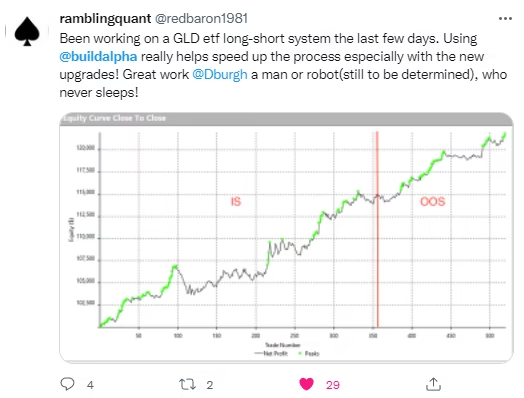
Systematic trader endorsing Build Alpha for NinjaTrader strategy generation
Build Alpha testimonial on no-code strategy building
Trader praising Build Alpha robustness testing features
Build Alpha review on automated strategy workflows
Professional trader feedback on Build Alpha code export
Quantitative trader review of Build Alpha genetic algorithm
Build Alpha user review on NinjaTrader strategy development
Positive review of Build Alpha signal library
Build Alpha customer review on portfolio strategy management
Trader testimonial about Build Alpha Monte Carlo simulation
Build Alpha review on Noise Test overfitting detection
Quantitative trader endorsing Build Alpha NinjaTrader platform
Build Alpha testimonial on NinjaScript code export
Trader praising Build Alpha out-of-sample testing
Build Alpha customer review on strategy generation
User feedback on Build Alpha no-code strategy generator
Professional trader testimonial about Build Alpha
Latest Build Alpha user review on NinjaTrader strategy generation

Ready to BUILD ALPHA?

Generate strategies. Validate. Export NinjaScript. No coding required.