For this Free Friday edition I want to talk about market regimes or market filters. I have a very simple intermarket filter or regime monitor to share.
The idea with market regimes or filters is to identify a condition or set of conditions that alters the market’s characteristics or risk profile. Ideally, you could find a bull and bear regime that would enable you to go long when in the bull regime and get into cash or go short when in the bear regime.
The simple regime filter I want to share was found using Build Alpha’s Intermarket signals. It only uses one rule and creates a clear bullish and bearish regime.
The rule says that if the Close of Emini S&P500 divided by the Close of the US 10 Yr Notes is less than or equal to the 10 days simple moving average of the Emini S&P500 divided by the 10 days simple moving average of the US 10 Yr Notes then we are in the bull regime.
Here it is in pseudo-code assuming eMini S&p500 is market 1 and US 10 Yr Note is market 2.
Let’s verify with some numbers that we have a discernible difference in market activity before I start flashing some charts at you.
Here are the S&P500’s descriptive statistics when in the bull regime:
Average Daily Return: 1.20
Std Dev Daily Return: 17.49
Annualized Information Rate:
1.09
Here are the S&P500’s descriptive statistics when in the bear regime:
Average Daily Return: -0.34
Std Dev Daily Return: 12.11
Annualized Information Rate:
-0.44
This would definitely qualify as something of interest. Let’s take a look at the equity curve going long when ES, the eMini S&P500 futures, enter into the bull regime.
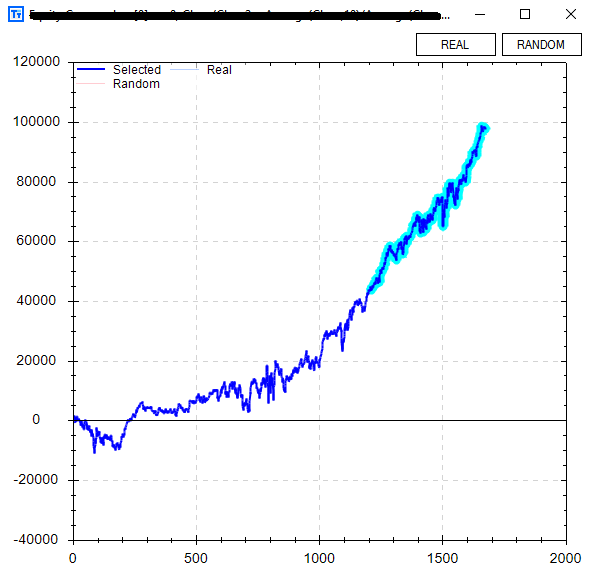
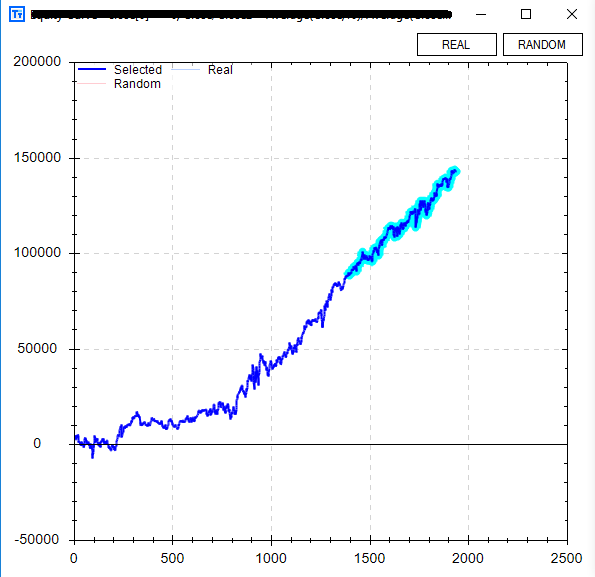
It actually performed quite well with no other rules or adjustments only trading 1 contract since early 2002. It even looks to have started to go parabolic in the out of sample data (last 30% highlighted).
Build Alpha now offers another check for validity -> The ability to test strategy rules across other markets. This is very important when determining how well a rule generalizes to new (and different) data. The user can select whatever markets to compare against, but in the example below I chose the other US equity index futures contracts. You can see Nasdaq futures in gold, Russell Futures in green, and Dow Jones futures in red.
Now back to our Free Friday regime filter… Wouldn’t it be cool if the US 10 Yr Note performed well while Emini S&P500 was in the bear regime? That way instead of divesting from the S&P500 and going into cash we could invest in US 10 Yr Notes until our bull regime returned.
Well, guess what… the US 10 Yr Note Futures do perform better in the bear regime we’ve identified.
The best part is… Build Alpha now lets you test market regime switching strategies.
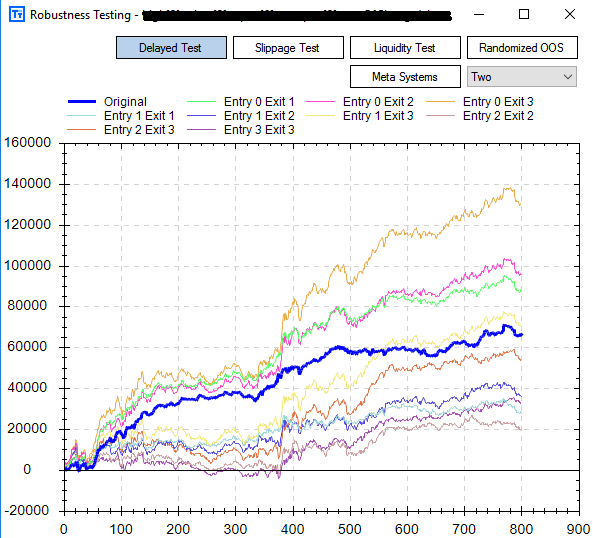
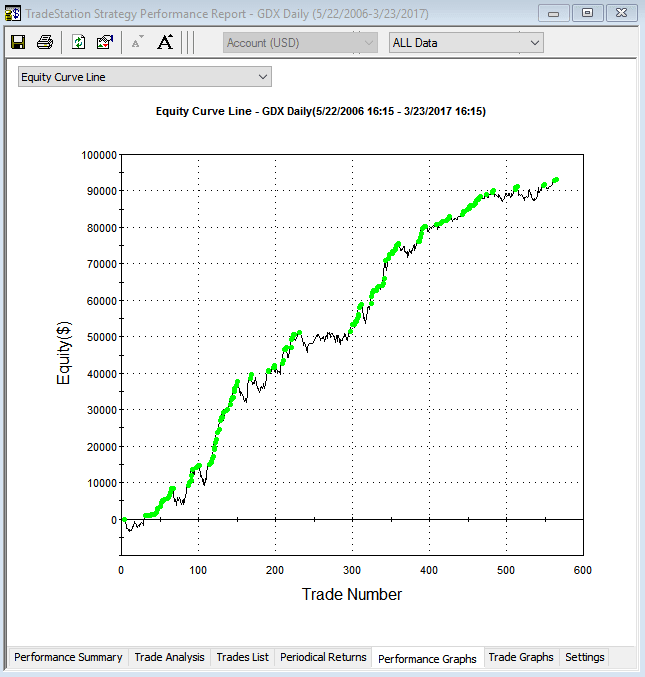
That is, invest in one market when the regime is good and invest in another market when the regime changes. This ability smoothed our overall equity curve and increased the profit by about 50%! Below is an equity curve going long Emini S&P500 in the bull regime and going long US 10 Yr Note Futures when the regime turns bearish.
Some major new additions coming to Build Alpha and I’ll be announcing them soon. As always thanks for taking the time to read these.
Out of Sample Data – How the Human Can Add Value to the Automated Trading Process
First, I need to describe over-fitting or more commonly known as curve-fitting. Curve-fitting is creating a model that too “perfectly” fits your sample data and will not generalize well on new unseen data. In trading, this can be thought of as your model too closely fits the historical data and will surely fail/struggle to adapt to new live data.
Here are two visuals I found to help illustrate this idea of curve-fitting.
How can we avoid curve fitting?
The simplest and best way to avoid (or reduce our risk of) curve-fitting is to use “Out of Sample” data. We simply designate a portion of our historical data (say the last 30% of the test period) to act as our unseen or “Out-of-Sample” data.
We then go about our normal process designing/testing/optimizing rules for trading or investing using only the first 70% of the test period or the “In-Sample” data.
After finding a satisfactory trading method we pull out our Out of Sample data and test on the last 30% of our test period.
It is often said that if the model performs similarly in both the in and out of sample data then we can have increased confidence the model generalizes well enough to new data.
No need to bring up selection bias or data mining here, but I will certainly cover it in another post/video series.
How can the human add value to the automated trading process?
The intelligent reader will question why we chose 30% and why the last portion of the data (as opposed to the first 27% or last 15%)?
The trader can add value and increase a trading model’s success by controlling the
Date Ranges of entire test
Out of sample location
Percentage of out of sample data
I have always heard that good science is often mostly attributable to good experimental design. In the trader’s case, good science would be setting up a proper test by choosing an appropriate test period, out of sample location, and out of sample percent.
Trading Data Example
Let’s take a look at the S&P500 from 2004 to 2017. In the chart below I have designated the last 40% of the data to be our Out of Sample data.
This means we would create a trading model on the data from 2004 to roughly 2011 – the blue In Sample data. However, 2011 to present day (red Out of Sample) has been largely straight up.
If we build a long strategy that avoids most of 2008 via some rule or filter it may certainly do well in on our Out of Sample data simply because the underlying market went straight up!
You can see the importance of intelligently selecting your test period and out of sample period’s location and size.
What if we used the first 40% of the data as our Out of Sample data? This provides a few benefits. First, it allows us to build our trading model on the most recent data or the last 60% of the data set – in our case 2009 to 2017.
Many traders will argue that they prefer to build their models on the most recent data as it is most likely the most similar to the live data they will soon experience. They then obviously test Out of Sample but just use older data and in our case 2004 to 2008 or the first 40%.
Now how did I know 40%? I simply looked at the chart and selected a percentage that would capture the financial crisis. My thought process is that if we train a model from 2009 to 2017 and then test it on 2004 to 2008 and it performs similarly in both periods then we surely have uncovered some persistent edge that generalizes over two unique sets of data. The two unique sets being our In-Sample (2009 to 2017) and our Out-of-Sample (2004 to 2008).
Selecting a proper location and percentage is mission critical. You want to design your test to be as difficult as possible to pass – try to break your system in the testing process. If you do not, then the market will surely break it once you start live trading!
Testing design and set up is undoubtedly where the human still adds value to the automated trading process. Build Alpha allows users to leverage computational power in system design, validation, and testing; however, the test set-up in BA is still an area where a smarter, more thoughtful trader can capture an edge over his competitors and add robustness to the output.
Bad Examples of OOS Data
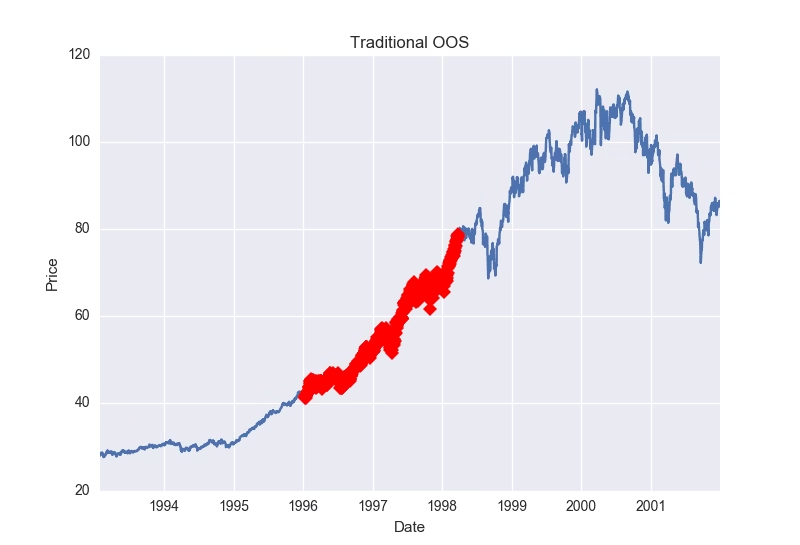
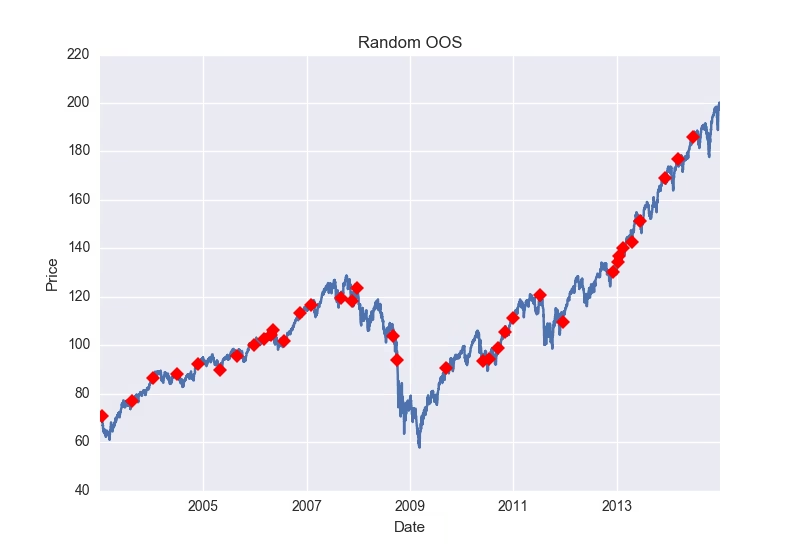
Below I have some photos of some terrible experiment design to help drive the point home. Both present fairly simple out of sample tests to “pass”. Passing OOS testing is not the goal. Creating robust strategies is. This requires difficult OOS tests to pass (not what is pictured below). Please watch the video above for an explanation.
Takeaways
The main takeaway is that the human can still add value to the automated trading process by proper test/experiment design. That is why BuildAlphasoftware allows the trader/money manager to adjust everything (or nothing) from
Test Period
Out of Sample percent
Out of Sample location
In-Sample Minimum number of trades
Out of Sample minimum number of trades
I hope this was helpful – catch you in the next one,
In this post I will go over a few different ways to manipulate price data to create visuals to aid in the investing and trading research process. I have attached a ten minute YouTube video that has explanations, etc. However, this post also attempts to briefly walk you through the Python code.
First, we will use some Python code to download some free data from the Yahoo Finance API. The code below creates a function called “get_data” that downloads and adjusts price data for a specified symbol over a specified period of time. I then download and store $SPY and $VIX data into a pandas dataframe.
import pandas as pd
import matplotlib.pyplot as plt
from datetime import datetime
from pandas_datareader import data
import seaborn as sns
This next piece of code is two ways to accomplish the same thing – a graph of both SPY and VIX. Both will create the desired plots, but in later posts we will build on why it is important to know how to plot the same graph in two different ways.
The first method is simple and straight forward. The second method creates a “figure” and “axis”. We then use plt.subplot to specify how many rows, columns, and which chart we are working with. For example, ax = plt.subplot(212) means we want to set our axis to our display that has 2 rows, 1 column, and we want to work with our 2nd graph. plt.subplot(743) would be 7 rows, 4 columns, and work with the 3rd graph (of 28). You can also use commas to specify like this plt.subplot(7,4,3).
Anyways, here is the output.
The next task is to mark these graphs whenever some significant event happens. In this example, I show code that marks each time SPY falls 10 points or more below its 20 period simple moving average. I then plot SPY and mark each occurrence with a red diamond. I also added a line of code that prints a title, “Buying Opportunities?”, on our chart.
df['MovAvg'] = Ticker1['Close'].rolling(20).mean() markers = [idx for idx,close in enumerate(df['spy']) if df['MovAvg'][idx] - close >= 10] plt.suptitle("Buying Opportunities?") plt.plot(df['spy'],marker='D',markerfacecolor='r',markevery=markers)
This code creates a python list named markers. In this list we loop through our SPY data and if our condition is true (price is 10 or more points below the moving average) we store the bar number in our markers list. In the plot line we specify the shape of our marker as a diamond using ‘D’, give it the color red using ‘r’, and mark each point in our markers list using the markevery option. The output of this piece of the code is below.
Next, and simply, I show some code on how to shade an area of the chart. This may be important if you are trying to specify different market regimes and want to visualize when one started or ended. In this example I use the financial crisis and arbitrarily defined it by the dates October 2007 to March 2009. The code below is extremely simple and we only introduce the axvspan function. It takes a start and stopping point of where shading should exist. The code and output are below.
Personally I do not like the shading of graphs, but prefer the changing of the lines colors. There are a few ways to do this, but this is the simplest work around for this post. I create two empty lists for our x and y values named marked_dates and marked_prices. These will contain the points we want to plot with an alternate color. I then loop through the SPY data and say if date is within our financial crisis window then add the date to our x list and add the price to our y list. I do this with the code below.
marked_dates = []
marked_prices = []
for date,close in zip(df.index,df['spy']):
if date >= datetime(2007,10,1) and date <= datetime(2009,3,9):marked_dates.append(date) marked_prices.append(close)
I then plot our original price series and then also plot our new x’s and y’s to overlap our original series. The new x’s and y’s are colored red whereas our original price series is plotted with default blue. The code and output is below.
That’s it for this post, but I hope this info helps you in visualizing your data. Please let me know if you enjoy these Python tutorial type posts and I will keep doing them – I know there is a huge interest in Python due to its simplicity.
Also, I understand there may be simpler or more “pythonic” ways to accomplish some of these things. I am often writing this code with intentions of simplifying the code for mass understanding, unaware of the better ways, or attempting to build on these blocks in later posts.
Cheers,
Dave
It has been brought to my attention that Yahoo Finance has changed their API and this code will no longer work. However, we can simply change the get_data function to the code below to call from the Google Finance API
def get_data(symbol,start_date,end_date):
dat = data.DataReader(symbol,"google",start_date,end_date)

dat = dat.dropna()

return dat
Google adjusts their data so we do not have to. So I removed those lines. I also swapped out ‘yahoo’ for ‘google’ in the DataReader function parameters. Google’s data is also not as clean so I added a line to drop NaN values. That’s it. Simple adjustment to change data sources.
Thanks for reading, Dave
Free Friday Update March 2017
Happy Friday!
For this Free Friday edition, I will just share an update of the Free Friday strategies performance.
One month is not indicative of anything and these are just meant for educational purposes (strategies may or may not have gone through the entire rigor of the robustness/validation techniques described on this site and offered within the software).
A lot of these strategies were built to demonstrate a specific Build Alpha feature and are for demonstrations purposes… always fun to track performance, however.
I post the strategies on Twitter and you can find them here: @dburgh or here: www.buildalpha.com/blog
All in all, not a bad month. A few things to consider… 1. One month is by no means telling, but it is sure nice to see profits. 2. As mentioned not all these strategies went through the full spectrum of validation techniques. 3. Strategy #6 only has 1 rule so it is much more common for its entry condition to be satisfied; hence the larger number of trades each month. 4. All of these results based on 1 futures contract traded or 1000 ETF shares traded – very simple.
Please note I only include trades that are “live” or occur after I’ve publicly posted the strategy.
Also, the Free Friday strategies were by no means designed as a portfolio. Having a strategy, like FF6, trading frequently and others hardly trading at all would be ill-advised in most cases. These are simply for demonstration purposes and fun to track.
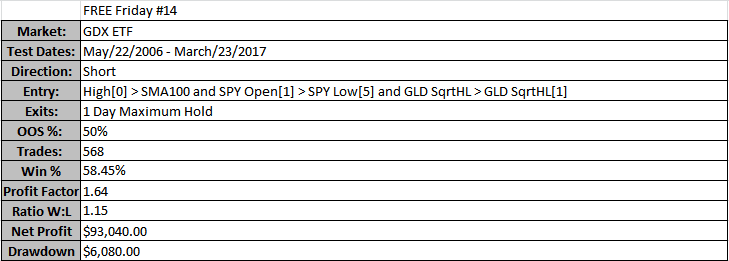
Happy Friday. The trader in me could not risk doing Free Friday #13 so I decided to release 2 strategies this week (14 and 14a).
The first strategy shorts $GDX, the Gold Miners ETF, and the second strategy goes long $GLD, the Gold ETF.
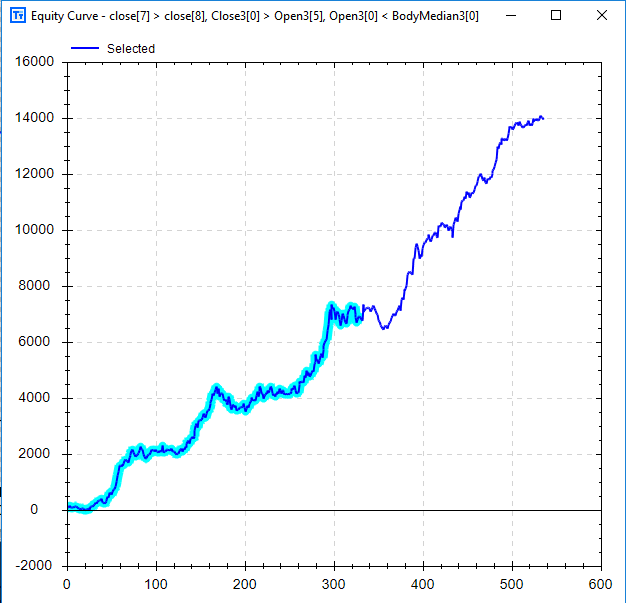
The strategy above is the GDX short strategy. The left chart is from Build Alpha (which now highlights out of sample trades – new feature) and the right chart is from TradeStation. Please note Build Alpha tested with only 100 shares per trade whereas the TradeStation charts in this post show results for 1,000 shares per trade. Below are the strategy results pulled from TradeStation.
Notice this GDX strategy takes Intermarket signals. One from SPY and one from GLD. The GLD signal is translated as the square root of this bar’s high * low is greater than the square root of the previous bar’s high * the previous bar’s low.
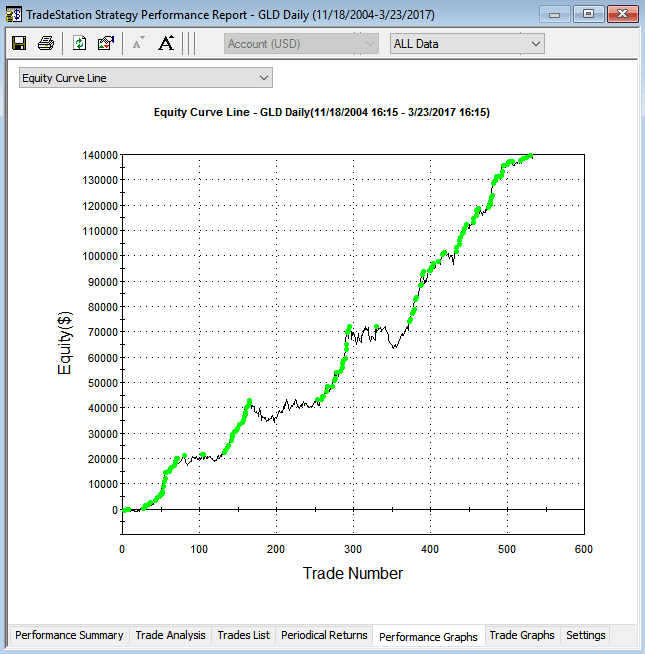
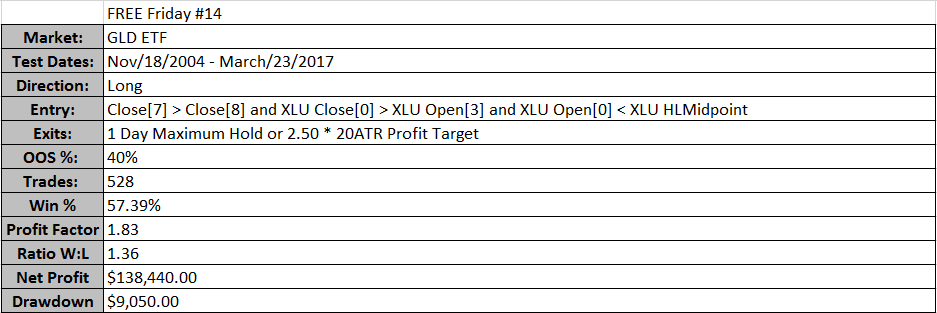
The second strategy is obviously the long GLD strategy. The chart below to the left is generated with Build Alpha using 100 shares per trade. The chart on the right replicated the strategy in TradeStation using 1,000 shares per trade (my laziness).
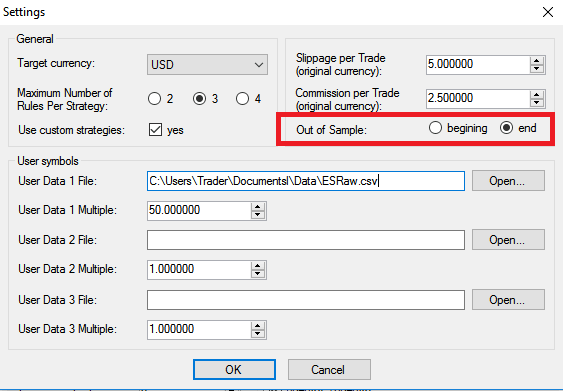
Please note the highlighted, out of sample, the section is at the beginning. Many traders prefer to build/train their model on the most recent data and use old data as the out of sample test data. Build Alpha now allows the trader this option through the updated settings menu (pictured later).
Please note the GLD strategy also uses Intermarket signals – in this case using XLU, the utilities ETF, for a pair of signals. Below I’ve attached a photo of the new settings menu to highlight how simple it is to change the out of sample period to the beginning or back to the end of the data.
Wrapping this up so you can get on with your weekend, I just want to show the combined chart of this long/short Gold strategy. Going Long GLD and short GDX when conditions are met. Obviously, and based on this post’s title, Build Alpha also permits multi-market portfolios now.
Happy Friday. This week’s Free Friday strategy is for $XLP or the ETF that tracks US Consumer Staples. However, it was designed taking input from two other popular ETFs.
Here is the equity curve and backtest results. The left is a graph created by TradeStation and the right is a graph showing our backtest results (blue) and XLP buy and hold (grey). The chart on the right, created by Build Alpha, is plotted by date whereas the TradeStation chart is plotted by trade number – both software have the ability to plot both x-axis styles.
This strategy uses only 3 rules for entry
XLP’s 2 Period RSI must be lower than it was 1 bar ago
XLU – Utility ETF – must close below its midpoint
XLE – Energy ETF – must be below its 3 period Simple Moving Average
The exits for this strategy are two-fold
Maximum hold of 4 days
Exit on the first profitable close
Below are the trade statistics for this Free Friday Strategy.
I know want to introduce another, and new, Build Alpha test to help validate trading strategies. I first mentioned this test here: Better System Trader Podcast. The Noise Test is a popular test that allows the user to randomly add AND subtract noise from the historical price data. The user can specify how much of the data he/she wants to adjust and by how much he/she wants to adjust the data.
For example, the user can change 50% of the data by 25% of the average true range. This means we would adjust the data by either adding or subtracting up to 25% of the average true range to any of the opens, highs, lows or closes until we’ve adjusted 50% of the data.
We now have a “new” data set that contains a different amount of noise. Build Alpha will continue to create 100 new data sets all with differing noise characteristics. Finally, we will re-trade our strategy on these 100 new data sets to see how well it performs had the noise been different.
The idea is… does your strategy fall off a cliff if some other amount of noise is introduced or subtracted to your underlying data set?
I will show results for two noise tests I ran on this Free Friday strategy.
My first configuration was to adjust all the opens, highs, lows and closes at the same rate (20%). Furthermore, I only wanted to add or subtract up to 20% of the average true range whenever making a change.
As you can see the strategy is not very “anti-fragile”. That is, changing the noise amount never produced better results than our backtest. This can be a major red flag. However, the strategy still maintained general profitability over the 100 tests. I was pleased enough to run a second test. This time more creative with the adjustments to the data.
Adding or subtracting up to 55% of the average true range to differing amounts of the opens, highs, lows, and closes produced the above graph. This Noise Test has me much less confident in the strategy. For instance, our original backtest is now a significant outperformer. This generally means that it was too reliant to the underlying data. However, it does maintain overall profitability across the tests so may contain some actual edge nonetheless.
If up to me, I would continue researching this strategy and others as this is not an overwhelming pass.
The Noise Test is just another robustness check that Build Alpha offers to give traders and money managers every tool possible.
An equity curve is a plot showing the growth of capital over time from one specific trading strategy or portfolio. Said another way, an equity curve shows the cumulative profit of a trading strategy over time.
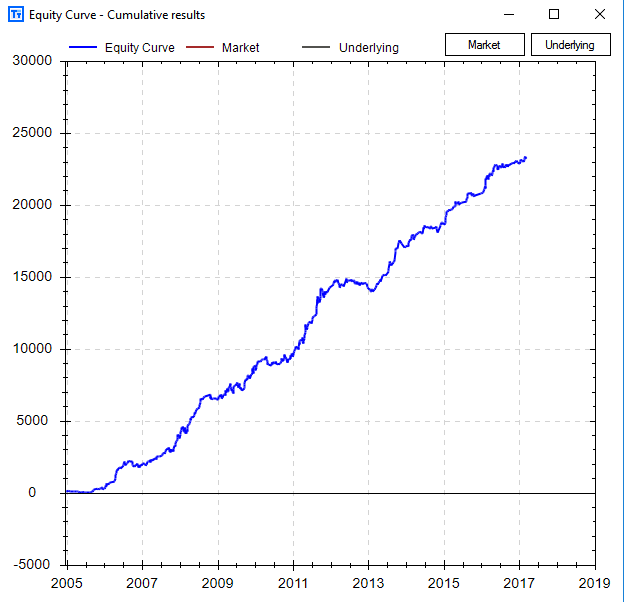
Algo traders look at equity curves as a first step in determining the viability of a trading strategy. For example, the equity curve below shows how an account would have performed had it traded only one contract using the fourth Free Friday strategy.
A rising equity curve warrants further investigation into a strategy’s robustness. Good strategies tend to move from the lower left to the upper right of the graph.
On the other hand, an equity curve with a negative return is moving in the opposite direction and most likely harmful for actual trading. A strategy like the one below can be discarded and does not need more of your time.
How to calculate an Equity Curve
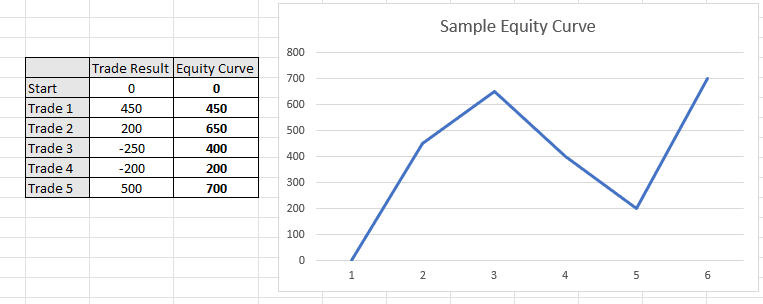
To calculate an equity curve we simply add each successive trade to the rolling sum. Assume a trading strategy made the following five trades: +450, +200, -250, -200, +500. To calculate the equity curve, we would simply add the trade results after each trade.
First, we have +450. Second, we have 450 + 200 or 650. Next, we have 650 – 250 or 400. Finishing this process results in the equity curve values +450, +650, +400, +200, +700.
What is Equity Curve Trading?
Equity curve trading, or managed equity curves, is using the equity curve of your trading strategy to make decisions about if you
should or should not take your strategy’s next trade
determine your next trade’s position size
should adjust your money management
A major fear in system trading is that often times your profit and loss or “equity curve” is your only feedback loop. That is, you don’t know when to stop trading a “broken” system until it has already cost you significant money.
One industry idea is to monitor the equity curve in comparison to a moving average of the equity curve. That is, if our equity curve falls below its rolling average of the equity curve then maybe it is a red flag or early warning sign the system is broken. On the other hand, if you are confident in your system then maybe this temporary sign of system weakness is actually an opportunity to trade larger!
Below shows an example of applying this equity curve trading technique to your own strategy and using the moving averages of the equity curve to approve trading signals.
Some trading systems might miss significant drawdowns by simply turning off once the equity curve has weakened below its moving average and resume trading once the equity curve reclaims the moving average of the equity curve. The above example shows such.
Either way system traders need to know how their trading strategies perform when the equity curve weakens. If not, we are only to blame for our losses especially if we can identify some loss saving techniques ahead of taking a system live.
Equity Curve Trading Strategies
The trader should test various moving average parameter settings to find the best equity curve moving average to apply to each algo trading strategy. The most popular are the usual moving averages of lengths 5, 10 and 20 trades. Each strategy’s equity curve analysis will be different.
Most equity curve or performance-based systems can be defined as:
Skipping trades when equity curve is above a moving average of equity
Skipping trades when equity curve is below a moving average of equity
Skipping trades after consecutive winning trades
Skipping trades after consecutive losing trades
Skipping based on net profit
Skipping based on rolling Sharpe Ratio
Skipping or increasing size can be interchangeable. Optimizing moving average length or N trades for any of the above calculations can provide additional insights into improving trading strategies.
The autocorrelation of the trading strategy’s returns will determine if one should stop trading after the equity curve falls below its moving average or if one should increase size. If the strategy’s returns show strong negative autocorrelation, then the latter makes more sense.
Is my Strategy Working?
Many traders and small investors monitor raw equity curves to make a decision on a strategy’s health. If the strategy falls below its moving average does this mean the strategy is broken? A disciplined trader may be wise to evaluate the strategy once live trading net profit falls below the equity curve of the strategy.
However, wiser investment decisions based on strategy health and robustness are usually made using alternative stress tests. Equity curve strategies may reduce maximum drawdown but only where returns show serial correlation. That is, losses beget more losses and wins beget more wins.
Most brokerage platforms do not enable this type of functionality to execute equity curve trading. However, Build Alpha makes it simple to test any strategy for various equity curve trading strategies across all financial markets.
Build Alpha
In the picture below you can see the thicker blue line represents our original backtest’s equity curve. This is how the strategy has performed ignoring all equity curve fluctuations. The nasty drawdown that concluded around trade number 740 is not a drawdown most traders could endure.
The baby blue line shows how the strategy performed only taking trades when the equity curve fell below its 5-period simple moving average. On the other hand, the yellow equity curve shows if you only took trades when the strategy’s equity curve was above its 5-period equity curve moving average.
You can see the baby blue returns are much smoother and avoided the most recent drawdown experienced around trade 740. In contrast, the yellow equity curve – only trading when the strategy was above its equity curve – caught all of the drawdown. In fact, the yellow equity curve had a worse drawdown than the original backtest.
Another Example
The blue and red lines show nice smooth returns whenever this strategy is below its 5 or 10 period equity curve moving average, respectively. On the flip side, the green and purple lines show how choppy and risky equity returns have been when only trading this strategy when above its 5 or 10 period equity curve moving average, respectively.
Need to Know
Equity Curve Trading can be applied to any asset class: stock market, futures, forex trading and even crypto currencies.
Equity Curve Trading can act as a money management technique and be applied to any used strategy.
The original strategy can use technical analysis, technical indicators, fundamental analysis, alternative data, data mining, various currency pairs, etc.
The most common equity curve trading strategy is comparing the cumulative profit of a trading strategy against a moving average of the cumulative profit. All things must be tested!
Build Alpha enables traders to monitor strategy results and numerous equity curve trading techniques.
Summary of Equity Curve Trading Strategy
Equity curve trading can provide valuable information that temporary weakness in a particular strategy has historically been followed by large drawdowns or by periods of out-performance and strategy recovery.
This knowledge can give insights to the trader on when to increase position size/leverage or to just simply have confidence in periods of equity curve drops, for example.
The main takeaway being… often smoother returns or a better risk-adjusted return can be achieved by considering the strategy’s “health” vis-a-vis the equity curve in relation to a moving average of the equity curve.
Following an equity curve trading technique will produce a new equity curve.
Update – Meta Strategies
Equity curve trading can be considered a Meta Strategy. A Meta strategy is a trading strategy that trades an underlying trading strategy. The idea is to develop an overlay strategy that will improve an existing trading system. Ideally, these layered decisions will increase overall net profit and performance as opposed to just following the original strategy.
The simplest Meta Strategy is to only take a trade if the underlying or original trading system’s last trade was a loser. Obviously, we can get more complex and say only trade if the original trading system’s last three trades were winners or, more probable, do NOT trade if the original trading system’s last three traders were winners.
Build Alpha displays all the 2 and 3 trade meta strategy scenarios for each and every system. BA also shows equity curve trading results for every strategy.
Import Custom Strategies
A key feature of Build Alpha is the ability to import trading systems built outside Build Alpha and run all the robustness and curve fitting tests on them. For example, you could easily import your systems, view their equity curves, and check all these meta systems on all of your trading systems. This is far more helpful than learning a new technical analysis technique.
The image above is Build Alpha’s custom strategy import window.
Thanks for reading,
Dave
Learn more about Build Alpha and Equity Curve Trading
Contact me for the demo and watch how Build Alpha can easily demonstrate the best equity curve trading strategies for any trading inputs.
Locate the Robustness Testing Button
On the right-hand side of the results window, there is a button called ‘Robustness Testing’.
Change the Meta Systems view
Two displays all two trade scenarios such as: two consecutive wins, two consecutive losses, one win and one loss, one loss and one win, etc. Three displays all the three trade scenarios while Average displays moving averages of the equity curve trading.
Author
David Bergstrom – the guy behind Build Alpha. I have spent a decade-plus in the professional trading world working as a market maker and quantitative strategy developer at a high frequency trading firm with a Chicago Mercantile Exchange (CME) seat, consulting for Hedge Funds, Commodity Trading Advisors (CTAs), Family Offices and Registered Investment Advisors (RIAs). I am a self-taught programmer utilizing C++, C# and python with a statistics background specializing in data science, machine learning and trading strategy development. I have been featured on Chatwithtraders.com, Bettersystemtrader.com, Desiretotrade.com, Quantocracy, Traderlife.com, Seeitmarket.com, Benzinga, TradeStation, NinjaTrader and more. Most of my experience has led me to a series of repeatable processes to find, create, test and implement algorithmic trading ideas in a robust manner. Build Alpha is the culmination of this process from start to finish. Please reach out to me directly at any time.
The Noise Test helps detect curve fitting by re-testing a strategy on many volatility-adjusted versions of the original price series to see whether profitability survives small, realistic perturbations.
First, let’s talk about overfitting (or curve fitting) and what it is. I will simply define it as fitting a function or model to data so well that the function or model is not generalizable and cannot/will not work on another data set. In trading terms, it is designing a strategy that trades historical data so well that it will surely fail on new data.
When Out of Sample Data is Not Enough
The first and most obvious test to prevent curve fitting is out of sample testing. In other posts I’ve described this, but in short, it is simply withholding a portion of your data to “validate” the strategy. For example, you have 10 years’ worth of data and you designate the first or last 30% to be out of sample. You build your model on the remaining seven years of data and then validate it on the withheld 30% or out of sample data.
However, and for various reasons, this might not be enough to prevent against curve fitting. There are two parts to the underlying data: the signal and the noise. It is often said that when something is curve fit it is “fitted to the noise” and does not capture the underlying signal. The Noise Test is a test to see how close we have fit to the “noise” in our price data.
What is the Noise Test in Trading?
The Noise Test adjusts the original price data by differing amounts (user selected) creating hundreds of new volatility-adjusted price series to re-trade the strategy on. The idea being, that if the strategy cannot produce a profit on the newly created noise-adjusted data then it was overfit to the historical data’s noise (not capturing a real underlying signal) and unworthy of live trading. I wrote about an example strategy here: Noise Test Strategy Example
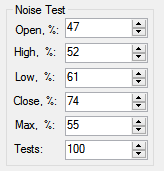
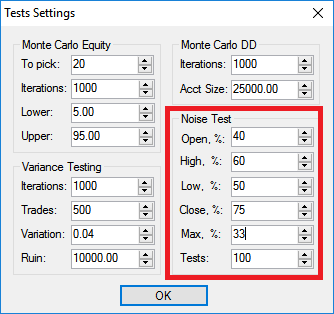
For example, the trader can select to change up to 40% of the opens, 60% of the highs, 50% of the lows, and 75% of the closes. Additionally, the trader can select by how much he’d like to adjust the price data – let’s say by up to 33% of the average true range. Here’s what this exact configuration would look like in Build Alpha. Then simply hit the Noise Test button from the right-hand panel of the results window to run the test.
What Does Noise Adjusted Data Look Like?
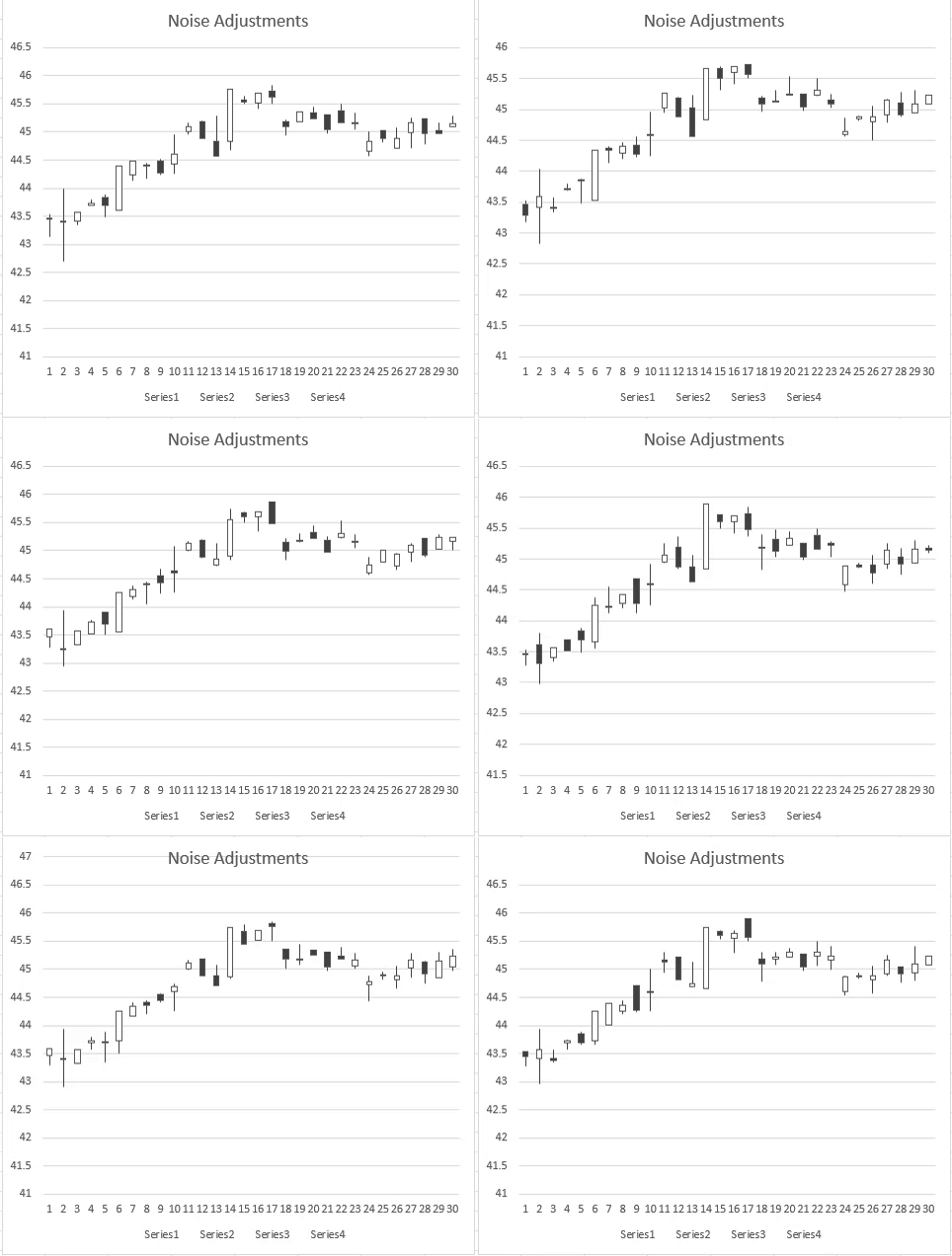
Below I’ve attached photos that show 4 “noise altered” price series created with the settings above for the S&P500. The charts below display the period of the August 2015 ETF crash. You can see how some bars have changed and some have even turned positive when originally negative and visa versa.
It still mimics the original S&P500 data and that is ideal as we want to keep certain elements of the original data such as the volatility clustering, e.g. However, we’ve changed the amounts of noise in each newly created series by adding or subtracting various amounts.
*Actual Price Data*
Noise Altered
Noise Altered
Noise Altered
Noise Altered
Here is an additional view of seeing how the Noise Test adjusted the underlying data. Click on the below image to watch the 15 second gif.
Analyzing the Noise Test Results
After adjusting the data, the Noise Test will then trade the strategy on each newly created price series and display the resulting equity curves. If the original strategy was “fitted to the noise” then the strategy should not maintain profitability as we adjust the noise in the data. However, if the Noise Test results remain profitable then we can have increased confidence a strategy was trading the underlying signal and not the “noise”. Below is the output of the Noise Test in Build Alpha.
How to Interpret Results
To oversimplify, let’s discuss a simple pass/fail scoring system.
PASS – most noise-adjusted equity curves remain profitable and the distribution stays meaningfully above zero.
WARNING – Profitability may survive but drawdowns explode or results become highly inconsistent with the backtest.
FAIL – Many noise-adjusted runs cluster near zero or negative; many deviate from the backtest. This suggests the strategy was (overly) fit to the historical noise.
Of course, there are more advanced evaluations such as reviewing the spread among noise test results. Reminder, these can all be automated with an automated workflow in Build Alpha v3. This means Build Alpha will only show you strategies it has generated that pass the Noise Test.
What To Do Next?
If your strategy fails the noise test or is flashing warning signs, the next logical steps are
Additionally, if you’re interested, I wrote a piece featured in SeeItMarket.com where I used the Noise Test to identify a lying backtest. Lying backtests are misleading and cause traders to risk hard earned money on false positives. If you’re curious to learn other stress tests, check out this full Robustness Testing Guide I put together.
Update – Advanced Uses of Noise Test
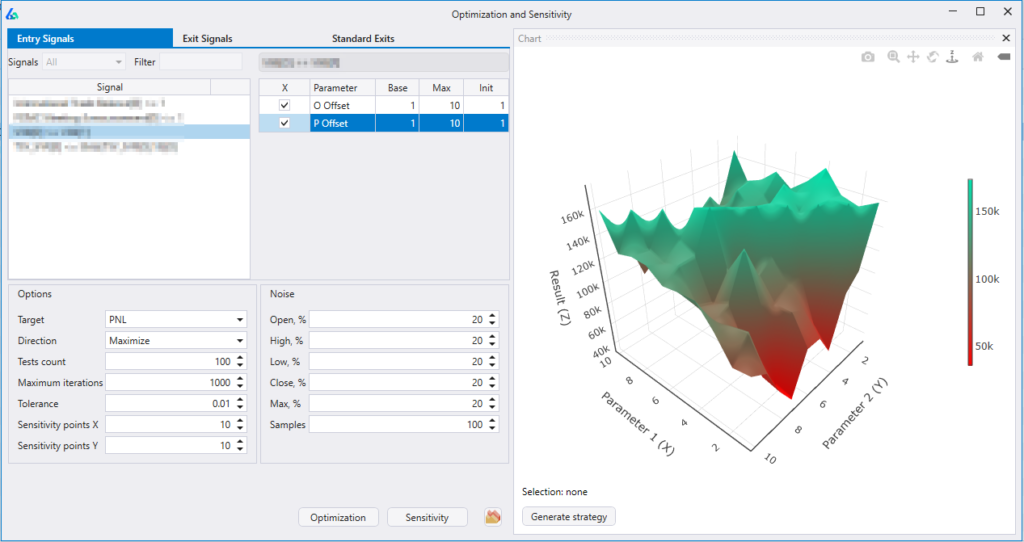
Build Alpha now permits the trader to add noise-adjusted data series into the optimization process. This Noise Test Parameter Optimization can produce more stable or robust parameter settings because we are optimizing on noise-adjusted data and not the single historical price path (that is unlikely to repeat). To read more about it and view a case study, please check out this post: Noise Test Parameter Optimization
E-Ratio
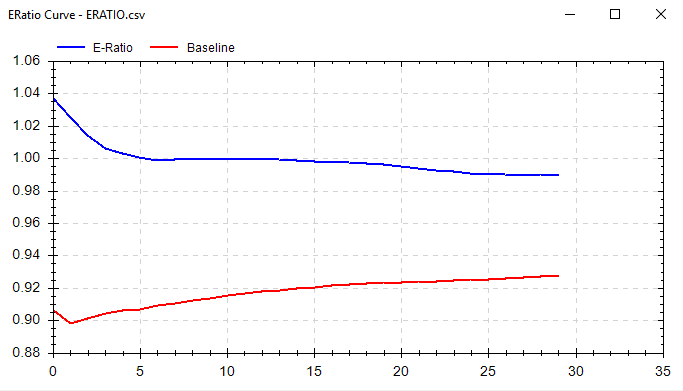
Edge Ratio or E-Ratio measures how much a trade goes in your favor vs. how much a trade goes against you. The x-axis is the number of bars since the trading signal. A higher y-value signifies more “edge” at that step in time.
Measurements are normalized for volatility; this allows us to use e-ratio across all markets and regimes. Once normalized for volatility, 1 signifies that we have equal amounts of favorable movement compared to adverse movement.
In other words, the y-axis is an expression of how many units of volatility more or against you your trade gets. A measure of 1.2 would indicate .2 units more of favorable volatility and a measure of 0.8 would indicate .2 units more of adverse movement.
The blue line is for the selected strategy’s signal and the red line is for a “random” strategy for the same market. The red line is to serve as a baseline to beat. Ideally, you’ll want to see a blue line above 1 and above the random line.
You may find many “good” strategies, but they may have an E-Ratio less than the red baseline or less than one. This would make us less confident that our signal will withstand the test of time.
Additionally, if E-Ratio falls off a cliff at bar 6… then it probably does not make sense to hold for 15 bars!
Another tool to make sure Build Alpha + Trader = Success.
How to calculate:
Record Maximum Adverse Excursion and Maximum Favorable Excursion at each time step since signal.
Normalize MAE and MFE for volatility. To compare across markets we need a common denominator. Let’s use ATR or a unit of volatility.
Average all MFE and MAE values. Now you should have average MFE and average MAE at 1 bar since signal. Average MFE and average MAE at 2 bars since signal…
Divide Average MFE by Average MAE at each time step.
Example. Calculate E-Ratio at one bar out from signal.
Signal 1:
MFE 1.50 ATR 1.27
MAE 1.00 ATR 1.27
Signal 2:
MFE 1.33 ATR 1.19
MAE 1.04 ATR 1.19
Signal 3:
MFE 1.83 ATR 1.67
MAE 1.27 ATR 1.67
Average MFE = ((1.50/1.27)+(1.33/1.19)+(1.83/1.67))/3 = 1.13
Average MAE = ((1.00/1.27)+(1.04/1.19)+(1.27/1.67))/3 = 0.81
E-Ratio at Bar One = 1.13/0.81 = 1.395
So in this example, one bar after our signal, we can expect ~.40 more units of volatility in our favor than against us. In other words, if ATR is 20 points then we can expect the trade to move on average 8 points (8/20 = .4) more in our favor than against us 1 bar after the signal is generated.
** Update **
I spoke quite a bit about E-Ratio or Edge Ratio in a recent podcast interview with Andrew over at BetterSystemTrader.com/79
Please check it out and let me know what you think. Thanks.
Thanks for reading, Dave
Free Friday Update February 2017
**Please note the last trade (+$1,350.00) was not counted in this February update as it exited in March**
Out of sample testing is purposely withholding data from your data set for later testing. For example, let’s say we have ten years worth of data and select to designate the last 30% of the data as out of sample data. Essentially what we do is take the last 3 years (30%) of the data set and put it in our back pocket for later use. We then proceed to create and optimize trading strategies using ONLY the first 7 years of data or the “in-sample” data.
Let’s assume we find a great looking strategy that performs extremely well on the first 7 years worth of data. What we would then do is take the last 3 years worth of data, or our out of sample data, out of our back pocket and proceed to test our strategy on this “unseen” data.
The idea is… if the strategy still performs well on this unseen, out of sample data then it must be robust and we can have increased confidence it will stand the test of time or at least in how it will perform on future market data.
To read more about out of sample testing please check out these
However, there is a major pitfall to the above approach given certain data sets. What if our amazing looking strategy happened to be long only and only performed well on our unseen, out of sample data because the last 3 years (our 30%) were extremely bullish. See picture below (red marks last 30% of data). Is it possible any long strategy would have passed this out of sample period?
What’s a solution? What if we use the first 30% of the data instead of the last 30%? What if we use some middle 30% of the data? Well, we actually still run the risk that any continuous 30% of the data may be extremely trendy. Here is a photo showing a strong trend in the beginning 30% of a data set.
Here is a photo showing a strong trend in the middle 30% of a data set:
Randomized Out of Sample Testing
The answer? Let’s take our original backtest results and run them through a randomized out of sample test. First, we randomly select dates until we have randomly selected 30% of the dates from our data. Now we have a “randomized out of sample” period to put in our back pocket. Basically, we will then run through our entire data set but filter out any trades that would have occurred on our now randomly selected, out of sample dates.
Then we can view the results of the trades that only took place on our randomly selected out of sample dates as a new “quasi-out of sample” equity curve. We have now significantly reduced the chances that any successful out of sample performance is solely due to some underlying trend or market regime as our out of sample data is now no longer continuous. Here is an example of random 30% of data selected for out of sample.
Is one test enough?
However, one more problem remains. What if we randomly created a trend or favorable market regime through our random sampling/selection? That is, we’ve randomly selected 30% of the dates and when they’re put in chronological order for our out of sample testing they coincidentally create a massive up trend that could skew our new out of sample results?
The answer? Run this test 1,000 times where we re-select a new random 30% of the dates (or bars) each time to act as our out of sample period. Some may create a favorable market regime, but we can see how our sample strategy does over a variety of randomly created regimes or out of sample periods.
Build Alpha Solution
Build Alpha offers this complete process and test with the click of a button. The leftmost graph below is the in-sample equity curves from the 1,000 runs. These are basically trades that occurred on dates that were NOT randomly selected to be part of the out of sample period. The middle chart is our randomized out of sample test. These are the equity curves from the 1,000 runs of the trades that occurred on the dates that were randomly selected. The thick blue line on the left and middle graph are the in and out of sample tests from our original back-test. The rightmost chart is simply the original back-test for reference.
Analyzing Randomized Out of Sample Results
Example 1
The example below shows our original backtest’s out of sample equity curve to be at the very top of the distribution of all the random out of sample tests (middle chart below). This is a sign that the underlying data contributed quite favorably to our results and may have produced unrealistic or unrepeatable out of sample results (most likely something like the first picture of this post where the last 30% of the data is considerably bullish).
Example 2
In the picture below I’ve displayed a simple demonstration that would show a “passing” random out of sample test or a situation where you can feel comfortable the original out of sample period is a “fair” period of time. The middle graph’s thick blue line (our original out of sample results) is in the middle of the random out of sample distribution. This means as we randomly selected random out of sample periods we created some out of sample equity curves that had better results than our original backtest and some that had worse results than our original backtest. This can only mean that our original out of sample period was “fair” and did not overly contribute to the favorable results, but rather the favorable results come from the strategy itself.
Takeaways
We know we want to test on “unseen” data, but also want to reduce the chances that an underlying trend produced favorable out of sample results. In order to avoid being fooled by a favorable out of sample period, we randomly create thousands of out of sample periods and want to see general profitability across them all.
If the original backtest’s out of sample line is significantly greater than all the randomized out of sample equity curves then we can conclude we had originally selected an overly optimistic out of sample period that contributed too greatly to our strategy’s out of sample success (similar to the first photo in this post).
Additionally, if our original backtest’s out of sample line is one of the worst performers compared with the randomized out of sample equity curves then we can conclude the original out of sample period chosen may actually be too unfavorable (and throwing the strategy away based on out of sample results alone may be ill-advised).
All in all, Randomized Out of Sample testing is just one more test Build Alpha offers to provide the utmost confidence a strategy will perform to expectation moving forward.
To read about more advanced tests to create confidence in your trading strategies check out this complete Robustness Testing Guide.
Free Friday 11 – Sample Size
For this week I want to discuss personal comfort regarding sample size or number of trades. I often get asked to generate strategies that are more “swing-trade” oriented and hold for days to weeks.
I have no problem with these types of strategies and Build Alpha can certainly build them. This Friday’s strategy is exactly that, but at the end I explain my thoughts regarding this style of trading.
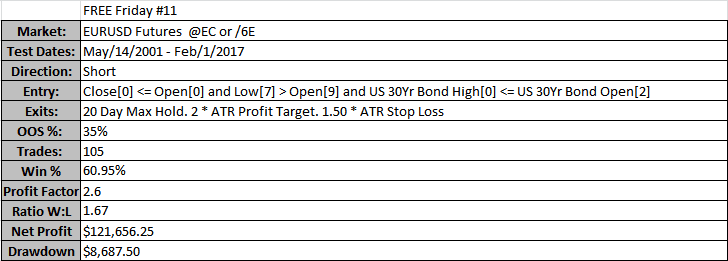
This strategy shorts the EURUSD futures whenever these 3 conditions are true:
Today’s close is below today’s open
Low[7] > Open[9]
US 30Yr Bond’s High[0] <= US 30Yr Bond’s Open[2]
The exit conditions for this strategy are as follows:
Maximum hold of 20 days
2.00 * 20 Period ATR Profit Target (Calculated at Entry)
1.50 * 20 Period ATR Stop Loss (Calculated at Entry)
Below I’ve attached a chart of the equity curve in TradeStation (left – by trade number) and the equity curve vs. S&P500 on the right generated by Build Alpha (by date).
As you can see these type of exits drastically reduce the number of trades (compared to say a 1 day maximum hold). Without getting technical, the more trades the lower the chances the strategy may be a “fluke”.
This strategy’s out of sample period began in 2012 which means that this strategy has had its last 20+ trades on “unseen” data and did quite well.
Some may say that is fine and they’re ready to proceed with this strategy, but others may say that this is not enough trades. This essentially comes down to personal preference.
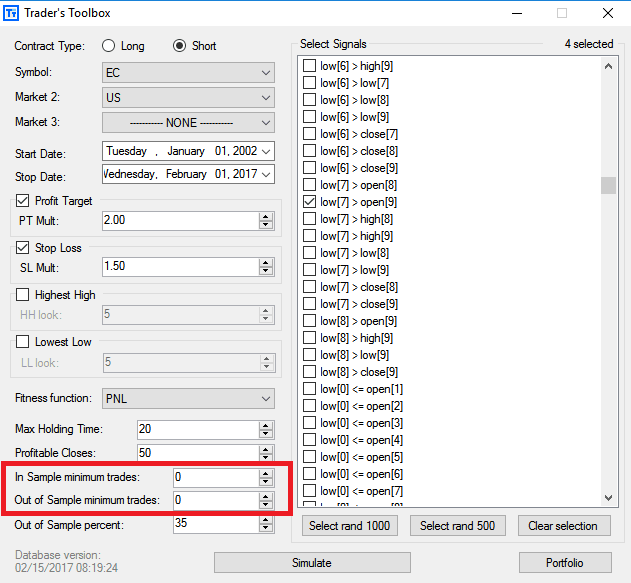
The important note I’d like to make is… Build Alpha allows you to discard strategies that the software generates that do not have a certain number of trades.
For example, your personal preference might require at least 500 out of sample trades. If so, you would simply enter that number into Build Alpha and the software would then discard any strategies that do not trade frequently enough during the strategy generation process.