BUILD ALPHA Update:
MCP + Prop Firm Simulator
Control Build Alpha with your AI agent. Connect Claude Desktop, Claude Code or Codex, then drive the interface with a prompt or run it headless. Plus a Prop Firm Simulator that ranks portfolios by the cash they are expected to pay you, and one-click data downloads from MetaTrader 5.
Two big features in this release. Build Alpha MCP lets you control Build Alpha with your AI agent: connect Claude Desktop, Claude Code or Codex, then set up the interface with a prompt or run Build Alpha headless and never open it. The Prop Firm Simulator replays your portfolios through prop firm challenge and funded-account rules and ranks them by expected payout per attempt. You also get a built-in database of futures prop challenges with a new Find Challenges tool and a one-click MetaTrader 5 data downloader, plus fixes to the Python code for Interactive Brokers, the MT5 code for Darwinex and other brokers, and alternative data comparisons in NT8 and MT5 code.
Build Alpha MCP: Control Build Alpha With Your AI Agent
Build Alpha now has an MCP server. MCP (Model Context Protocol) is the open standard AI apps use to connect to outside tools. Connect Claude Desktop, Claude Code or Codex to Build Alpha and your agent can do nearly everything you do with a mouse: configure a search, build signals, run robustness tests and export code.
There are two ways to use it.
MCP vs. the LLM Orchestrator
In v3.1, the LLM Orchestrator let Build Alpha call an AI model to tune AutoTune between rounds. Build Alpha stayed in charge and the model advised. MCP flips that around: your agent is in charge, and Build Alpha is the research engine it calls. Use whichever fits how you work.
Getting Connected
The Build Alpha MCP server runs locally alongside Build Alpha, so use a desktop or command-line client: Claude Desktop, Claude Code or Codex (the Codex CLI, IDE extension and ChatGPT desktop app share one MCP configuration). Add the Build Alpha server to your client's MCP settings and start prompting.
What Your Agent Can Do in Build Alpha
Through MCP, an agent has access to the same research workflow you do.
MCP Capabilities
- Configure a search end to end
- Create custom signals or entries
- Work with the full signal library
- Add custom data and symbols
- Run every search type: genetic search, portfolio search, prop firm simulation and portfolio simulation
- Set Automated Filters and Workflows
- Set Sequence Workflows so Build Alpha only surfaces strategies that pass your robustness gates
- Export trade lists and strategy code
The last few matter most. Pair an agent with Sequence Workflows and your robustness gates, and Build Alpha only surfaces strategies that survive every test you set: out-of-sample, Vs Random, the Noise Test, Monte Carlo Permutation and more. The agent does the clicking. The gates do the judging.
Sample Prompts
Two examples from opposite ends of the research spectrum: a quick idea check and a large search with robustness gates.
Single Strategy: Test a Quick Idea
Run a Massive Search With Robustness Gates
Forget Where a Setting Is? Ask.
Then go back to the UI and keep working. Or never touch the UI at all.
Trading research on a new level.
Prop Firm Simulator: Rank Portfolios by Payout, Not Pass Rate
The requests for prop firm features from Build Alpha users became too overwhelming to ignore. Many of you are already killing it with these firms. The Prop Firm Simulator replays your portfolios, bar by bar, through a prop firm's challenge and funded-account rules from every historical start date, then reports what a prop trader actually gets paid on.
Here is why that matters. In a simple example from the full guide, a strategy passes the evaluation 59% of the time but collects a payout only 35% of the time. Passing is not getting paid. So the simulator ranks portfolios by Expected Net / Attempt: what one challenge purchase is worth after every fee.
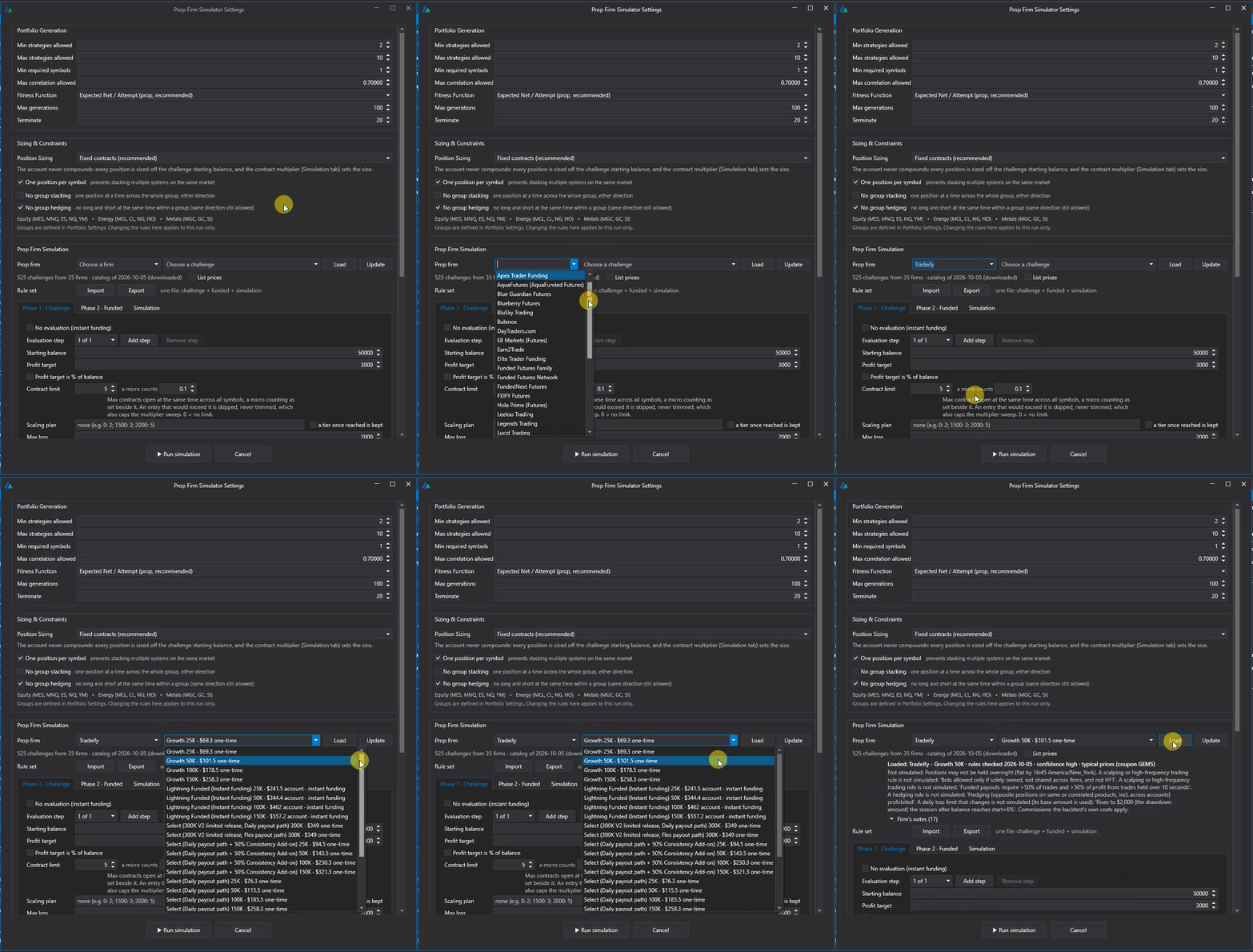
- Challenge, Funded and Simulation tabs. Profit targets, trailing and end-of-day drawdowns, daily loss limits, contract limits, minimum trading days, monthly fees, resets, consistency caps and payout rules.
- Portfolio generation. Searches combinations of your saved strategies with min and max strategy counts, a minimum number of symbols and a correlation cap.
- Fixed contracts, no compounding. Micros count 0.1 toward the contract limit, and an entry that would exceed it is skipped, never trimmed.
- Rule set files. Import and Export one file that holds the challenge, funded and simulation settings together.
New Prop Fitness Functions
- Expected Net / Attempt (recommended): what one challenge purchase is worth after fees
- Prop ROI: trader payouts per attempt divided by cost per attempt
- Pass Probability: share of start dates that hit the target before breaching
- Survival Prop: favors funded accounts still open at the end of the horizon

In those results, the portfolio with the highest pass rate (90.7%) is worth +$1,785 per attempt. A portfolio further down passes only 73.2% of the time but is worth +$2,659 per attempt with a 7.53x Prop ROI, because it reaches payouts sooner and more often.
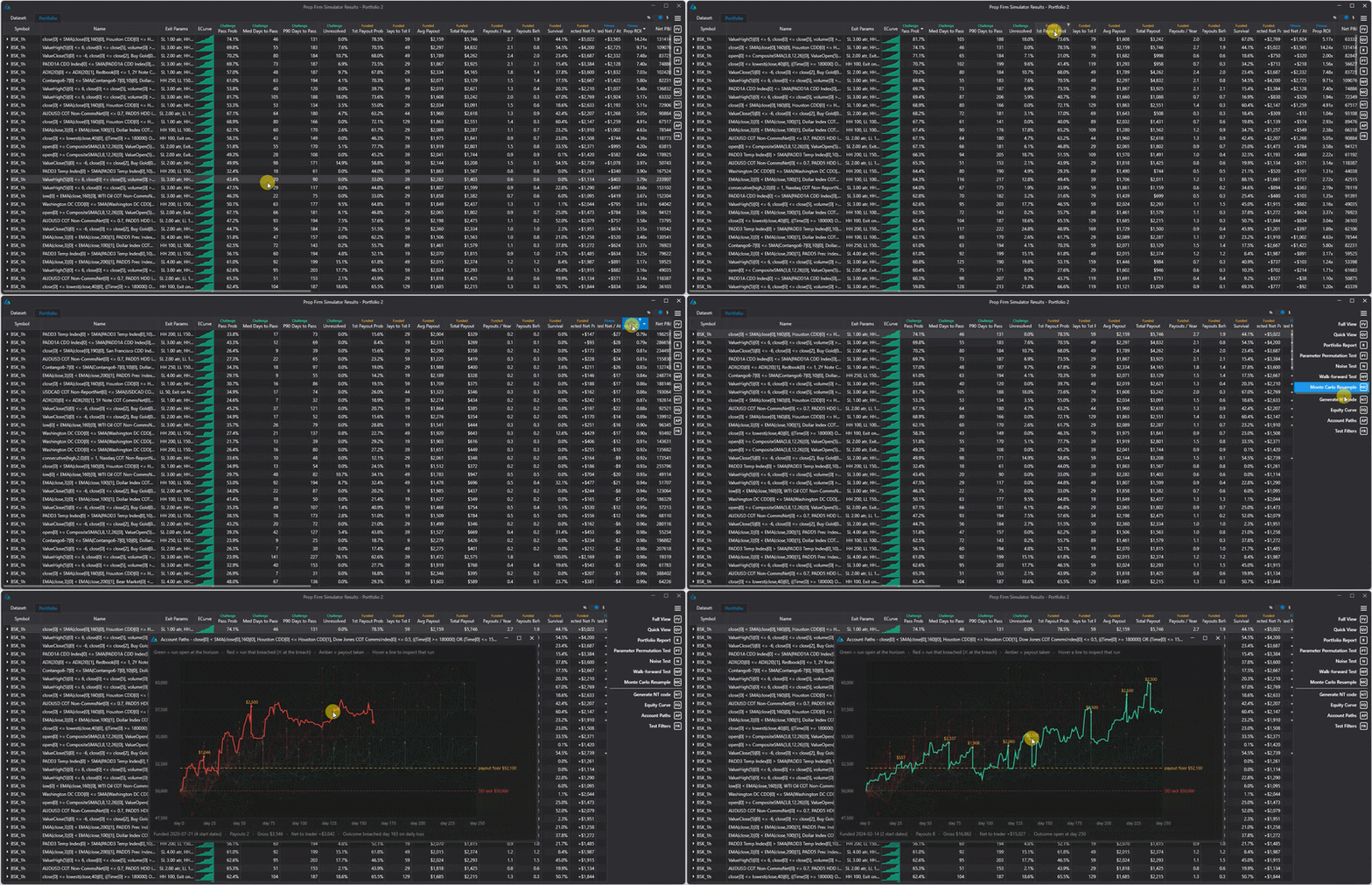
Click any portfolio, open Account Paths and you get one line per funded start date. Hover a line to see that run's payouts, gross, net to the trader and outcome. And when you generate code, the prop logic carries into it: maximum counts, position stacking, group stacking across custom symbol groups, and sizing.
The full guide walks through the prop firm math (why your cash flow is not your strategy's P&L), the expected value formula, real payout rules like qualifying days and caps, every metric in the results window, and why the simulator replays real start dates instead of shuffling trades.
Read the full Prop Firm Simulator guideFind the Best Challenge for Your Portfolio
Preconfigured prop firm rules are already here. Build Alpha now includes a database of futures prop firm challenges, and an AI agent scans the web to keep it current with the latest challenges, rules and pricing. As of this writing it holds 800+ active challenges from 42 firms. Pick a firm and a challenge in the simulator settings, click Load, and its rules fill in. No typing required.
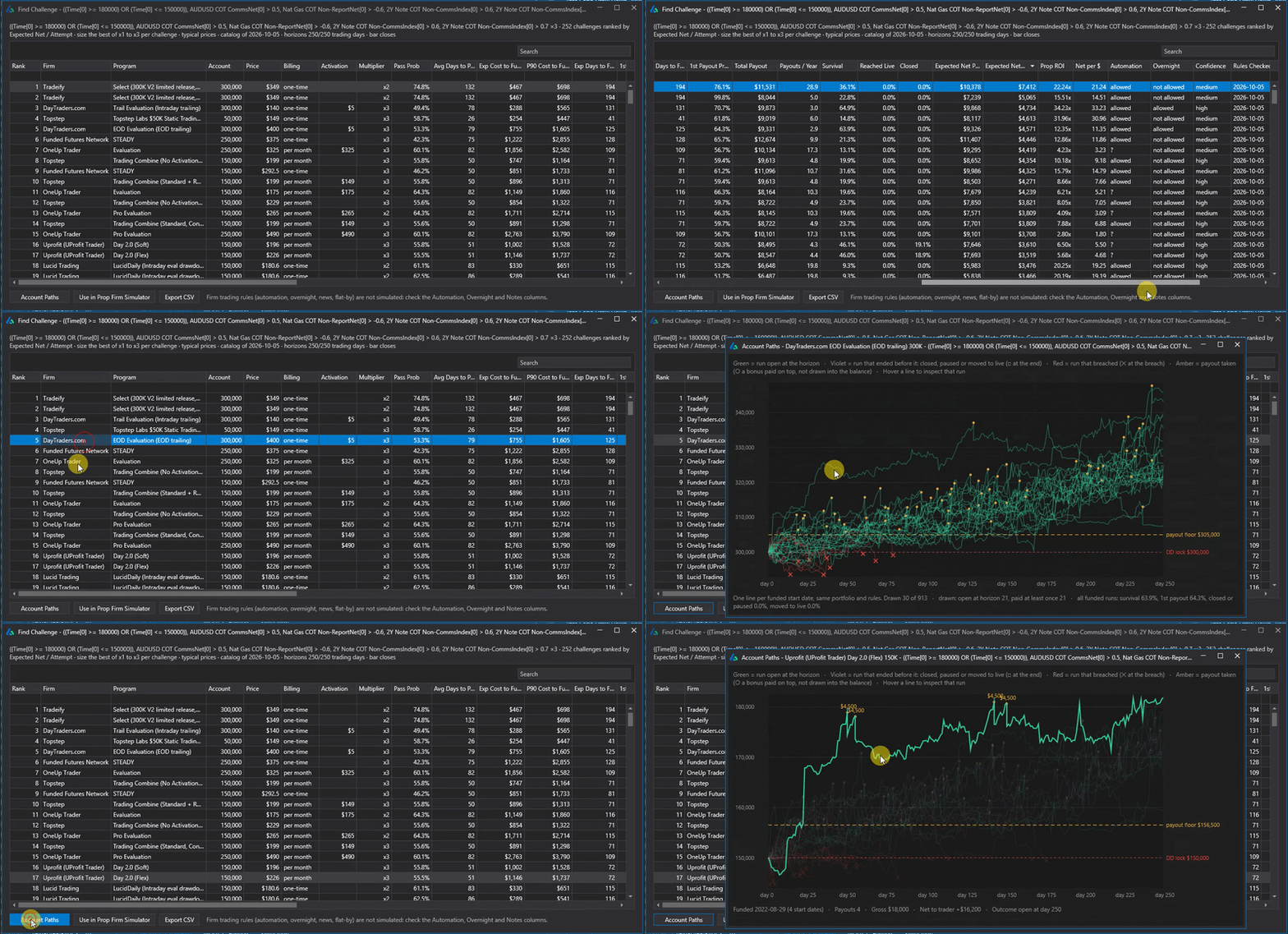
Then work the other direction with Find Challenges, the prop firm Challenge Finder, available from the right-hand panel of the Prop Firm Simulator results. Select a portfolio and it runs that portfolio through every challenge in the database, ranked in a sortable table by Expected Net / Attempt. View any challenge's Account Paths for that portfolio, or load that challenge back into the Prop Firm Simulator to search for better portfolios built for it. Firm rules the simulator can't model, like automation, overnight and news rules, get their own columns so you can check them before you buy.
Run This Before You Commit
The same portfolio may work for one challenge and be a disaster for another. Run Find Challenges before you buy a challenge to make sure you're optimizing your spend and your chances at a payout.
MetaTrader 5 Data Downloader
Build Alpha can now pull data straight from MetaTrader 5. Go to File → Tools → Settings → Add from MT5, search for a symbol, choose your timeframes and timezone, and click Download.

Downloaded symbols are formatted for Build Alpha and added to your Symbols dropdown instantly, ready to test. Because the data comes from your own MT5 broker, you build and test on the same data you trade. See Build Alpha for MetaTrader for the full MT5 workflow.
Code Export Fixes: IBKR Python, MT5 and NT8
Three fixes for traders running Build Alpha strategies live.
See the Python trading strategy builder, the MetaTrader EA generator and Build Alpha for NinjaTrader for more on each platform.
A Live Execution Layer
Streaming P&L, live position tracking, and native execution coming directly to Build Alpha in the next release. The gap between strategy generation and live trading gets one step shorter.

How to Get the Update
Check your email! It is live if you're reading this. If you didn't get it please check spam then email me.
If you're new to Build Alpha and reading this from outside the user base, the demo is the fastest way to see what Build Alpha can do. To see licensing please head to the Licensing Page.

Build Alpha: generate, validate and export strategies, now with your AI agent at the controls
David Bergstrom
A decade-plus in professional trading as a market maker and quantitative strategy developer at a high-frequency trading firm with a CME seat. Consulting for hedge funds, CTAs, family offices, and RIAs. Self-taught C++, C#, and Python programmer specializing in data science, machine learning, and trading strategy development.
Frequently Asked Questions
What's new in this Build Alpha update?
Build Alpha MCP lets you control Build Alpha with your AI agent through Claude Desktop, Claude Code or Codex. The Prop Firm Simulator ranks portfolios by expected payout per attempt under prop firm rules, with a built-in database of futures prop challenges and a Find Challenges tool. A new MetaTrader 5 data downloader pulls symbols, contract specs and optional tick data straight from your MT5 broker. The Python code for Interactive Brokers, the MT5 code for Darwinex and other brokers, and alternative data comparisons in NT8 and MT5 code were also fixed. A new MetaTrader 5 data downloader pulls symbols, contract specs, and optional slippage and tick data straight from MT5.
Can Build Alpha download data from MetaTrader 5?
Yes. Go to File → Tools → Settings → Add from MT5 and install the connector with one click. Then search for a symbol, choose timeframes and a timezone, and click Download. Build Alpha pulls the price data plus tick size, point value, margin and swaps, can also download slippage and tick data, and adds the symbol to your Symbols dropdown.
What is the Build Alpha MCP?
An MCP server that connects AI agents to Build Alpha. MCP (Model Context Protocol) is the open standard AI apps use to connect to outside tools. Once connected, an agent can configure searches, build signals, run robustness tests, set workflows and export code inside Build Alpha.
Which AI apps can connect to Build Alpha?
Claude Desktop, Claude Code and Codex (the Codex CLI, IDE extension and ChatGPT desktop app share one MCP configuration). The server runs locally alongside Build Alpha, so use a desktop or command-line client. Other clients that support local MCP servers can connect the same way.
Can I run Build Alpha headless with an AI agent?
Yes. You can let the agent set up the interface while you watch, or run Build Alpha headless so the agent configures, runs, filters and exports without the interface ever opening.
What can an agent do in Build Alpha through MCP?
Configure a search end to end, create custom signals or entries, work with the full signal library, add custom data and symbols, run genetic search, portfolio search, prop firm simulation and portfolio simulation, set Automated Filters, Workflows and Sequence Workflows, and export trade lists and strategy code.
How is MCP different from the LLM Orchestrator?
With the LLM Orchestrator, Build Alpha calls an AI model to tune AutoTune between rounds, so Build Alpha stays in charge. With MCP, your agent is in charge and calls Build Alpha as its research engine. Use whichever fits how you work.
I forgot where a setting is. Can the agent help?
Yes. Ask Claude where the setting lives or what it does, then go back to the interface and continue your setup or work.
Does the AI trade live?
No. The agent works during research. Strategies export as native code to platforms like NinjaTrader, TradeStation, MultiCharts, MetaTrader, TradingView and Python for Interactive Brokers, and run as deterministic code with no dependency on an AI connection.
What is the Prop Firm Simulator?
A tool that replays portfolios bar by bar through a prop firm's challenge and funded-account rules from every historical start date. It reports pass probability, payout probability, payouts, survival and the expected net value of one challenge purchase after all fees. See the full Prop Firm Simulator guide.
What is Find Challenges?
A tool in the Prop Firm Simulator results that runs a selected portfolio through every futures prop challenge in Build Alpha's database and ranks them in a sortable table by Expected Net / Attempt. An AI agent keeps the database current with the latest challenges, rules and pricing. You can view any challenge's Account Paths or load that challenge back into the simulator.
Is live trading coming to Build Alpha?
Yes. A live execution layer with streaming P&L, live position tracking and native execution is coming in the next release.
Which fitness function should I use for prop firm portfolios?
Expected Net / Attempt is the recommended choice because it measures what one challenge purchase is worth after every fee. The highest pass rate is often not the portfolio that pays the most.
What code export fixes are in this update?
The Python code generated for Interactive Brokers was fixed so live signals line up with the backtest, the MT5 code now runs correctly on Darwinex and other MetaTrader 5 brokers, and alternative data comparisons in NT8 and MT5 code no longer have rounding issues.
Is there an extra cost for these features?
No. MCP and the Prop Firm Simulator are included with your Build Alpha license. The only outside cost is your own Claude or ChatGPT plan or API usage for the agent you connect.
How do I update Build Alpha to the latest version?
Check your email! New members head to the Licensing Page.
Does Build Alpha run on Mac or Linux?
Build Alpha is a native Windows application. Mac and Linux users run it under Parallels, VMware or Boot Camp. Windows 10 and Windows 11 are supported.
Go Deeper
Ready to BUILD ALPHA?
Get the latest release. Put your AI agent at the controls and find the portfolios prop firms actually pay.