What the LLM Orchestrator Actually Does
Build Alpha's strategy generation engine has always been driven by a genetic algorithm. You set the search parameters: which signals are allowed, what fitness function to optimize, what regime filters apply, position sizing methods, risk management, and what robustness (validation) gates to enforce. Then Build Alpha generates the best possible candidate strategies inside your constraints automatically.
The LLM orchestrator sits on top of Build Alpha's automated strategy generation. The LLM reads the the genetic algorithms output, decides whether the search is in a productive region, and adjusts the search settings to redirect it. The LLM can also inject its own trading signals into the process (more on this later).
Please note: This is a completely optional feature. You can disable AutoTune in the Additional Settings and Build Alpha will not use any LLM or AI - only the built-in genetic algorithm.

This is a big deal because your results are no longer determined by the initial settings. Set the constraints, hit Start, and the orchestrator keeps the engine running on productive territory. When the search plateaus, the model changes the box (where it is looking) rather than over-tuning what's inside it.
Inside the Box vs Picking the Box
The genetic algorithm searches inside the box. The LLM orchestrator picks the box.

A genetic algorithm is excellent at exploring a search space once you define it. If a productive region exists inside that space, the GA will likely find it. The problem is when the productive region is not in the search space at all. You can run a simulation for hours and will only discover the best strategy allowed by the wrong constraints.
This is the parameter-vs-hyperparameter distinction.
Parameters are values inside a strategy: RSI length, stop distance, moving-average lookback. Hyperparameters define the search itself: which signals are available, what counts as a good strategy, what regime filter is active, and what time window the engine studies.
The genetic algorithm tunes parameters. The LLM tunes hyperparameters. They solve different but complementary problems.
Previously, most of the manual effort was really hyperparameter work: choosing which signals to include, setting parameter ranges, deciding what the engine should reward, and recognizing when the current setup is stuck. This used to require a human constantly watching, interpreting, and adjusting the engine. Now the LLM can handle the full loop.

The Signal Universe
The orchestrator changing the box only matters if there are a lot of boxes worth picking. Build Alpha has over 7,000 signals covering both price and non-price based data sets. The genetic algorithm can pull from any of them. The LLM can choose which categories to emphasize, exclude, or combine.
The LLM Can Invent New Signals
The orchestrator isn't limited to choosing from existing signals. It can create new signals mid-session and feed them into the genetic algorithm. If the model decides that a custom volatility-adjusted breadth metric would help in the current market regime, it can write that signal definition, hand it to the engine, and Build Alpha starts evolving strategies that use it alongside the built-in signal library.

This matters for two reasons. First, it means the search space expands during the session, not just the search settings. Second, the LLM is essentially doing what a quant researcher does (proposing novel features and testing whether they carry information) but at machine speed.
Validation still applies
Every LLM-generated signal flows through the same validation pipeline as built-in signals. Strategies using AI-invented signals still have to pass noise tests, walk-forward analysis, vs random benchmarking, and any other gates you've configured. The LLM can propose signals. Build Alpha decides whether they actually work.
Exportable to Every Supported Trading Platform
And here's the kicker: signals the LLM creates are first-class citizens in the export layer. When Build Alpha generates code for:
- TradeStation
- NinjaTrader
- MultiCharts
- MetaTrader 4
- MetaTrader 5
- TradingView
- IBKR (Python)
- ProRealTime
it includes the LLM-invented signal logic. You end up with deployable code, in your platform's native language, including the novel features the orchestrator came up with.
The Self-Improving Loop
Most AI tooling stops at the same place. You write a prompt, you get results back, you read the model's "insights," and then it's on you to do something useful with them. Open a different tool. Adjust your settings. Run another simulation. Read another report. Repeat.
This is the part the marketing decks don't talk about. Insights aren't strategies. They're suggestions waiting for a human to act on. And the human is slow (and often busy).
Building Strategies at Machine Speed
Build Alpha doesn't stop at insights. The orchestrator reads the engine's output, decides what to change, and Build Alpha automatically applies the changes. New search settings are loaded, the genetic algorithm restarts, and new strategies are generated and evaluated. The LLM reads the new output and either lets the search continue or changes course again.
The trader isn't in the loop. The trader is reviewing the loop. Big difference.
What used to be the slow part of systematic research: running a session, looking at results, deciding what to try next, reconfiguring, running again now happens at the speed the engine can execute. And Build Alpha is written in C++ optimized for high performance. A research session that would take a serious quant a full week with full attention now can cover more ground and run in minutes or overnight. You wake up to a population of validated strategies, a complete decision history of why those strategies emerged, and a Report you can audit at your own pace (if you even want to).
This is the actual unlock
Connecting an LLM to a strategy generator is table stakes. Self-improvement without a human bottleneck is the part that changes how research gets done. This is what the orchestrator is for.
Persistent Memory Across Sessions
The loop above describes what happens within a session. But research doesn't stop when you close the app. Most AI tools forget everything the moment the conversation ends — every new session starts from zero, no matter how much the model learned the day before.
Build Alpha's orchestrator doesn't work that way. When you stop a simulation, the LLM summarizes what it learned during the run — what worked, what didn't, which hyperparameter moves paid off, which were dead ends — and writes those lessons to a persistent memory store on your machine. Tagged with the settings, signal pool, market, and fitness function that produced them.
What Gets Stored
When you stop a simulation, the LLM doesn't just save the strategies it found. It writes a structured summary of the reasoning behind the run — the hyperparameter changes it made, the plateaus it hit, the signals that worked, the ones that didn't, and what it would do differently. Each entry is tagged with the signal pool, fitness function, market, timeframe, and direction so future sessions can find it.

How New Sessions Use It
Before a new simulation starts, the orchestrator queries the memory store for similar past configurations. The search uses a proprietary scoring system that weights signal overlap, fitness function similarity, direction, and date overlap. If you ran a similar session three weeks ago and the LLM learned that volatility regime filters didn't help on this market, the new session starts already knowing that.
It doesn't have to rediscover what the previous session figured out. The first round of the new session is already informed by everything the previous runs learned.
The Compounding Effect
This is what makes Build Alpha get smarter over time. A new licensee on day one is starting from zero. The same licensee six months in has built up a memory store full of regime-specific lessons across every market and configuration they've explored. The tool becomes more valuable the more you use it — not because the software changes, but because the orchestrator's working knowledge of your research history compounds.
Connect an LLM in 3 Steps

Prop Firm and Robustness Filters Still Apply
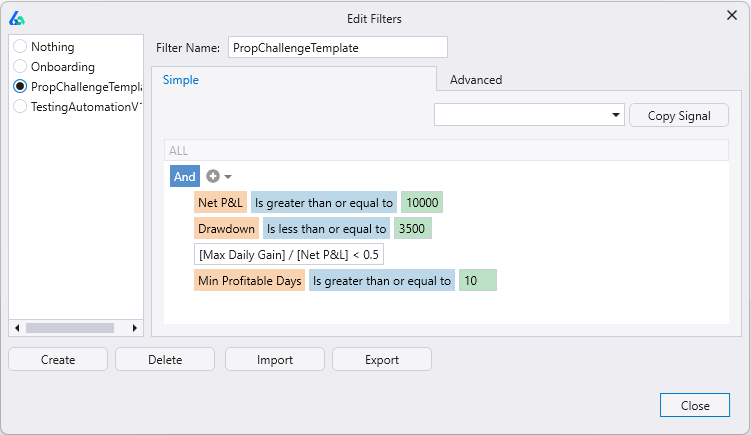
Yes, the orchestrator works with prop firm filters. Set prop firm constraints (daily loss limits, max drawdown thresholds, profit targets, minimum trading days, consistency, etc.) and Build Alpha will only show strategies that pass.
The orchestrator can't bypass validation. It can only redirect the search. If you set robustness tests then strategies still have to pass. Such tests as:
- noise testing
- parameter permutations
- vs random benchmarking
- walk-forward analysis
- monte carlo permutation
and any other gates you've configured. For more, check out this video with my two favorite robustness tests.
Bring Your Own Keys
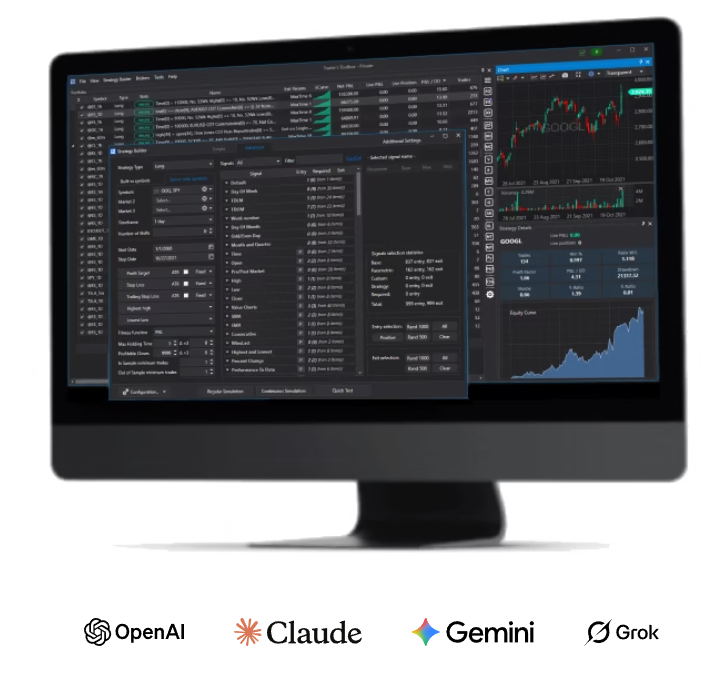
Build Alpha doesn't proxy your LLM traffic. You bring your own API keys, Build Alpha calls each provider directly, and you pay each provider their normal pricing. Token costs are low because the model only sees compact summaries, not raw bar data or trade lists. Here's where to get a key from each supported provider:
Claude (Anthropic)
console.anthropic.com/settings/keys- Sign in to console.anthropic.com
- Settings → API Keys
- Create Key, name it, copy
- Add billing if needed
ChatGPT (OpenAI)
platform.openai.com/api-keys- Sign in to platform.openai.com
- API Keys (left sidebar)
- Create new secret key, copy
- Add credit if first time
Gemini (Google)
aistudio.google.com/app/apikey- Sign in to Google AI Studio
- Get API Key (top right)
- Create API Key in new project
- Copy the key
One-time setup
Paste each key into Build Alpha once and switch between providers freely. The keys live on your machine. Build Alpha never sees them on a server.
Free api key
Google's Gemini has free tiers available. Open Router also has free and cheap models. These are great options for Build Alpha traders wanting to test AutoTune without additional costs.
Messages and Reports: Watching It Run
Every decision the LLM makes is logged. You can open the message panel mid-session and read exactly what the model is doing: which settings it changed, why it changed them, what it expects to happen next. When the run finishes, Build Alpha generates a summary report showing the trajectory of the search, the hyperparameter changes the LLM made, and the final candidate strategies.
There are four message types you'll see during a session, plus the full LLM Report. Here's what each one looks like in practice:
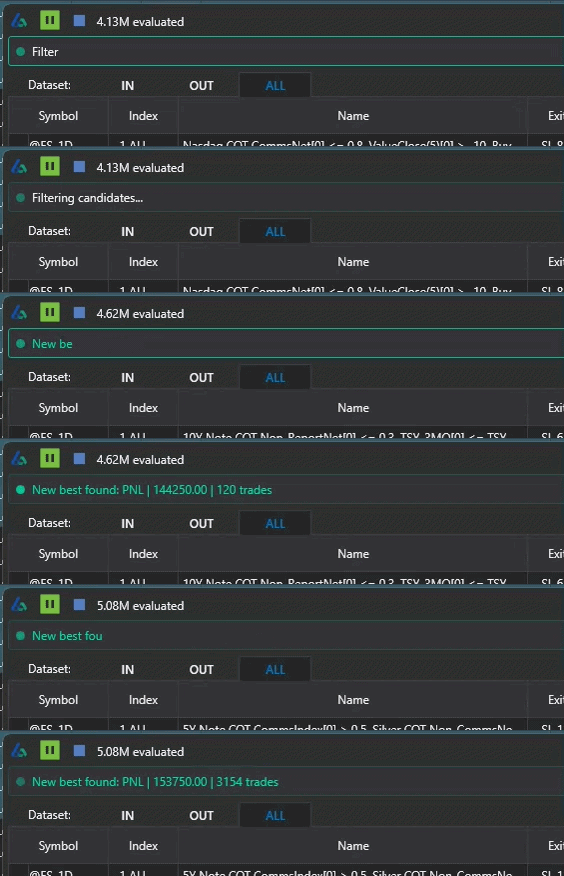
1. New Best Fitness Found
The most satisfying message. The genetic algorithm has discovered a candidate that beats the current best on whatever fitness function you're optimizing. The orchestrator notes the improvement and lets the search continue in this productive direction.
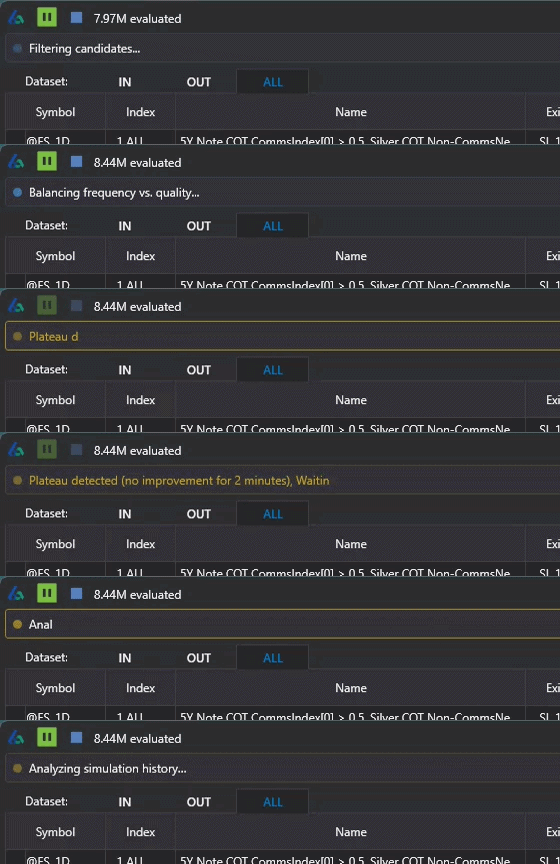
2. Plateau Detected
The most important message. The GA has stopped finding meaningful improvements, which means the search has converged inside the current configuration. A human researcher would have to decide whether to keep grinding or change the search. The orchestrator decides for you and may trigger a settings change.
3. New Settings, Restart
The follow-up to a plateau. The orchestrator picks new hyperparameters or injects its own trading signals before restarting the genetic algorithm in a new region. The message log shows exactly what changed and why.
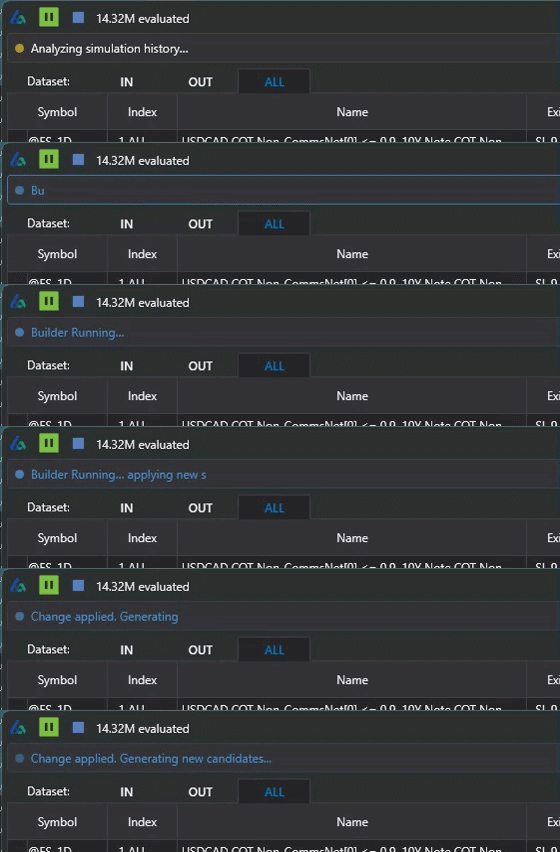
4. AI Analyzing (Standard Messages)
The heartbeat. Between major events, the orchestrator is constantly reading output, scoring progress, and reasoning about whether the current trajectory is still productive. These messages are where you'll see the model's actual thinking, including the questions it's weighing and the signals it's tracking. I thought it useful to include these.
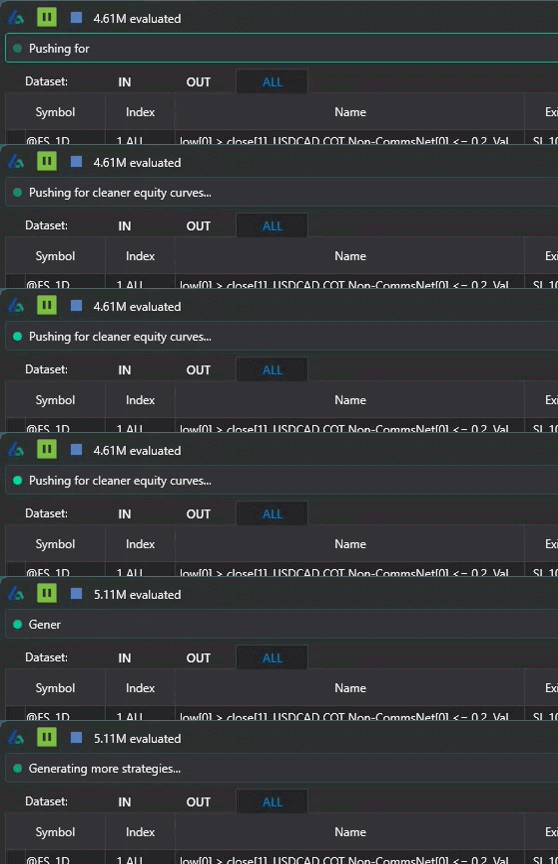
5. The Report: Reviewing What Happened
At anytime after the first change, Build Alpha updates a Report covering every round of the run. You can scroll back through the entire decision history and read the LLM's reasoning at each step: why it called a plateau, why it picked the new settings it picked, what it expected to happen, and whether that expectation panned out. This is where the orchestrator stops being a black box and becomes a research notebook.
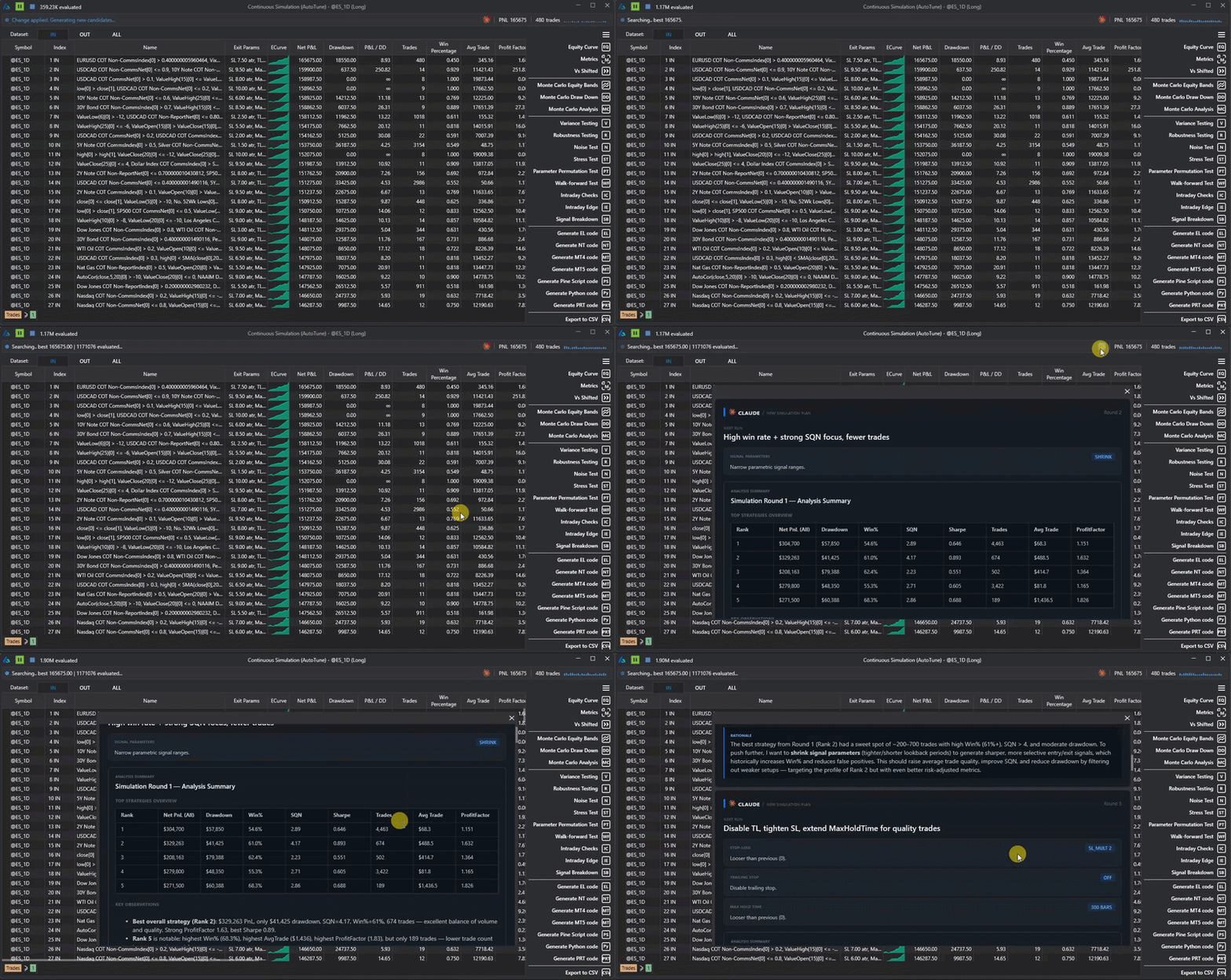
This matters for two reasons. First, you can audit what happened. No black-box behavior. Second, the message log doubles as a research notebook. The model is essentially writing down its reasoning as it goes, which becomes useful documentation when you come back to a strategy two months later and need to remember why it was discovered with those specific settings. Reminder: you can double-click in the Name column to add any notes to a strategy.
Full Demo: Claude Generating Strategies With Build Alpha
Watch the full workflow end to end — Claude connected as the orchestrator, driving an AutoTune session, reading the output, adjusting hyperparameters, and creating new signals while Build Alpha generates and validates strategies.
What the Orchestrator Doesn't Do
Worth being explicit about this, because LLM-driven anything attracts a lot of bad assumptions:
- It doesn't generate live trade signals. The LLM only changes search settings in the strategy discovery process. The genetic algorithm still produces the strategies, and the robustness pipeline still validates them. What you activate as live is still your call.
- It doesn't bypass validation. Every strategy that comes out of an LLM-driven session goes through the same noise tests, monte carlo simulations, walk-forward analysis, and Vs Random benchmarking as any other strategy.
The Honest Caveat
An LLM-driven session is still a search. Better orchestration finds productive regions faster, but it doesn't manufacture edge in a market where none exists. If your fitness function rewards the wrong thing or your constraints too tight, the orchestrator will find the best strategy among bad options or nothing at all. It cannot invent alpha.
David Bergstrom
A decade-plus in professional trading as a market maker and quantitative strategy developer at a high-frequency trading firm with a CME seat. Consulting for hedge funds, CTAs, family offices, and RIAs. Self-taught C++, C#, and Python programmer specializing in data science, machine learning, and trading strategy development.
Frequently Asked Questions
What does the LLM orchestrator actually do?
It sits above the genetic algorithm. The GA searches for strategies given the settings you provide. The LLM reads the AutoTune output, decides whether the search is in a productive region, and adjusts the settings to redirect the search. It's a hyperparameter optimizer driven by a language model rather than a grid.
Does it work with prop firm filters?
Yes. Any filter or template, including prop firm rule sets, robustness gates, and custom fitness functions, applies to LLM-driven sessions exactly as it does to non-LLM-driven ones. The orchestrator works inside whatever validation envelope you've configured.
Which LLM should I use?
Any of the supported providers will work: ChatGPT, Claude, Gemini, Grok, DeepSeek, or Perplexity. Reasoning-tier models tend to make better orchestration decisions than fast or cheap models. Token costs are low because the model only sees summary AutoTune output, not raw bar data.
Do I have to give Build Alpha my API key?
You bring your own keys. Build Alpha stores them locally on your machine and uses them to call each provider directly. Anthropic, OpenAI, Google, and xAI bill you on their normal API pricing. Some offer free tiers. There is no Build Alpha markup.
Will the LLM hallucinate trading advice?
The LLM never trades, never picks live signals, and never produces equity curves. It only changes search settings. Every strategy that emerges still goes through the genetic algorithm and the full robustness pipeline. The model can't bypass validation.
Can the LLM create new trading signals on its own?
Yes. Beyond tuning hyperparameters, the orchestrator can invent new signals mid-session and feed them into the genetic algorithm. Build Alpha already ships with 17 categories of signals (price action, technical indicators, volume, volatility, seasonality, market breadth, sentiment, yields, spreads, economic data, COT data, news, option flows, intermarket, multi-timeframe, fundamentals, weather), and the LLM can add custom signals on top. Every LLM-generated signal goes through the same validation pipeline as built-in ones, and they're exported in the generated code for TradeStation, NinjaTrader, MultiCharts, MT4, MT5, TradingView, IBKR, and Python.
How is this different from optimizing parameters?
Parameters are values inside a strategy: an RSI length, a stop distance. Hyperparameters are the rules of the search itself: what counts as a good strategy, what signals are allowed, what regimes to focus on. The genetic algorithm tunes parameters. The LLM tunes hyperparameters. They solve different problems.
Does Build Alpha remember what the LLM learned across sessions?
Yes. When you stop a simulation, the LLM summarizes the run's reasoning and writes it to a persistent memory store on your machine — tagged by signal pool, fitness function, market, timeframe, and direction. Before a new session starts, the orchestrator searches the memory store for similar past configurations using a proprietary scoring system. The new session doesn't start from scratch; it starts informed by everything previous runs learned.