Event Conditioned
Intraday Trading Signals
What happened in the last hour, the opening range, or at midday often tells you something about what happens next. This guide shows how to turn those intraday events into testable signals with Build Alpha's Value When function, plus a free download of ready-made signals.
Table of Contents
What Are Event Conditioned Intraday Trading Signals?
An event conditioned trading signal is a rule that only becomes active after a specific intraday event has happened, such as yesterday's last hour closing up, the opening range finishing higher, or price holding above VWAP at midday. The event sets the context. The trade happens later, in a different window of the session.
Most indicators describe the bar you are on. Event conditioned signals describe what already happened at a specific time (or event) and carry that information forward. That lets you ask questions a standard indicator library cannot express cleanly:
- If yesterday's last hour was up, does the first hour of today tend to follow through?
- If the opening range closed higher, is the last hour of the day worth buying?
- If price is above VWAP at noon, does strength persist into the close?
- If the overnight session or premarket was higher, what happens after the open?
Event Conditioned Signals: Quick Summary
- An event (last hour up, OR higher, above VWAP at noon) sets the condition
- Build Alpha's Value When function stores a value at the moment that event happens
- The stored value is compared later in the session, or the next day, to trigger or filter a trade
- Every time and threshold is optimizable in Build Alpha with no code
- Validation is still paramount
The Value When Function
Value When is a custom Build Alpha function that takes two inputs: a condition and a value. Whenever the condition is true, the function captures the value. On every other bar, it keeps returning the last captured value until the condition is true again.
# Store the open price at 9:30 every day
ValueWhen(Time = 93000, Open)
# Store the close at 16:00 every day
ValueWhen(Time = 160000, Close)
If you can describe or calculate it, you can store it when an event happens.
Value When belongs to the family of event-aware signals introduced in Build Alpha v3.1, alongside EventVWAP and CountSinceEvent. See the feature engineering guide for the broader framing of how new signals get created from raw market data.
How an Event Conditioned Signal Is Built
The key design principle is separation in time. The event happens in one window. The trade happens in another. That separation is what makes these signals clean to test: the event tells you something about the session, and the trade asks whether that information carries forward.
5 Event Conditioned Setups
Here are five examples. The first three are standalone ideas. The last two use event conditions as filters on a classic opening range breakout. The times assume US equity index hours in Eastern Time (9:30 open, 17:00 close). Every time and threshold is a parameter you can change and test in Build Alpha.
Setup 1: Yesterday's Last Hour Up → Buy the First Hour
Does late-day strength carry into the next morning? Store the close at 16:00 and 17:00. The next morning, both stored values still hold yesterday's numbers, so the comparison is fully known before the open.
LH_End = ValueWhen(Time = 170000, Close)
# Condition (uses yesterday's values)
LH_End > LH_Start
# Trade
Buy at 9:30 · Exit at 10:30

Setup 2: Opening Range Higher → Buy the Last Hour
Does a strong opening range predict strength into the close? The opening range result is known by 10:30, hours before the last-hour trade.
OR_Close = ValueWhen(Time = 100000, Close)
# Condition (known at 10:30)
OR_Close > OR_Open
# Trade
Buy at 16:00 · Exit at 17:00

Setup 3: Above VWAP at Midday → Buy the Last Hour
Price holding above VWAP at noon is a simple read on who controlled the first half of the session. Store the distance from VWAP at midday and use it as the afternoon condition.
# Condition (known at 12:00)
Noon_vs_VWAP > 0
# Trade
Buy at 16:00 · Exit at 17:00

Setup 4: Only Take ORB Trades When the Opening Range > Yesterday's Last Hour's Range
This filter only allows opening range breakouts when today's opening range is larger than yesterday's last-hour range, a sign that today's session is opening with more energy than yesterday closed with.
OR_Range = ORH - ORL
# Yesterday's last-hour range
Prior_LH_Rng = ValueWhen(Time = 170000, LH_High - LH_Low)
# Filter
OR_Range > Prior_LH_Rng
# Trade
Buy the break above ORH · Sell the break below ORL · Exit at 17:00
In the chart below, the opening range covered 57 points, larger than the prior day's 44-point last hour. The filter is on, the breakout above ORH triggers, and the rest of the session trends higher.

Setup 5: Only Take ORB Trades When Opening Range / Yesterday's Daily Range > X%
Same idea, scaled to the whole prior day. If the opening range alone is already a large share of yesterday's full daily range, volatility is expanding and a breakout has room to run. X is an optimizable threshold.
Prior_Day_Rng = ValueWhen(Time = 170000, HighOfDay - LowOfDay)
# Today's opening range (known at 10:30)
OR_Range = ORH - ORL
# Filter
OR_Range / Prior_Day_Rng > X%
# Trade
Buy the break above ORH · Sell the break below ORL · Exit at 17:00

Check Your Data Before Testing
Bar timestamps: Some data vendors stamp bars with the open time, others with the close time. Confirm which one your data uses so a "15:00" condition means what you think it means. All the bar's information is known at the close. Build Alpha uses closing bar timestamp as the bar's timestamp.
Video: Setups 1 to 5 in Build Alpha
In this video, I build all five examples above and show how to leverage Build Alpha to find improvements.
The Signal Library (Free Download)
I built a set of 168 event conditioned signals you can load straight into Build Alpha. They are organized into four families below. Each one can be used as an entry signal, an exit signal, or a filter on any other strategy.

Last-Hour Signals
- Last hour higher / lower
- Last-hour range as a percentage of daily range (greater than / less than)
Opening-Range Signals
- Opening range higher / lower
- Opening range as a percentage of daily range (greater than / less than)
- Opening range greater than / less than last-hour range
- Opening-range return greater than / less than last-hour return
Body-to-Range Ratio Signals
- Last-hour body-to-range ratio (greater than / less than)
- Opening-range body-to-range ratio (greater than / less than)
Time-Specific Price and Market-Structure Signals
- Above VWAP / below VWAP
- Above today's open / below today's open
- Above ORH / below ORH
- Above ORL / below ORL
- High of day above ORH / high of day below ORH
- Low of day above ORL / low of day below ORL
The time-specific signals come in 30-minute checkpoints through 16:30, so "above VWAP at 12:00" and "above VWAP at 14:30" are separate signals you can test against each other. Of course these could be one signal and the time value can be optimized shown in the video.
Other Ideas to Test
Opening range and last-hour midpoints as support and resistance levels, volatility thresholds such as range greater than k × ATR, and return thresholds such as last hour up more than 0.5% instead of simply up.
Place the file in your BuildAlpha folder. Rename your existing CustomIndicators.xml first so you don't overwrite your own signals!
Download ↓Want to keep your existing custom signals too? Upload both XML files (these signals and your current CustomIndicators.xml) to an AI assistant and ask it to merge them. Merging two XML files is a simple task for AI. Then place the merged file, named exactly CustomIndicators.xml, back into your BuildAlpha folder.
Combining Event Signals With Other Signals
An event conditioned signal is rarely a complete strategy on its own. Its real value is as context. Build Alpha lets you mix these signals with any of its built-in signals or your own custom signals, and the genetic search will test and validate the combinations for you.
Stack Two Events
Yesterday's last hour up AND opening range higher. Two independent reads of strength before the next trade.
Add a Regime Filter
Only take the last-hour setup when the daily close is above its 200-day moving average, or when volatility is below a threshold.
Add a Calendar Filter
Some intraday tendencies differ by day of week or around the end of the month. Let Build Alpha test whether a day-of-week filter adds anything.
Use as an Exit
Exit a swing position early if the last hour closes weak with a high body/range ratio. Event signals work as exits just as well as entries.
Add them to a signal pool and let the genetic algorithm decide which combinations survive.
Signal Categories You Can Combine With
Event conditioned signals can be tested with every other signal family in Build Alpha. Browse all Build Alpha signals.
Build Your Own With Prompt to Signal
If you have an event idea that is not in the file, you can describe it in plain English with Prompt to Signal, introduced in Build Alpha v3.1.
Prompt to Signal lives inside File → Custom Indicators Editor. You describe the signal, and the AI Assistant builds it using Build Alpha's backend, then adds it to your indicator list like any other signal.
Because it uses the same backend, the result exports to EasyLanguage, NinjaScript, MultiCharts PowerLanguage, MQL4, MQL5, Pine Script, ProRealCode, and Python.
Example Prompts
- "Store the close at 11:00 and compare it to the close at 9:45. True if it is higher."
- "True if yesterday's last hour range was more than 40% of yesterday's full daily range."
- "True if price was above the opening range high at 13:00 today."
Optimizing and Validating
Every time and threshold in this guide is a parameter. The last-hour start time, the opening range length, the midday check time, the opening range size thresholds.
Build Alpha can optimize all of them with no code.
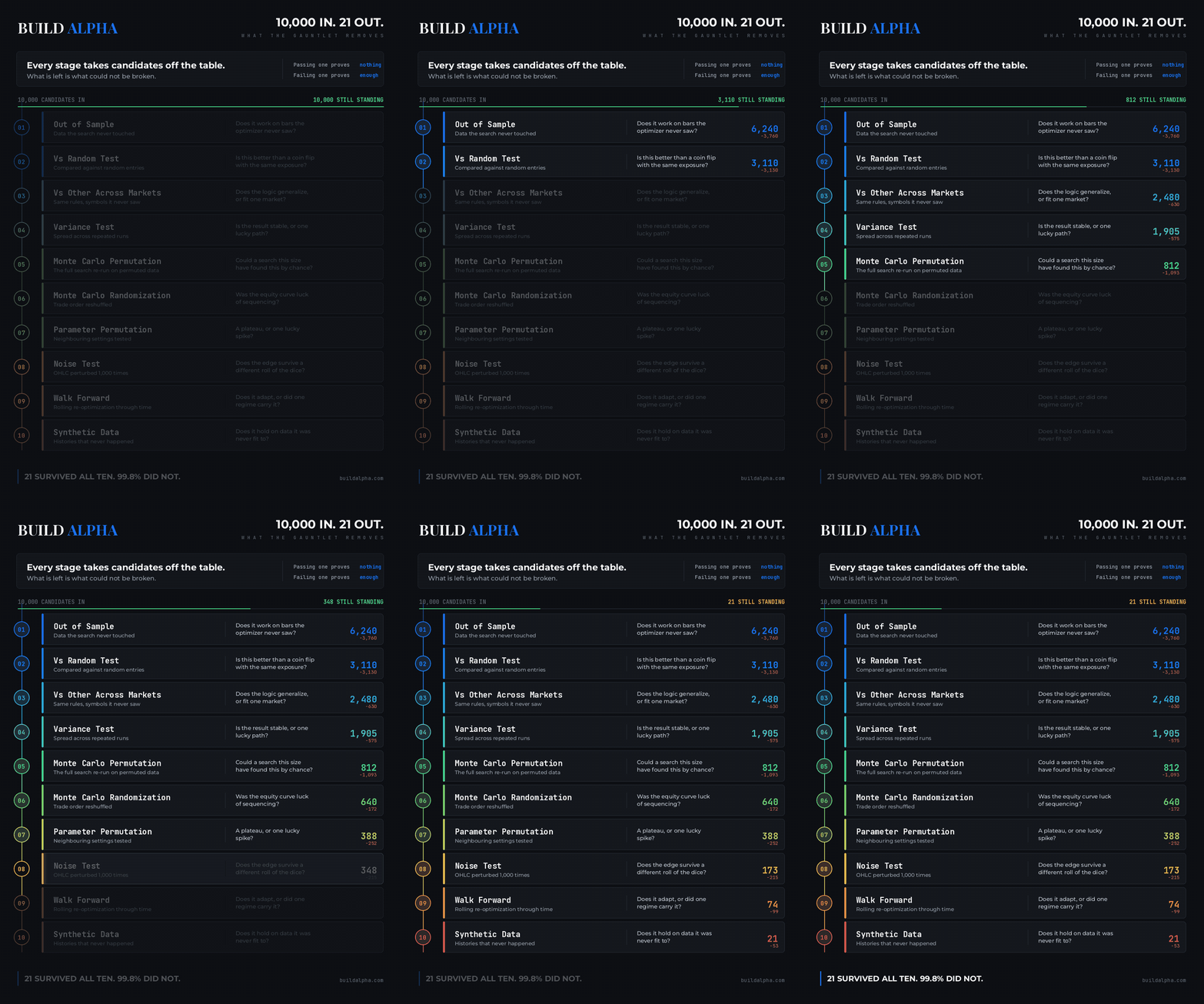
That is also the danger. Test ten start times, six window lengths, and five thresholds and you have 300 variations. Some may look great by chance. This is the search space problem, and the answer is (automated) validation:
Sample
Forward
Test
Benchmark
Permutation
Carlo
A robust event signal works across a plateau of nearby times. The parameter permutation test and noise test are built for exactly this. The robustness testing guide covers the full set.
Future Ideas to Expand On
A few hints on where to explore next. All of them can be built and tested in Build Alpha.
Does ES strength into the close predict tomorrow's first hour in NQ? Store the last-hour change on a second market and use it to condition trades on the first. Leadership between related markets is a natural fit for event conditioning.
Instead of "OR higher," require the opening range to be large relative to recent volatility. Normalizing by ATR makes the signal comparable across quiet and volatile regimes, and k becomes a testable threshold.
Same idea for the close. A last hour that moved more than k times normal volatility is a different event than a quiet drift higher. Test whether large late-day moves follow through (or reverse) the next morning.

David Bergstrom
David Bergstrom is the founder of Build Alpha. His background is in machine learning at a market-making firm. He has spent over a decade building systematic trading tools used by independent traders, proprietary firms, and hedge funds in 70+ countries.
Frequently Asked Questions
What is an event conditioned trading signal?
An event conditioned trading signal only becomes active after a specific intraday event has happened, such as yesterday's last hour closing up or the opening range finishing higher. The event sets the context and the trade happens later, in a different window of the session or on the next day.
What does the Value When function do in Build Alpha?
Value When takes a condition and a value. Whenever the condition is true it stores the value, and on every other bar it returns the last stored value until the condition is true again. This lets you anchor a price or indicator reading to an event and compare it later.
Do I need to code to build event conditioned signals?
No. The downloadable signal file loads directly into Build Alpha, and you can create new ones in the Custom Indicators Editor or describe them in plain English with Prompt to Signal. All times and thresholds can be optimized with no code.
Can event conditioned signals be combined with other signals?
Yes. They can be used as entries, exits, or filters and mixed with any built-in or custom Build Alpha signal. Adding them to your signal pool lets the genetic search test the combinations for you.
What data do I need for overnight and premarket signals?
You need data that includes extended hours. Futures data with a 24-hour session covers overnight and premarket windows. Stock data limited to regular trading hours does not.
How do I know an optimized time or threshold is not curve fit?
Check the neighbors. A robust event signal keeps working when the time or threshold is nudged slightly. Use out-of-sample testing, walk-forward analysis, the noise test, and the parameter permutation test before trusting any result.
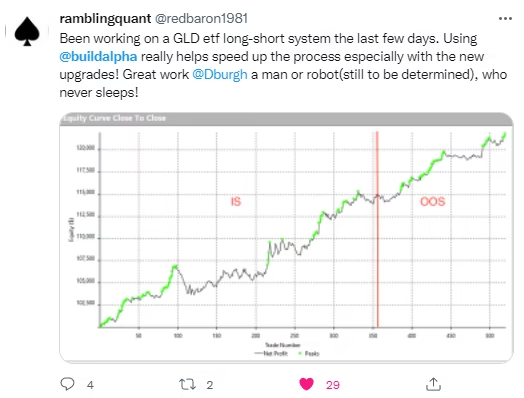
What Traders Say About Build Alpha








Explore More
Ready to Test Your Own Events?
Build Alpha generates, validates, and exports algorithmic trading strategies automatically. 7,000+ signals. 12+ robustness tests. No coding required.