What’s New in the Build Alpha Update
First, thank you all for the patience on this update. A lot has happened since the last update. Covid lockdowns, I built and sold another software company (now part of a public company), had two kids (being a dad is the coolest), consulted for a handful of funds, partnerships with TradeStation, Interactive Brokers, etc.
Long story short, I’m focused on Build Alpha and have a lot to share!
Here is a brief table of context of what is new in this update:
- Live Data monitoring
- Historical intraday database
- Data Converter No Code
- Automated Workflows
- New Code Generators (Pine, IB, MT5)
- Cryptocurrency Data
- *Beta* Intelligence Report
- Quantified Chart Patterns
- Vs Shifted Test
- Monte Carlo Permutation Test
- Ability to train systems on synthetic data
- Tonight Mode
- Quick Test
- Updated Custom Signal Builder
- Machine Generated Rules
- Signal Pools
- OR Logic Exits
- Conditional Signals
- Dark Mode Option
- Drawdown Normalization
- Fixed Fractional Position Sizing
- Position Sizing Scalers / Continuous Signals
- Commitment of Traders Data
- Weather Data
- Market Breadth Data
- Google Trends Data
- Parameter Permutation Testing
- Stress Testing or Scenario Testing
- Walk Forward with Synthetic Data
- Opening Range and Custom Entries
- Custom Fitness and Correlation
- Multi-strategy Portfolio Simulation
- Portfolio Suggest
- Daily Position Report
Live Data Monitoring
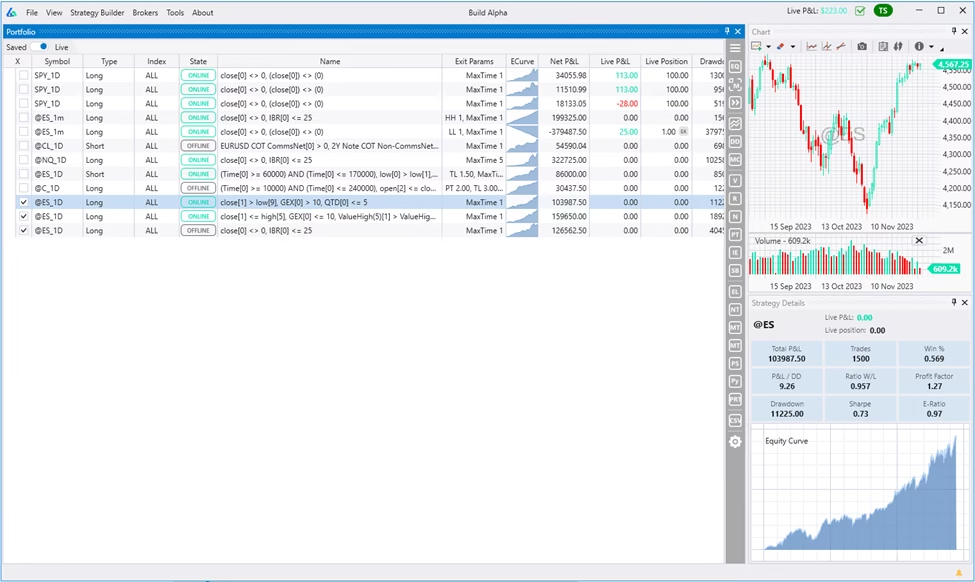
Build Alpha now connects to live data feeds for strategy monitoring and alerting real-time positions. This gives a much more reliable way to track hundreds of strategies than exporting code to your respective broker platform. Note: You can still export code for any strategy!
Historical Intraday Database
Build Alpha now has a historical database going back to 2006. The API connections are great for live data updating; however, the APIs do not always quickly provide historical data for testing and often fail with many consecutive API calls (or randomly).
Build Alpha can still use built-in data files, imported data files, API connections, and now the built-in historical intraday database. You can easily access built-in intraday data via the Server-side symbols dropdowns.

No Code Data Converter
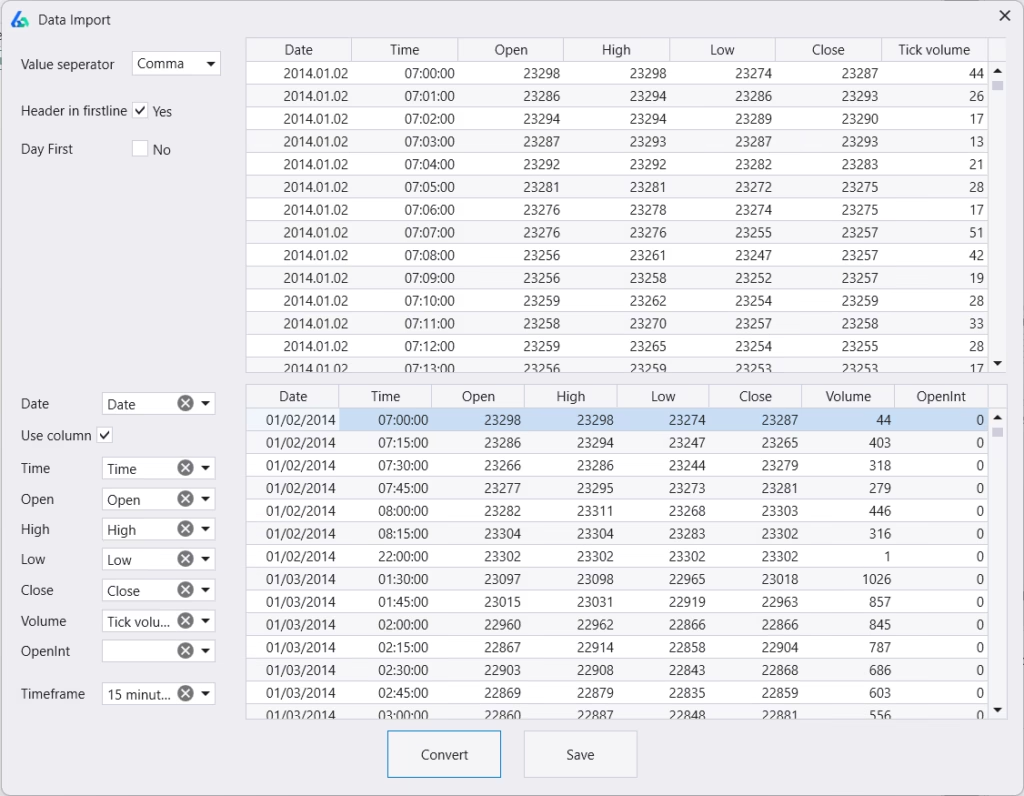
Import any data file from any source with any format and Build Alpha will format it. No more converting or formatting with excel, python or ChatGPT. Includes the ability to resample (create) any higher timeframe as well.
Automated Workflows
Traders can now set in-sample, out-of-sample and combined results filters to automatically discard any strategies not meeting certain criteria. Traders can set performance metric thresholds to ensure strategies have a high enough winning percentage, high enough profit factor, trade frequently enough, etc.
Additionally, set advanced filters and automate robustness testing! For example, traders can specify the lower band of the Noise Test to be positive or the 90th percentile of the Variance Test to be x% of the backtest or various other ideas.
This makes finding strategies that fit your portfolio or risk criteria even simpler. Run a simulation and only see what passes your filters and tests.

This really makes it possible for lazy or busy people to develop exactly the algorithmic trading strategies they’re after in financial markets.
New Code Generators Added (TradingView, Interactive Brokers and Metatrader5) and Improved
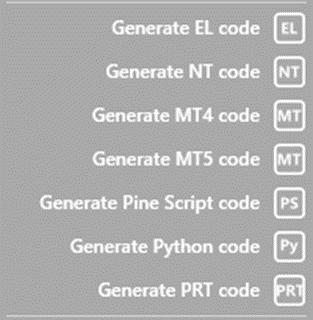
Build Alpha now generates fully automate-able, trade-able code for any strategy it builds for TradingView (Pine Script), Interactive Brokers (Python) and MetaTrader5.
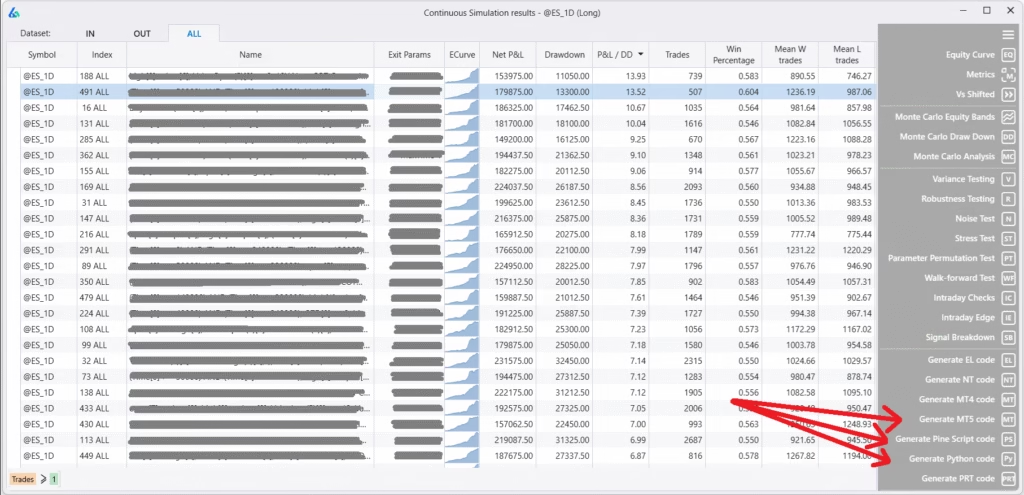
This adds to the existing list which now looks like
- TradeStation
- MultiCharts
- NinjaTrader8
- Python (Interactive Brokers)
- ProRealTime
- TradingView PineScript
- MetaTrader4/5
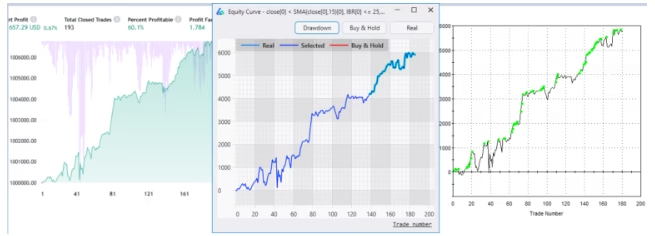
Read more on how and what TradingView Pine Script is and how it works with Build Alpha. You have full control over any generated code or trading algorithms. Image below shows TradingView (left), Build Alpha (center), TradeStation (right) displaying the same equity curve.
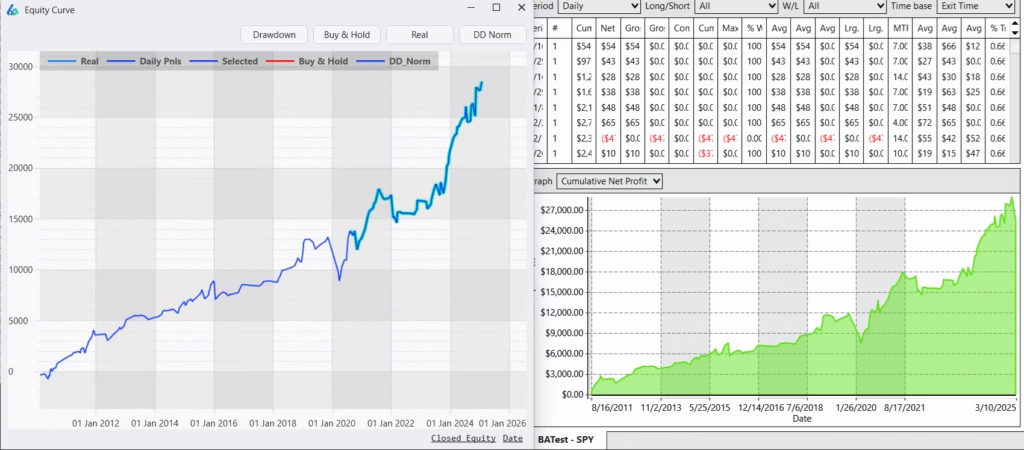
Additionally, I’ve revamped the Ninjatrader8 generated code. NT8 has grown in popularity as it appears to be the backend or broker of choice for many prop firms and prop challenges. Build Alpha (left) fully supports NT8 (right).
Cryptocurrency Data and Connectivity
You can now connect to Binance or use the historical database to build cryptocurrency strategies with no code. Binance connection will permit live position updating of any saved crypto strategies.
Build Alpha also supports fractional sizing so you can buy pieces of coins for accurate backtesting results and flexible position sizing options. Please suggest what other crypto connections I should add. Note: You do NOT need any of these connections to use Build Alpha.
Intelligence Report
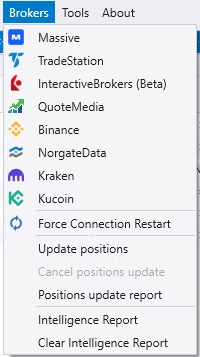
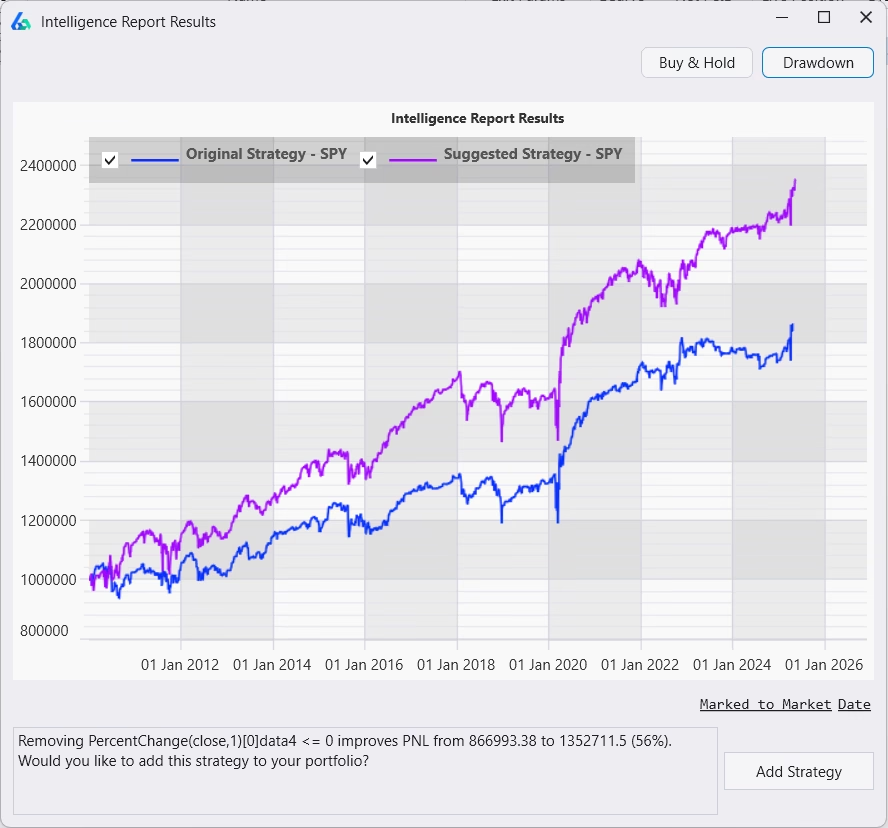
Build Alpha can now review all your saved strategies and make suggestions to automatically help improve them. This is new [beta] AI feature has been trained on thousands of strategies and market environments. Anyways, you can run the Intelligence Report from the Brokers menu and any strategies with an IR icon have a suggested improvement. Click on the IR icon to view the suggested modification.

This has made strategy modification and improvement much simpler!
Quantified Chart Patterns
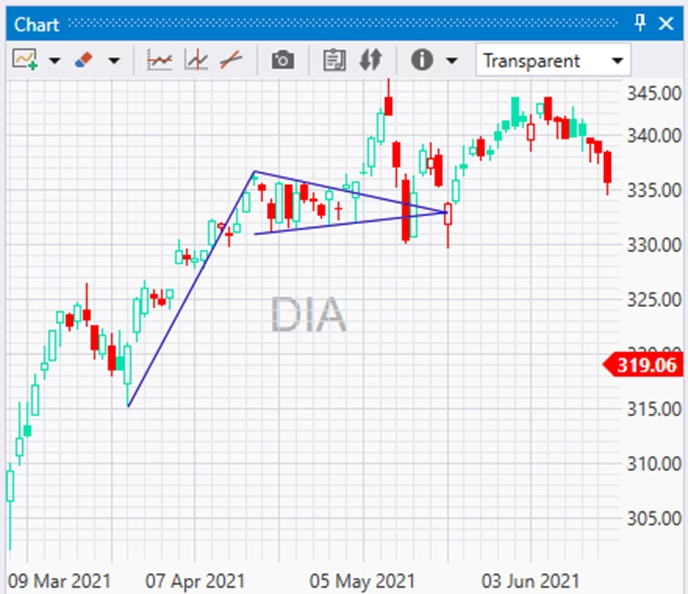
One of the largest requests from new traders (and some professional traders) is to test [infamous] chart patterns. To do so properly, the patterns must be quantified. That is finally possible in Build Alpha. The chart patterns Build Alpha now supports are:
- Double Top and Double Bottom
- Rising Wedge and Falling Wedge
- Broadening Top and Broadening Bottom
- Bull Pennant and Bear Pennant
- Ascending and Descending Triangle
- Bull Flag and Bear Flag
- Head and Shoulders and Inverse H&S
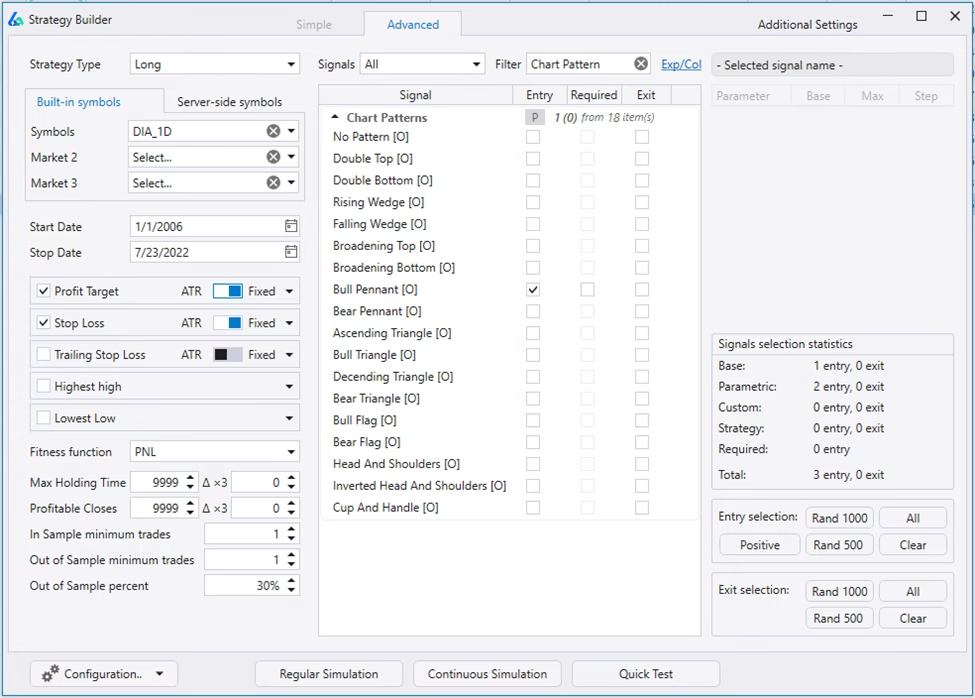
Here is a quick example on $DIA ETF and how to select them as entry or exit signals in Build Alpha for testing
Vs Shifted Test
Every data provider uses hourly bars from the top of the hour to the end of the hour. That is, 11:00 to 12:00, 12:00 to 13:00, etc. However, shifting the opening and closing time can create additional data sets with near identical properties.
“Shifted Data” is a great way to evaluate if our strategies require the exact historical data patterns for success or will be robust to slight variations (spoiler there will be variations in live trading).
Shifting the data works on any timeframe. This test may change bar patterns, high and lows, consecutive up and down streaks, indicator calculations, and more.
Here is an example from my Complete Robustness Testing Guide, assume a long strategy needs four consecutive red bars to trigger a trade. In the original data (on the left), the strategy nailed a winner. On the shifted data (on the right), the trade never happened.
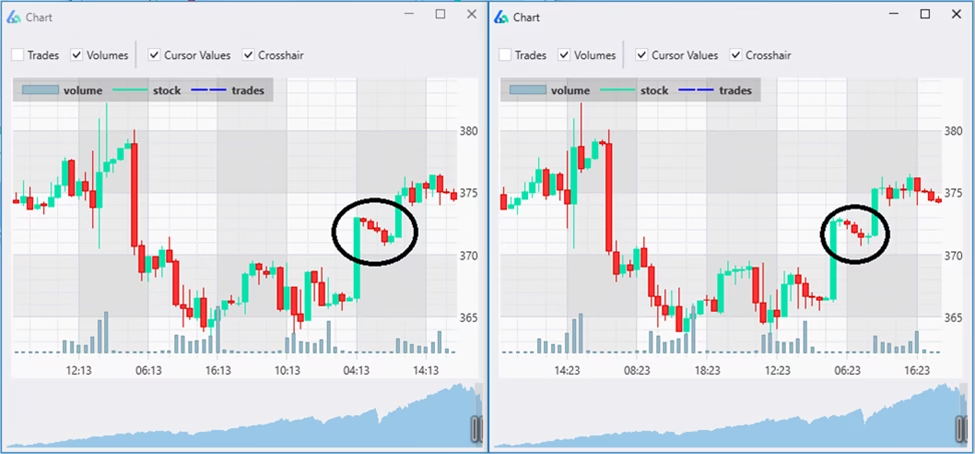
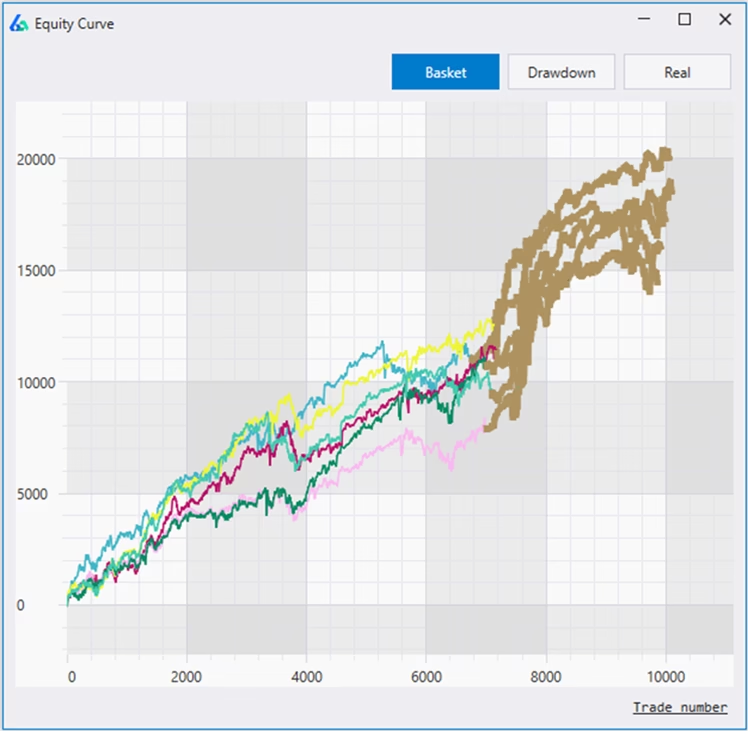
Re-trading your strategy on shifted data can give insights on how overfit your strategy was to the EXACT patterns available in the historical price data. Past performance should maintain across shifted data sets. If performance degrades, it may be a warning sign that the strategy is overoptimized (overfit). Here is one example of the Vs Shifted output
Monte Carlo Permutation Test
The MC permutation test is a unique approach to randomizing the underlying OHLC data originally presented by Timothy Masters in his book Permutation and Randomization Tests for Trading System Development (Masters, 2020).
The Monte Carlo Permutation test takes the logs of interbar gaps and the intrabar OHLC relationships, randomizes their order, then exponentiates them back into raw OHLC prices. This process creates unique OHLC data while destroying any underlying patterns.
This newly created data, like other adjusted data sets Build Alpha creates, can provide another test set of data to make sure our data was not overfit to the actual historical data. I love multi-path tests like this! Another stress test for the arsenal.
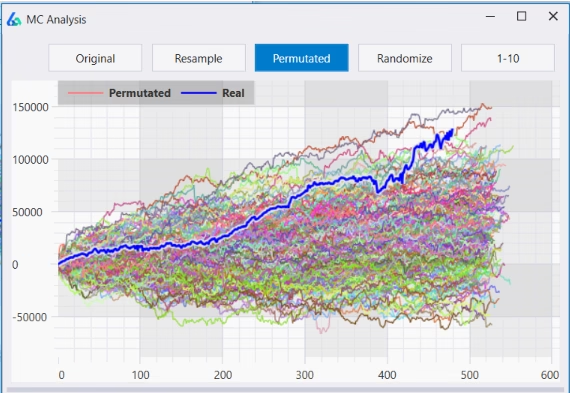
I discuss interpretations and Tim’s views in my full Monte Carlo Trading Guide.
Build trading systems on synthetic data
Testing trading strategies on synthetic or altered data such as Noise-adjusted data, Vs shifted data, Monte Carlo Permuted data, etc. post simulation is a great way to identify curve fit or overfit strategies before trading them live.
However, can we use this altered data pre-simulation to build more robust trading strategies? This new feature in Build Alpha allows you to add altered data series to the genetic algorithm (simulator engine).
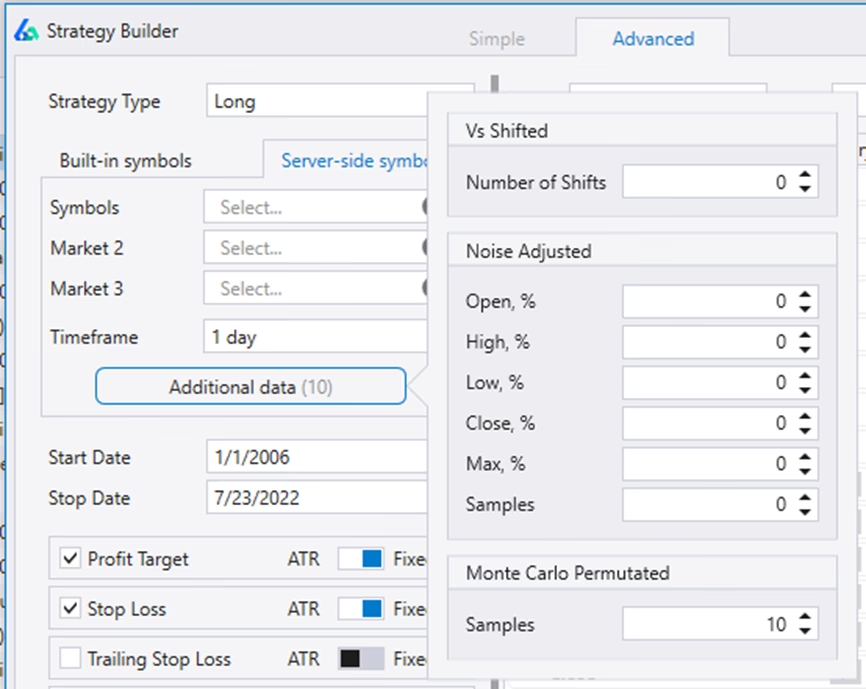
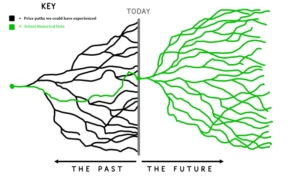
You can think of these altered data sets as alternate universes from a multiverse. The actual historical data we lived through is our universe, but these other universes were a possibility that we could have lived through. Since we don’t know what will happen next, we need a strategy that is robust across the multiverse!
Below is our universe in the upper left and three alternate universes. You can see each universe made all-time-highs at a different time and each took different paths (despite all ending at the same point).
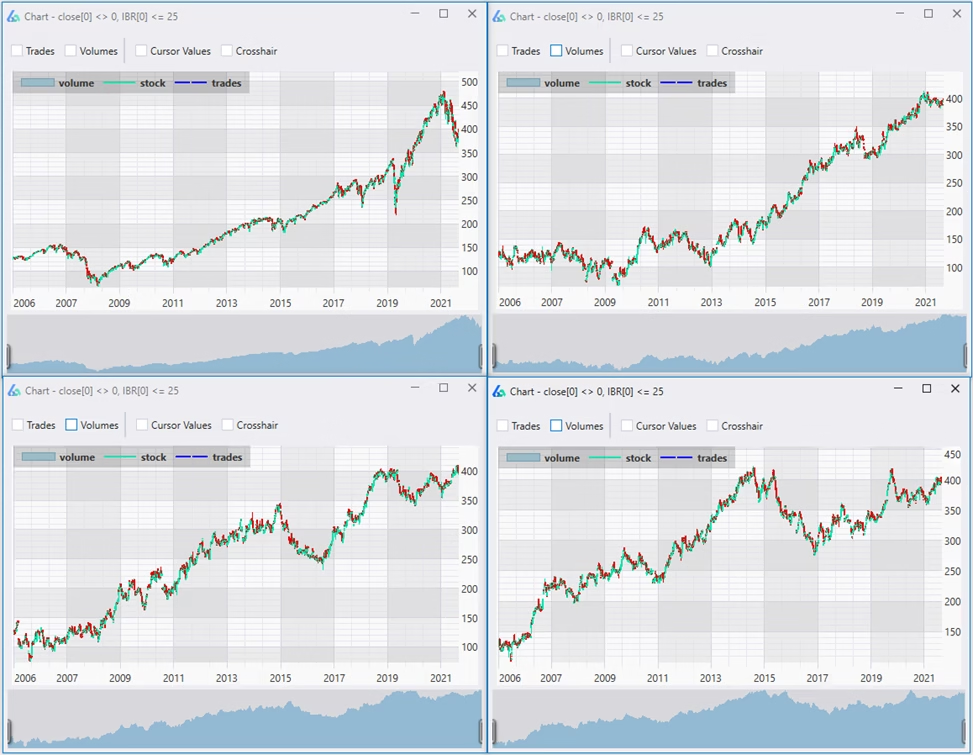
Build Alpha will return the results of the strategies that perform best across the basket (or multiverse) and you can breakdown and view each universe’s specific performance. The ‘MCP’ suffix denotes the underlying data for this strategy was generated via Monte Carlo Permutation.
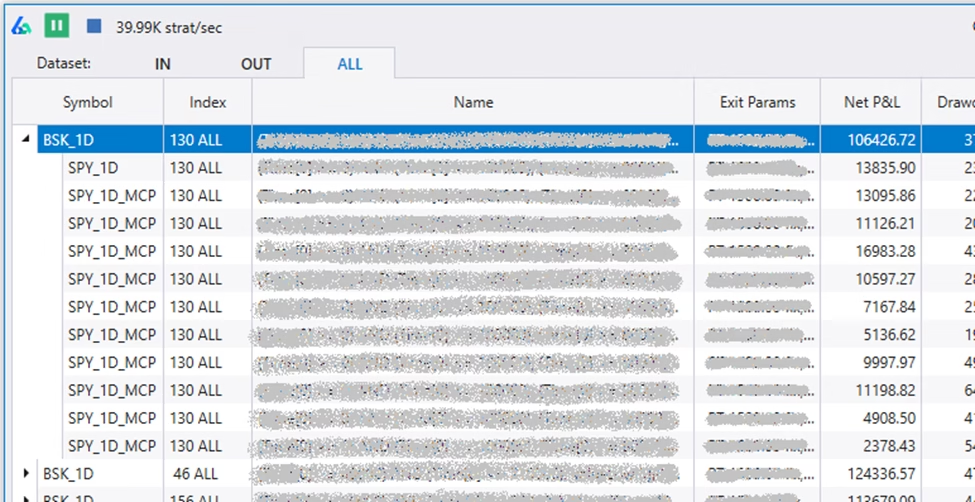
Read this full guide on how to build strategies on synthetic data
Tonight Mode
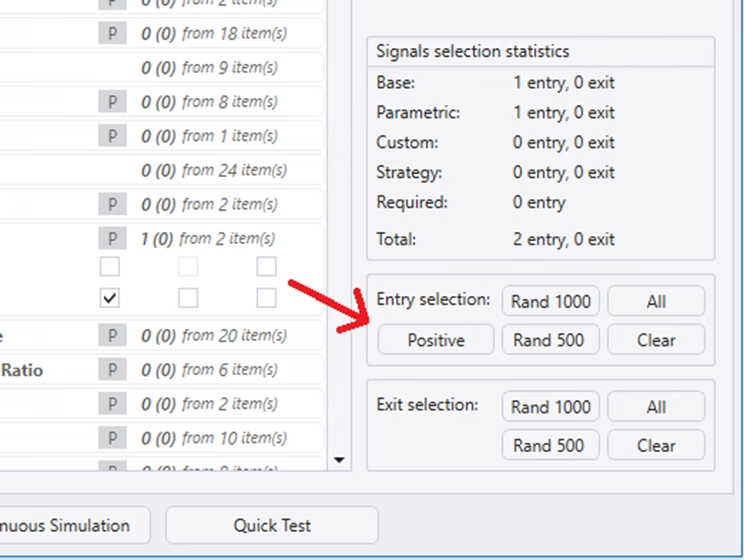
This feature automatically selects all entry signals that are true for the given day. Select the symbol and date, then hit the ‘Positive’ button and Build Alpha will auto-select every true signal. Very cool feature to find things for the coming day, week, etc. It also helps those who have trouble coming up with trading ideas.
Quick Test
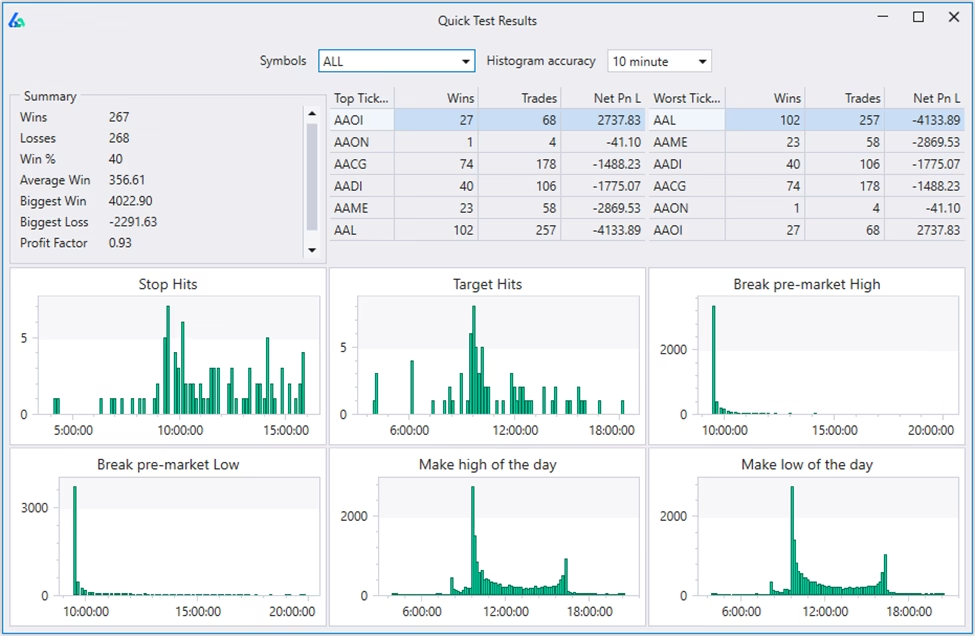
A quick and dirty way to get high level insights into a trading strategy. This enables traders to configure their entry, exits, stops, targets, symbol universe and hit ‘Quick Test’.
The Quick Test will provide a breakdown including:
- Summary of results
- Top Tickers
- Worst Tickers
- When stops are hit
- When profits are hit
- When breaks pre-market high
- When breaks pre-market low
- When makes high of day
- When makes low of day
One beta user described this as “an incredible weapon” to investigate and extract more edge from a trading system. For forex, futures and crypto it will check 24 hours.
Updated Custom Signal Builder
My goal, as stated on the BA homepage, is to bridge the quantitative trading world with those who cannot (or do not want to) code. This means adding more flexibility and functionality to Build Alpha.
The latest version has an improved Custom Indicator Builder so you can build your own signals and add them to the existing 5,000+ BA signal library.

I wrote all about this new feature in its own post. The Custom Signal Builder post has examples and a how-to-use walkthrough! I also wrote this about Feature Engineering Trading Signals (building custom signals).
Parametric Custom Signals
All custom signals are also parametric so you can optimize them through the Build Alpha interface. This goes for signals created using the no code editor (above) or custom signals added via python.

Machine Generated Rules
You can enable or disable this feature in the Additional Settings menu. If enabled, Build Alpha will use your selected signals to create new signals. Typically, Build Alpha will look at things like counting, sequence, correlation, weights, decay and various other transformations to create new signals from your existing selected signals. Disable this feature and Build Alpha will only use signals you have selected.

You can read more in this Feature Engineering blog post.
Signal Pools
A Signal Pool or Trading Signal Pool is an aggregation of other signals to determine how many signals occur on the same bar. Looking at the combination of trading signals or pooling signals together can often present more insights and breadth of the current market.
Consider three signals like
- Close is above SMA200
- 2-Peroid RSI is below 10
- Bearish Engulfing candle
On any given bar we could have 0% true, 33% true, 67% true or 100% true. Below is a plot for 10 different RSI signals on the SP500 Emini Futures.
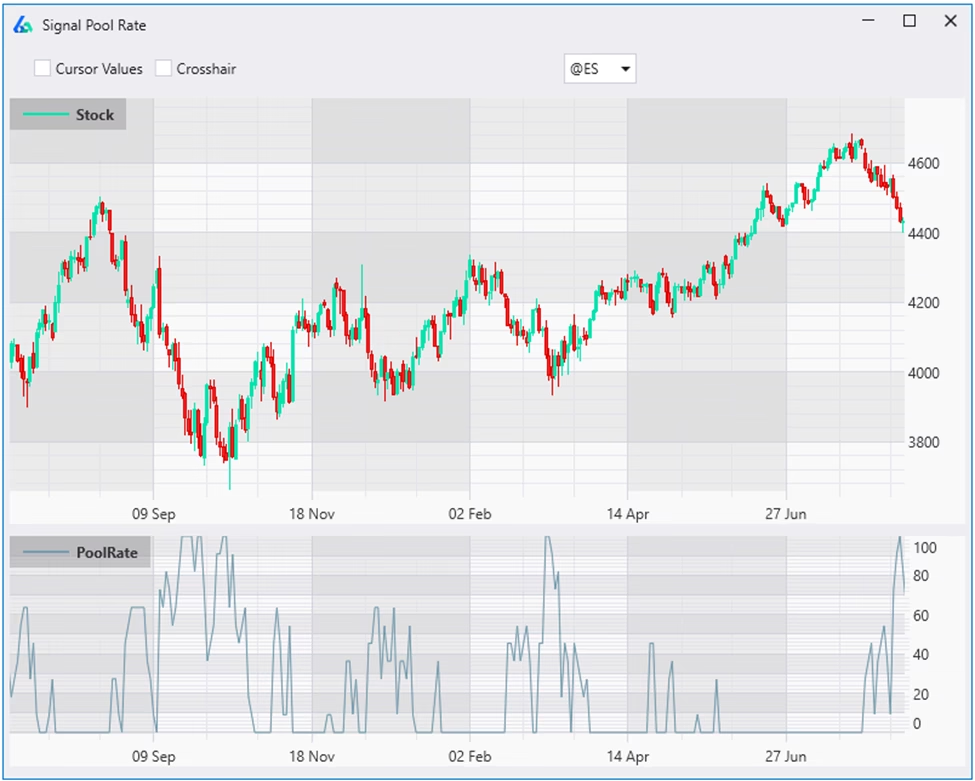
You can create Signal Pools with the Custom Indicator Editor. Read more about creating custom Trading Signal Pools and how they can improve simple or weak trading signals and technical indicators.
This is also how to create OR entry rules. That is, the Signal Pool is > 0 means at least one of the pooled entries is true.
OR Exit Logic
Combine exit signals with OR logic. Nothing major just an additional Exit Signal Mode for more flexibility.
Conditional Signals
Trading rules don’t have to be rigid. For example, a volatility-based exit could tighten when markets get choppy or loosen as a trend strengthens. With Build Alpha, you can create conditional signals: if condition is true, use exit1; if false, use exit2. These conditions can also be combined and nested for more nuance than a simple on/off rule.
Example:
- If VIX > 25, exit if price falls below a moving average.
- If VIX < 25, exit if price drops 3 ATR below the highest close of the past N bars.
In low volatility (VIX < 25), dipping below a moving average might not matter, but when volatility spikes (VIX > 25) and price breaks below, it could signal trend reversal — so exiting makes sense.
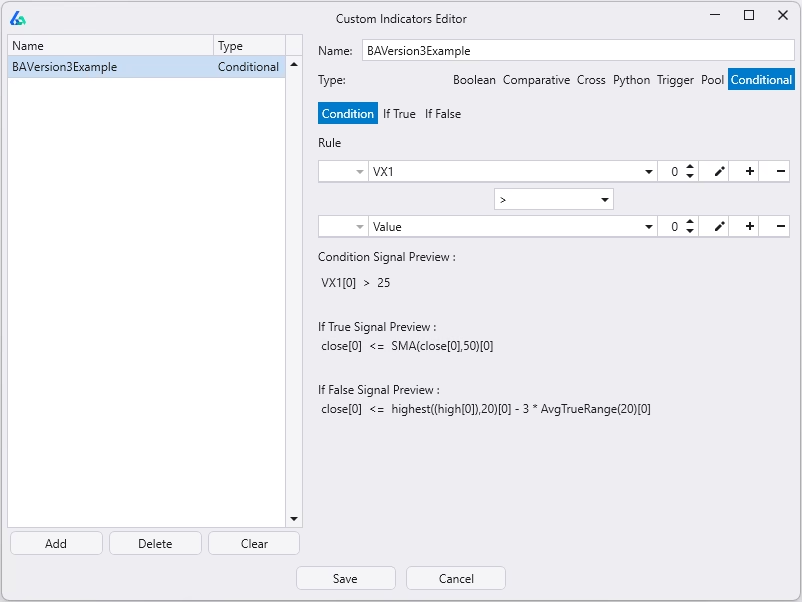
This flexibility lets you adapt exits to different market regimes, test assumptions, and even redefine concepts like “overbought” based on context — all within Build Alpha.
Parametric Python Signals
First, I must reiterate, Build Alpha does not require you to write any python code. Build Alpha is completely no code! However, if you want to extend Build Alpha with your own custom signals you can use the no code editor or you can add custom python signals.
Now you can add python signals that can be parameterized and optimized by Build Alpha! Simply place your variables inside one comment section of the python template and then control the parameter ranges from Build Alpha’s user interface.
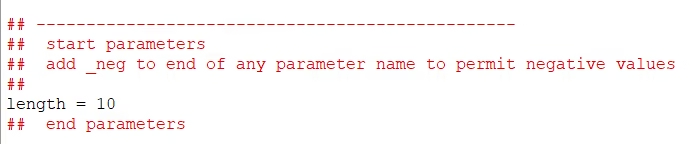

You can read more about extending Build Alpha with python in this blog post.
Dark Mode Option
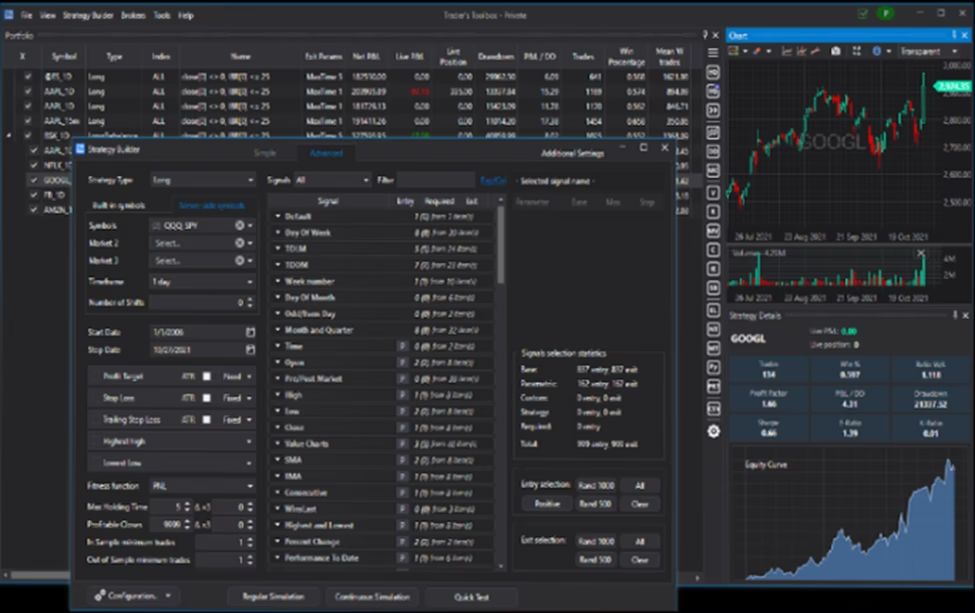
You guys asked and I could no longer deny it. For those of you burning the midnight oil, there is finally dark mode available for Build Alpha. You can control color option from the main menu View >> Themes >> Light or Dark. Here’s a quick snapshot of Build Alpha in dark mode.

Drawdown Normalization
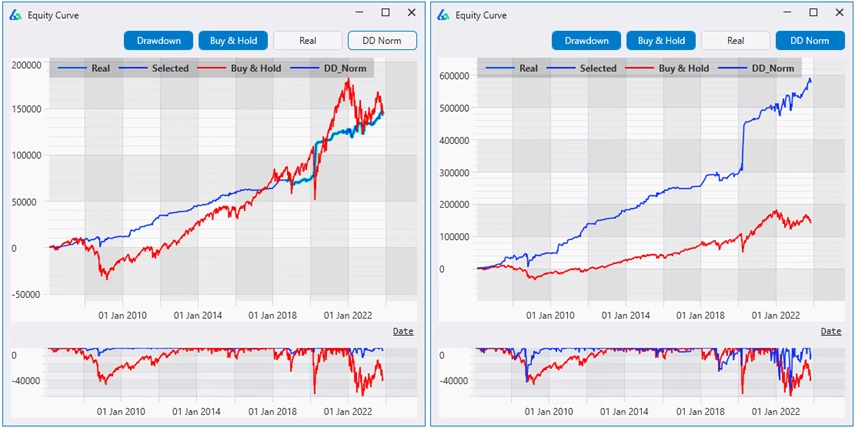
The latest version has a new feature in the Individual Equity Curve graph called “DD Norm” short for Drawdown Normalization. This feature aims to show how a strategy would perform (hypothetically) if one were to scale the sizing of the strategy so that the strategy’s drawdown would match the drawdown of Buy and Hold. In other words, how the strategy would do assuming the same “risk” as Buy and Hold.
Fixed Fractional Position Sizing
Size your trades based on distance to stop loss or risk level. This was popularized by (the late) Dr. Van Tharp. This is a new position sizing method added to the existing list of fixed dollar sizing, volatility based sizing, etc.
Position Sizing Scaler / Continuous Signals
Create continuous signals to multiply your position size. Some refer to this as “signal strength” but I feel that is too limiting in its application. Anyways, this feature enables total flexibility to create position sizes that scale with any market condition or calculation.
For instance, perhaps trading more [size] when volatility or volume spikes is helpful (and perhaps it is the other way); however, not testing how to size during different market conditions is the only real mistake. Build Alpha now has a no-code editor (and python ability) to create these custom or continuous sizing rules pictured below.
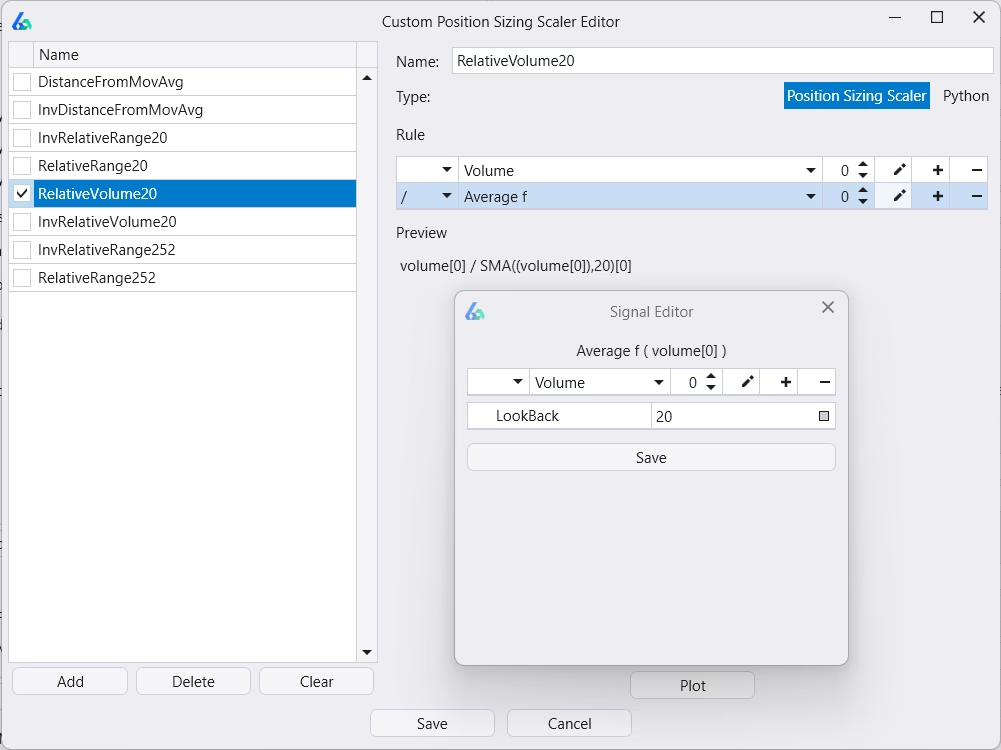
Plot any position sizing scaler to review it before adding to a simulation.
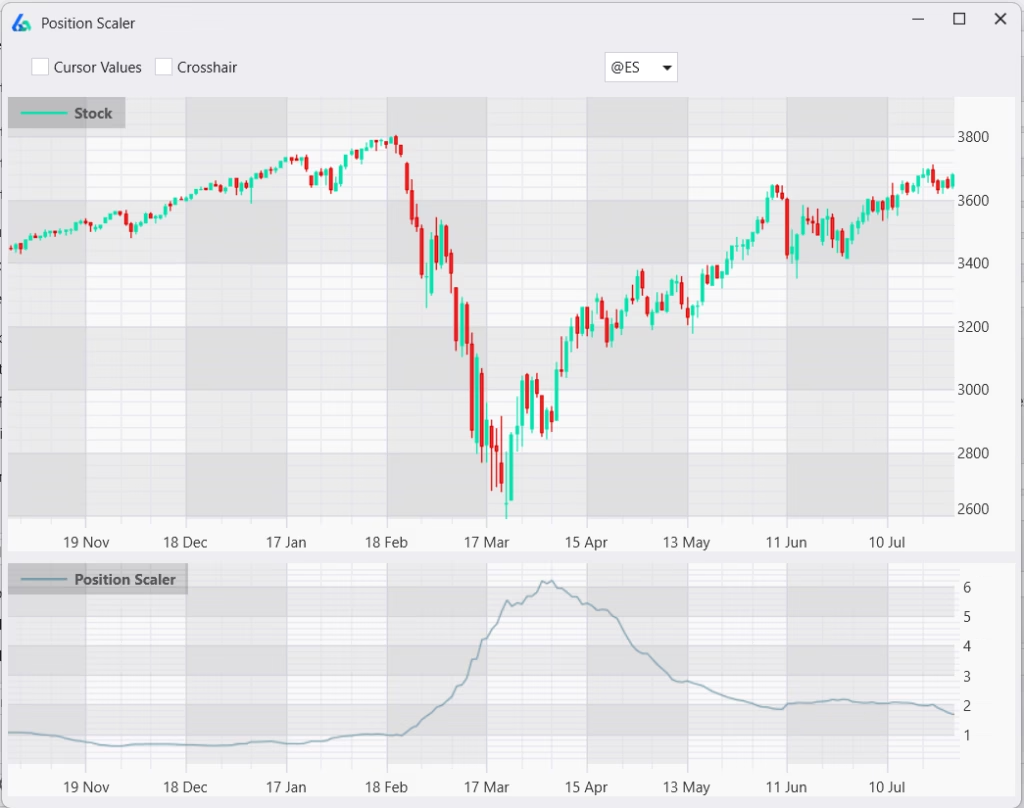
Notice the subplot shows position size grows as price declines from normal. You can also create the inverse, normalize, standardize, use percentiles, etc. to create flexible position sizing rules.
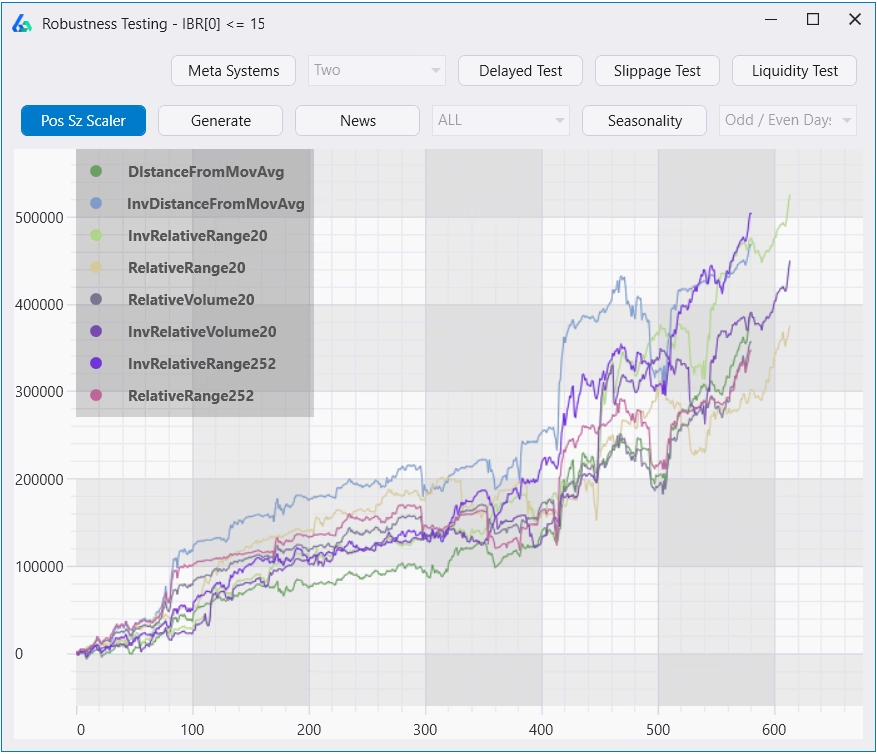
Additionally, you can create rules and allow Build Alpha to show you how any strategy would perform with any position sizing scaler. If position sizing scaler is enabled, the scaler logic will be added to the generated code for any and all platforms automatically. Below shows how different position sizing scalers can affect total P&L by 50%+ in some cases. Always worth exploring.
Commitment of Traders Report Data Added
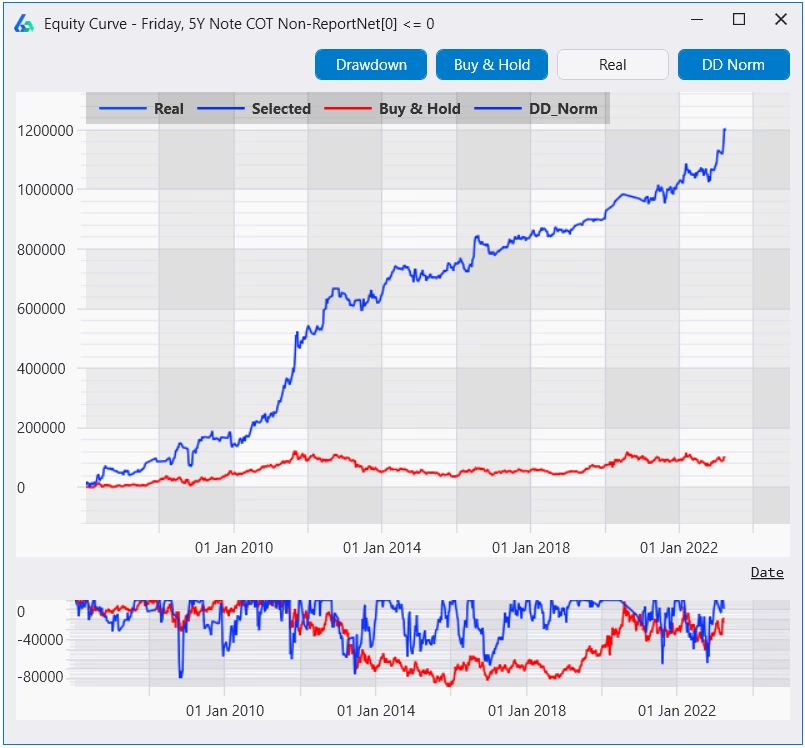
Crowded trades and understanding positioning are playing a larger and larger role in today’s market. The Commitment of Traders Report is published by the CFTC and contains information how hedge funds, commercial hedgers and retail traders are positioning. This can help you understand if you are positioning with smart money or the dumb money.
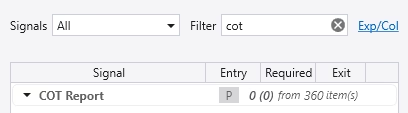
This data can provide context about market environment for price and volume-based strategies. Build Alpha now has COT Report data included. You can read more about it here and see an example strategy using a COT filter: Improving Strategies with the Commitment of Traders Report
Weather Data Added
Build Alpha now has weather data going back 30 years to test and build trading strategies. Weather data has been successful in helping large tier 1 trading firms generate alpha over the past few years and is now available.
For instance, Citadel – the world’s most successful hedge fund – generates more from commodities than any other strategy – $30b+ since 2002. However, half of that gain has come in the last four years under Sebastian Barrack. Barrack grew a tiny strategy to one that generates 50%+ of their profit some years by using weather models (and physical tracking).
The Financial Times has a great piece on Citadel’s use of weather data here: How Citadel harnessed the weather to claim hedge fund crown.

Read more about Build Alpha weather data for trading here.
Market Breadth Data Added
I have expanded the data in the existing Market Breadth Signal category. There is now AAII, NAAIM sentiment data. You can read about all the market breadth, sentiment and other alternative data Build Alpha has included here: Improving Strategies with Market Breadth
Google Trends Data Added
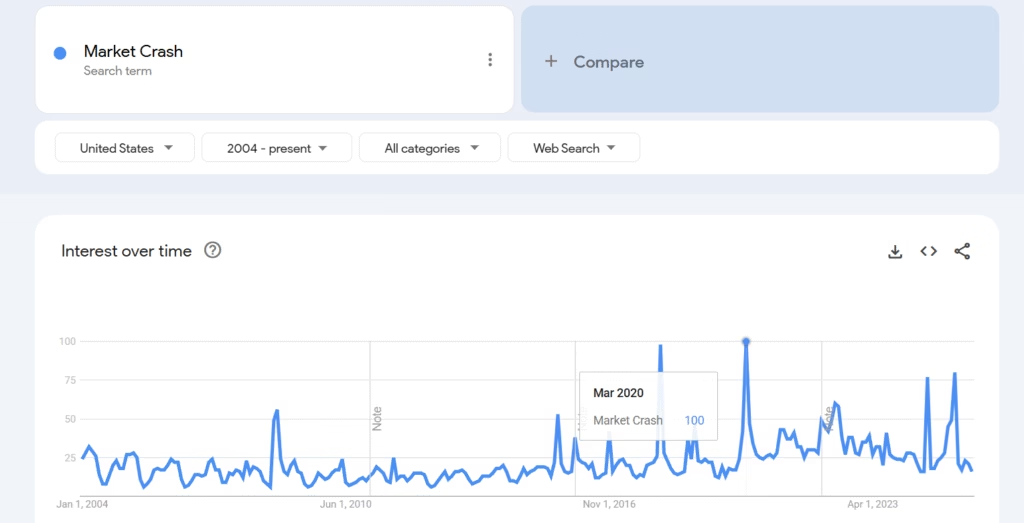
Build Alpha now has Google Trends data so traders can add sentiment and search history volume to simulations. Build Alpha has Google Trends data for the following keywords for the last 20 years (note Google already normalizes this data)

- Recession
- Bear Market
- Market Crash
- Market Bottom
- Buy Gold
- Financial Crisis
- Bank Failures
- Open a trading account
- Best stocks to buy
- Day trading
- Options trading
- Unemployment benefits
- Mortgage rates
- Inflation
- Interest Rates
Parameter Permutation Test
Build Alpha always let you test and optimize parameters; however, I have recently added a simple Parameter Permutation Test to the right-hand panel for a quick view. Hit this button and quickly view how a strategy performs with +/- X% variation to all parameters used in the strategy with default being 10% fluctuation.
Varying the parameters also helps better set expectations. Your strategy may return 5x but after optimizing the strategy it is better to expect 2-3x (arbitrary example).
Also, a wider dispersion of results is often a sign of overfitting and of course seeing large performance degradation is a more overt sign of overfitting. Here’s an example of desirable results that are closely knit:
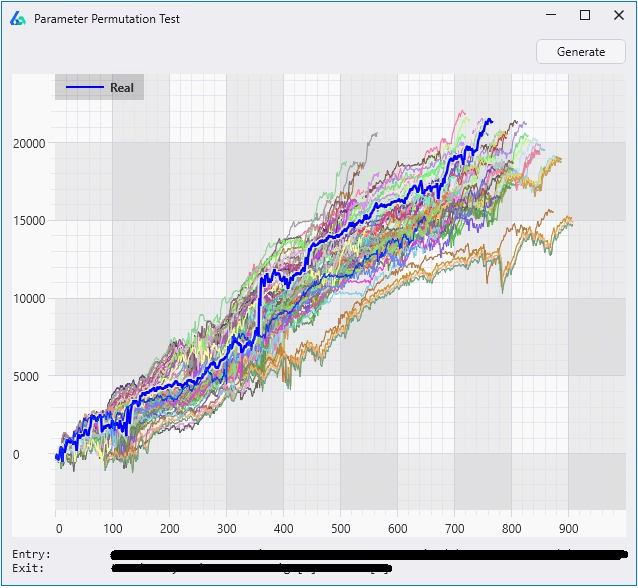
To read more about Build Alpha’s advanced optimization and sensitivity feature please check out this post: Optimizing across noise adjusted data sets for more robust parameters
Stress Testing or Scenario Testing on Synthetic Data
Stress-test your strategy against the market you fear—before it happens. Build Alpha generates synthetic price series that match the statistical “fingerprint” of any asset or regime you select, then automatically tests your strategy across them. Build Alpha supports two data generation engines and a no-code rule builder to make setup fast. Chain rules with OR and BA evaluates each rule independently—color-coding results—so you can see, at a glance, how your system holds up to multiple hypothetical stressors on a single chart.
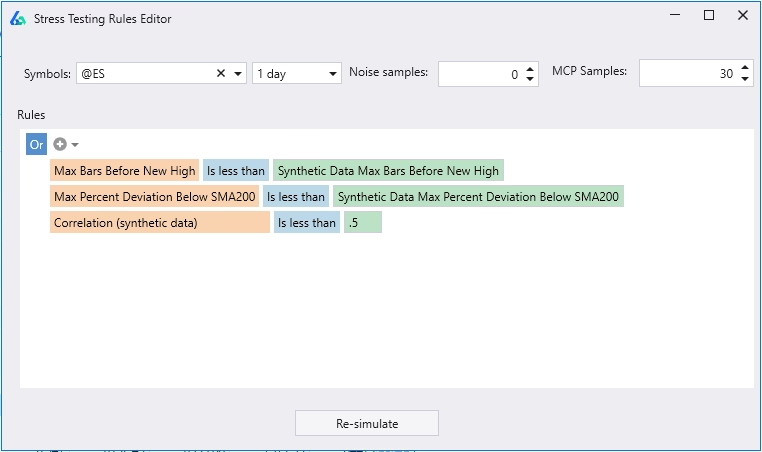
Build Alpha will also generate summary statistics – displayed under the chart – showing how each rule performed. These insights can reveal which scenarios cause trouble or spark new ideas for hedging strategies.
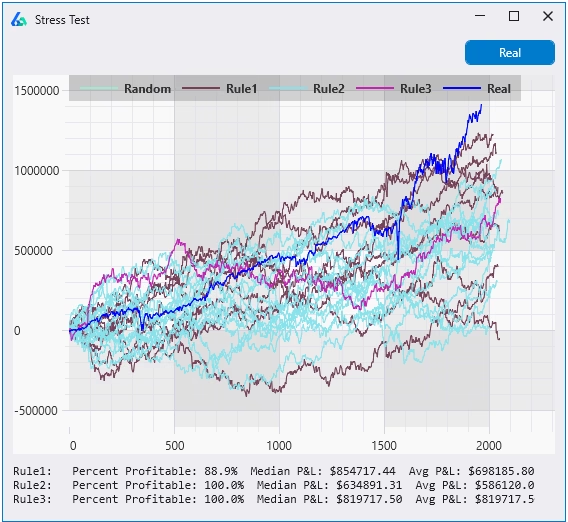
Walk Forward Testing (with and without Synthetic Data)
Walk Forward Testing splits the historical data into multiple training and testing partitions where we optimize strategy parameters during the training data (in-sample data, blue below) and test the best parameter settings on the unseen (out-of-sample, green below) data.

The Walk Forward test button has been added to the right-hand panel of the Strategy Generation results window. You can run various out of sample splits, runs, and create your own pass/fail metrics. Additionally, you can add alternative (synthetic) data to optimize across not only the historical price data but also on synthetic, noise adjusted data. This allows us to test our strategy on alternate realities other than the single one we lived in!

You can read more about Walk Forward Testing at this blog post.
Opening Range and Breakout Entries
Change entry type to stop or limit orders and specify logic. Full flexibility to create custom entry logic including opening range breakouts (e.g., buy the first n-minute high of the day). Below shows how to enter at 0.50 ATR above the high of the (traditional) opening range (9:30 AM EST to 10:30 AM EST). To enter at the exact high of the opening range please make the Entry Adjustment Value 0.
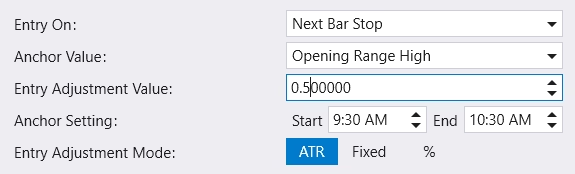
You can pair this with a time signal to only trade between 10:30 AM and 4:00 PM. Additionally, you can set a maximum number of trades per day and even force an exit at the end of the day to have no overnight risk. It is extremely simple to have Build Alpha generate traditional intraday breakout strategies now.

The strategy example above uses the first two 30-minute candles of the regular trading session (9:30 – 10:30 AM, volume spikes) as the opening range and buys the breakout at the opening range high. The trade then closes at the end of the day (last big volume spike of the day, 4:00 PM) for no overnight risk.
Import and Export Strategies
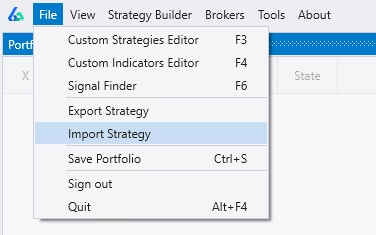
Build Alpha also allows you to highlight (ctrl + click) and then go to File >> Export to export strategies. These can be sent to any other Build Alpha user for easier collaboration. The receiving end can go to File >> Import and the strategies will be appended (added) to their portfolio. You can right-click to re-run or modify on your own.
Probability of Profit Models (beta)
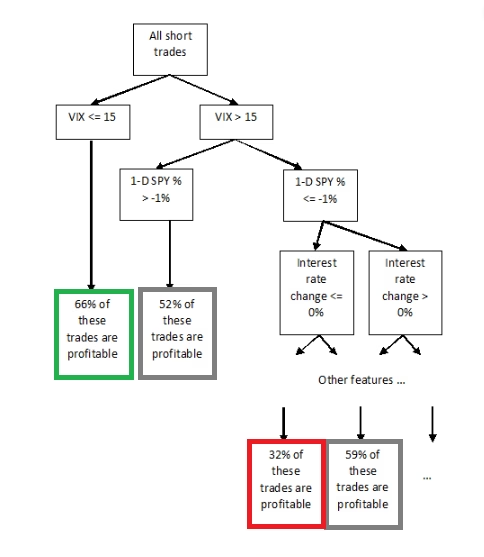
You can now create Probability of Profit models to overlay on your automated trading strategies. These models will predict the probability that your next trade is profitable. You can create these machine learning models with a new, no code editor and view the individual decision trees. Here is an example decision tree below.
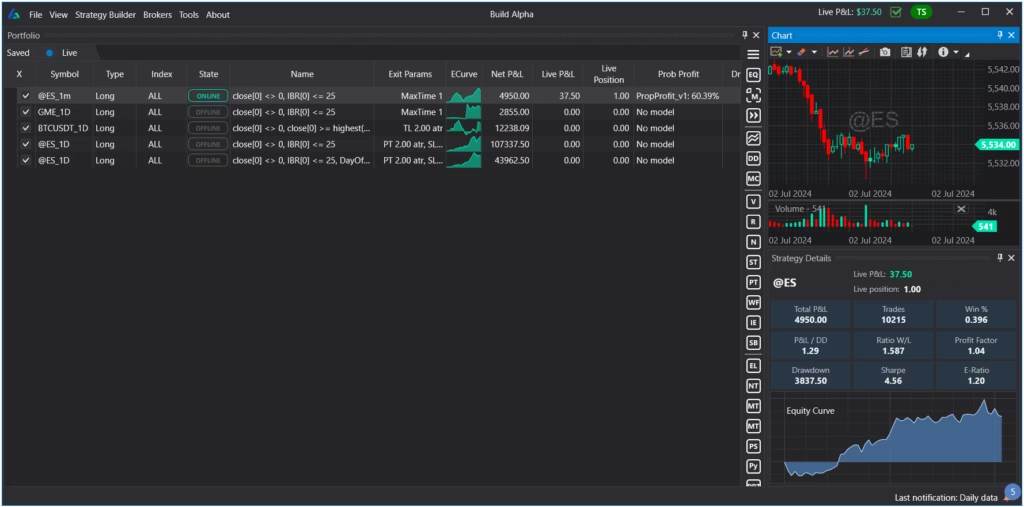
The trader can now view a Probability of Profit model as soon as a new trade is initiated in Build Alpha’s live data view. You can see below the demonstration model shows a 60.39% chance of this current trade resulting in a profit in “Prob Profit” column.
To read more about Probability of Profit models please check this full blog post.
Social Posting (beta)
Right-click on any saved strategy to enable automatic social posting when a new trade is entered. You can publish to x.com or discord. Instructions to set it up are in the written User Guide.
You can publish any trading system
- with or without entry and exit logic visible
- after x number of wins or losses
- add your own text or logo
You can configure all of this through this easy to use interface seen below.

Custom Fitness and Correlation Fitness
Build Alpha now has the ability to search for strategies that meet any custom fitness function. This is the metric that the software will optimize for. Instead of optimizing for Sharpe ratio or total return now you can create a weighted fitness function that combines many metrics.
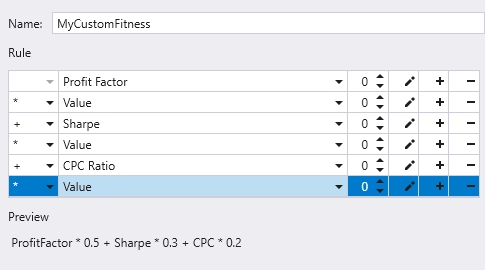
Additionally, you can now set Correlation as the fitness function and Build Alpha will search for strategies that are the least correlated to your existing portfolio. This is a huge time saver to find complimentary strategies that can improve risk-adjusted returns.
Portfolio Mode
Build Alpha now lets you combine many independent, uncorrelated strategies into one shared account, simulating realistic capital interactions (not just merged trade lists), and optimize rebalancing, sizing, and exits for the whole portfolio. Full multi-strategy portfolio simulations!
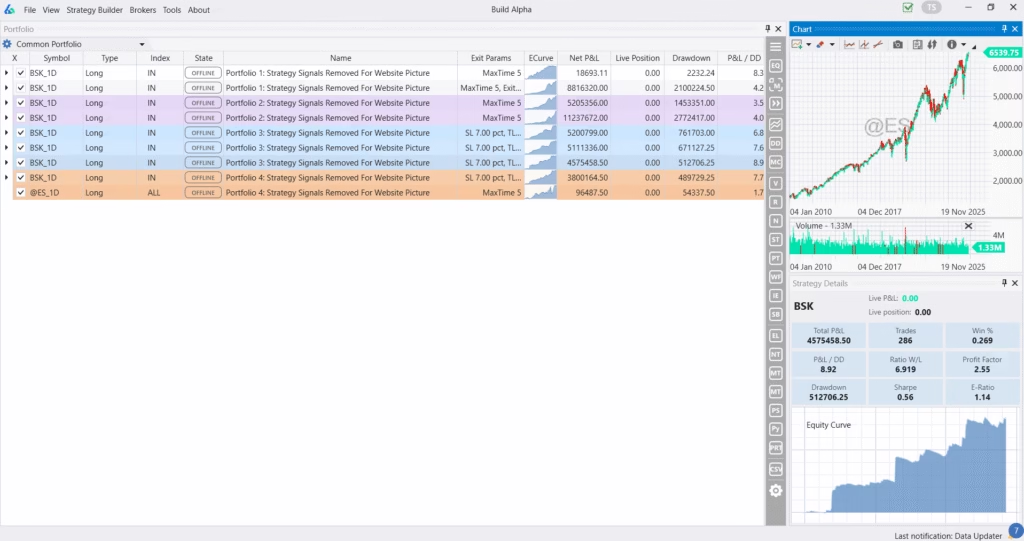
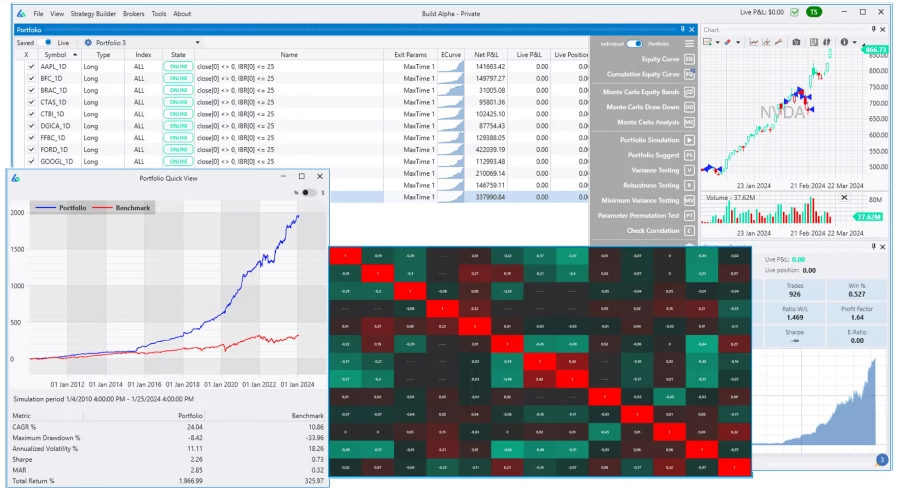
Test filters and ranks at scale, inspect correlations, run multi-strategy Walk Forward, stress test across synthetic regimes, and even tap Portfolio Suggest (AI) to discover allocations and rules that improve risk-adjusted returns finding the best combinations and weightings of all your saved strategies.
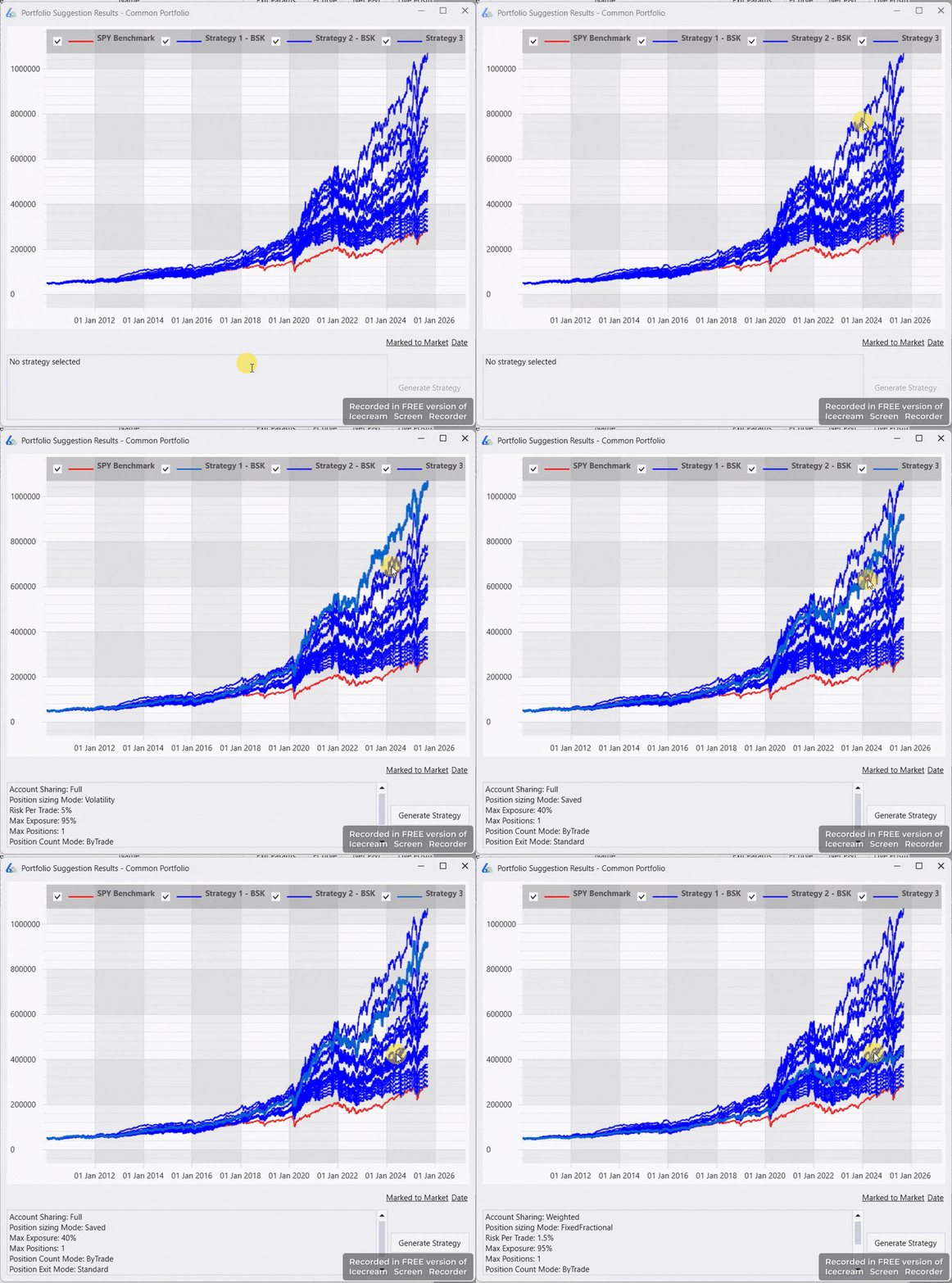
Includes fundamental data (Nasdaq) for factor models and symbol filtering, in-trade re-sizing to target volatility, and a Daily Position Update Report for pre-open workflow. A full multi-strategy testing and monitoring environment. Read more here: Build Alpha Portfolio Backtesting
Summary
If you are starting to look at algorithmic trading, beginning as an automated trader or a serious trading system developer then this new update has something for you. I always want to remind everyone that the BA license does come with instructional videos, a written user guide and support. I am literally always in front of a computer because I love this stuff; contact me through the website or email anytime. I will keep building this algorithmic trading software and appreciate all of those that continue to make suggestions, test features, be sound boards, etc. because without the BA community this just wouldn’t be possible (or fun). What should I add next?